AI visibility tracking tools get the data from commercially available APIs, or by scraping real AI results from LLMs. At Surfer, we do the latter. And we know that’s the only right approach.
Scraping is the only way to give you recommendations that reflect what your buyers see when they use AI search. Because the differences between API data and scraped UI data are huge. The overlap is just 30% at best. In many instances, even smaller.
We have the data to back up this claim. We ran 1,000 prompts across five AI products using two methods: once by scraping the interfaces real users see, and once via an API. We collected 13,779 answers across 14 model-and-method combinations and investigated the following aspects: cited brands, sources, and pages, as well as answer length.
(One disclaimer: AI Overviews' API method is borrowed from AI Mode. According to Google documentation, AI Overviews runs on Gemini 3, and no such model is sold. Those bars are greyed in the charts below.)
While not all AI products followed the same pattern, the differences are huge enough to prove that no API reproduced what the consumer product showed.
Let’s dig deeper!
First things first: How can you collect data from AI models?
If you already know the general difference between APIs and scraping for getting a machine-readable record of AI outputs, just skip this section.
But after the intro you thought, “Okay, what are you even talking about?,” I’ll give you a short rundown of how each method works, and how it matters for AI visibility monitoring.
Scraping the consumer interface
Web scraping collects the exact outputs users get when they search through a ChatGPT or Perplexity interface. The scraping software opens a chatbot, submits a prompt, and then parses the text, brand mentions, and citation links. So the information it gets includes all the retrieval, ranking, safety filtering, personalization, and answer-shortening that the products apply for their direct users.
In many ways, scrapers are harder and more expensive to maintain. Interfaces change, rendering is slow compared to an API call, and the scraper has to be updated alongside UI changes. But the benefit of getting exactly what the user sees is hard to beat.
The API
API-based data collection provides structured, programmatic access via official endpoints.
Each of the LLMs we investigated offers API access to a model closely related to the one behind the product. But “closely related” is the point here. You only get the raw model. You won’t get the interface logic, search behavior, sources, or any other customizations the platforms apply but don’t want to publicly share.
So yeah, APIs are comfortable for building products because they give developers clean, ready-to-implement responses. But they’re less convenient for the end users of AI trackers who want to be 100% sure they're monitoring exactly what readers see, and not approximations.
The differences between scraped LLM answers and API results: Results from 13,779 answers
Surfer runs on scraped data, so we regularly re-do this comparison research to make sure our approach holds up.
For last year’s run, we only investigated APIs and scraped UIs for ChatGPT and Perplexity. We discovered differences in… well, almost everything that matters in AI visibility tracking: brand and sources mentioned, the number of citations, answer length.
This year, we threw AI Overviews, AI Mode, and Gemini into the mix to see if the findings still stand, and just how big the differences will be.
How did we run the study? We measured each model twice: once through the scraped consumer product, once through an API. We collected AI answers in 9 different ways, totaling 13,779 answers.
We compared them on the following criteria:
- Do they name the same brands and the same number of brands?
- Do they write answers of the same length?
- Do they cite the same sources and the same number of sources?
Let’s see the results in detail. We also added a quick summary of how to read our findings—namely, what our tables of numbers actually mean for your AI tracking.
The brand lists barely overlap for both methods (even after cleaning up the names)
We took the set of brands each channel named for a given prompt and calculated the Jaccard overlap (a statistical measure quantifying how similar two sets are) between the API set and the scraped set. We ran the tests on the raw results, and then canonicalized the names (so that "SurferSEO", "Surfer SEO", and "Surferseo" counted as one company, for example).
The mentioned brands overlapped only from 15.5% to 23.8%. Canonicalization lifted the overlap, but the numbers still amounted to only 21.3%–31.6%.
.png)
Gemini has the highest level of similarity, but it’s still just 3 out of 10 brands repeated. Perplexity reaches the maximum of 21.3% overlap.
What that means for your AI visibility tracking: if you’re measuring a brand's share of voice based on API data, you only have around a 25% chance your report overlaps with whatever your buyer sees. That’s not enough to be certain you’re really dominating the searches (or missing from them).
APIs mention more brands
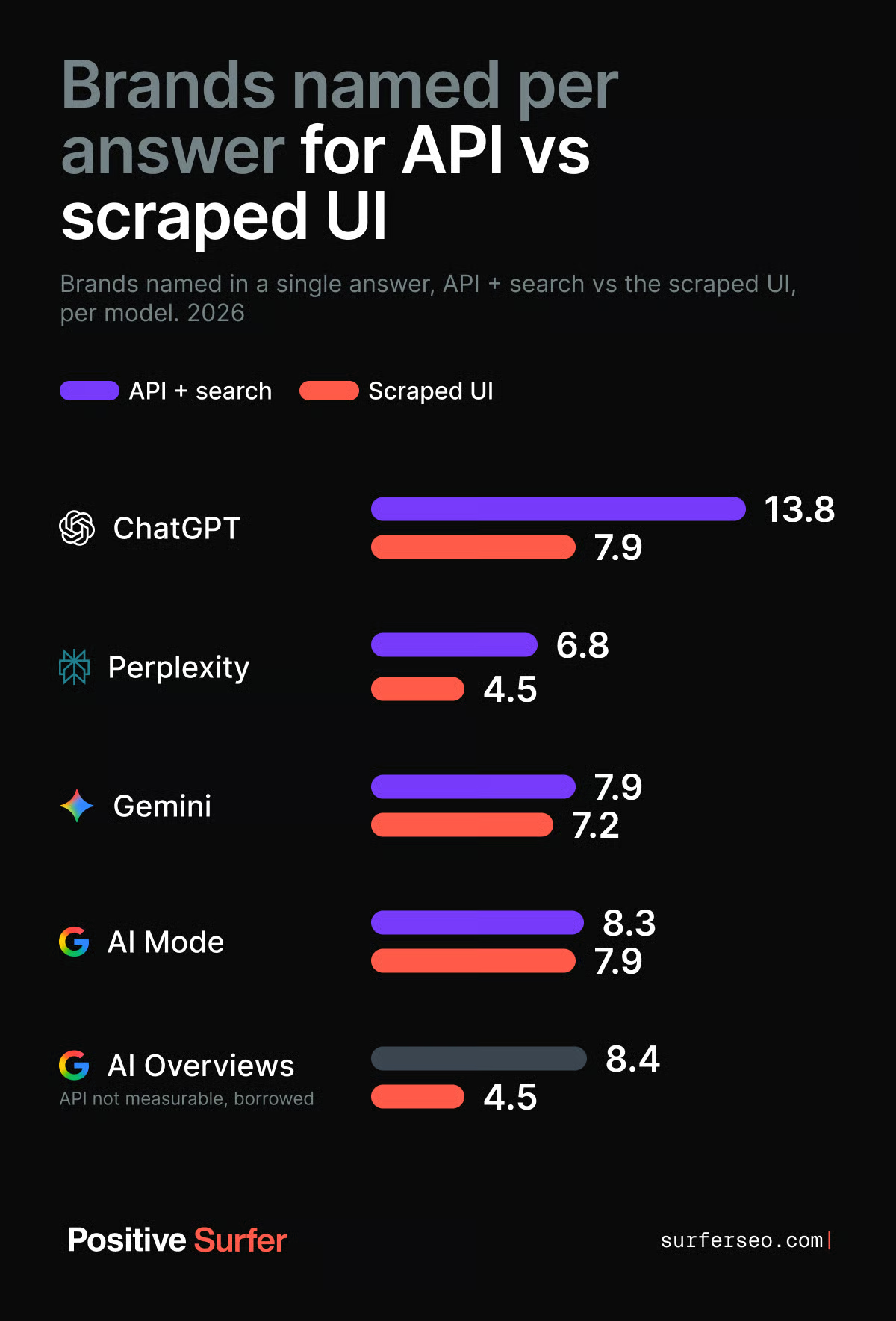
The API names more brands than the scraped interface across all five products.
ChatGPT is the extreme case, listing a whopping 13.8 brands per answer through the API vs just 7.9 in the regular interface. AI Overviews also show almost twice as many answers. Gemini and AI Mode are close to parity, at 1.10x and 1.06x, respectively.
What that means for your AI visibility tracking: API-based tracking will overreport the number of brands that make the cut. So that mention you see in your reports? It may not show up for any of your buyers.
Most API answers are much longer (but it’s the opposite for Perplexity)
Most answers from APIs are longer than from the consumer-facing products. ChatGPT's API writes 2.05x as many words as ChatGPT shows its users. For Gemini, it’s 1.27x, while for AI Mode it’s 1.06x. Perplexity is the outlier here, with its API responses slightly shorter than those of the customer-facing interface.
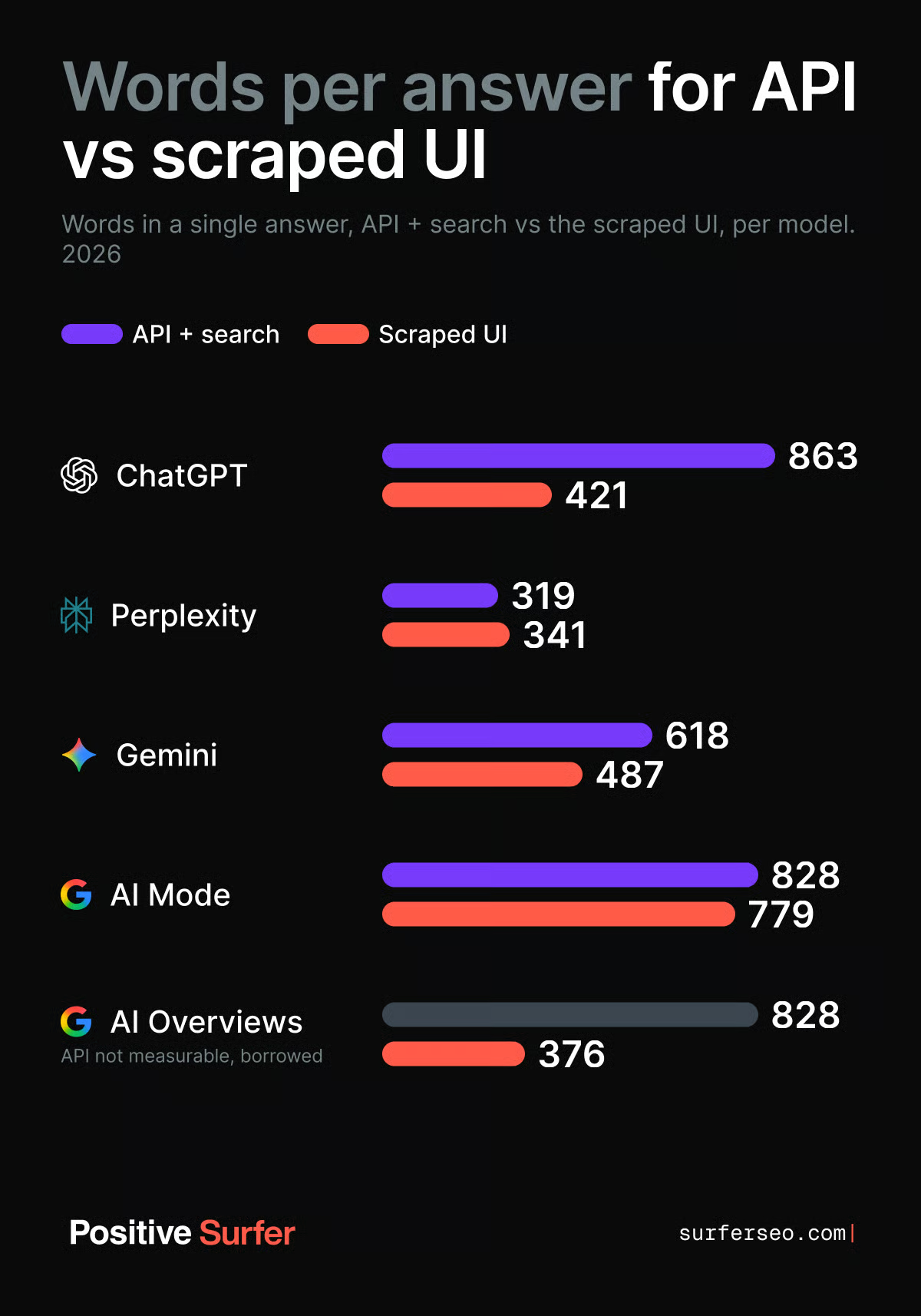
What that means for your AI visibility tracking: If the answer the customer sees is shorter, it means it dropped some of the content the API kept. It may as well be the source you own. And even for Perplexity, where the pattern is reversed, the difference still remains: maybe customers already see your brand, but your tool will never report it.
For sources cited per answer, it depends on the model (but the overlap remains small)
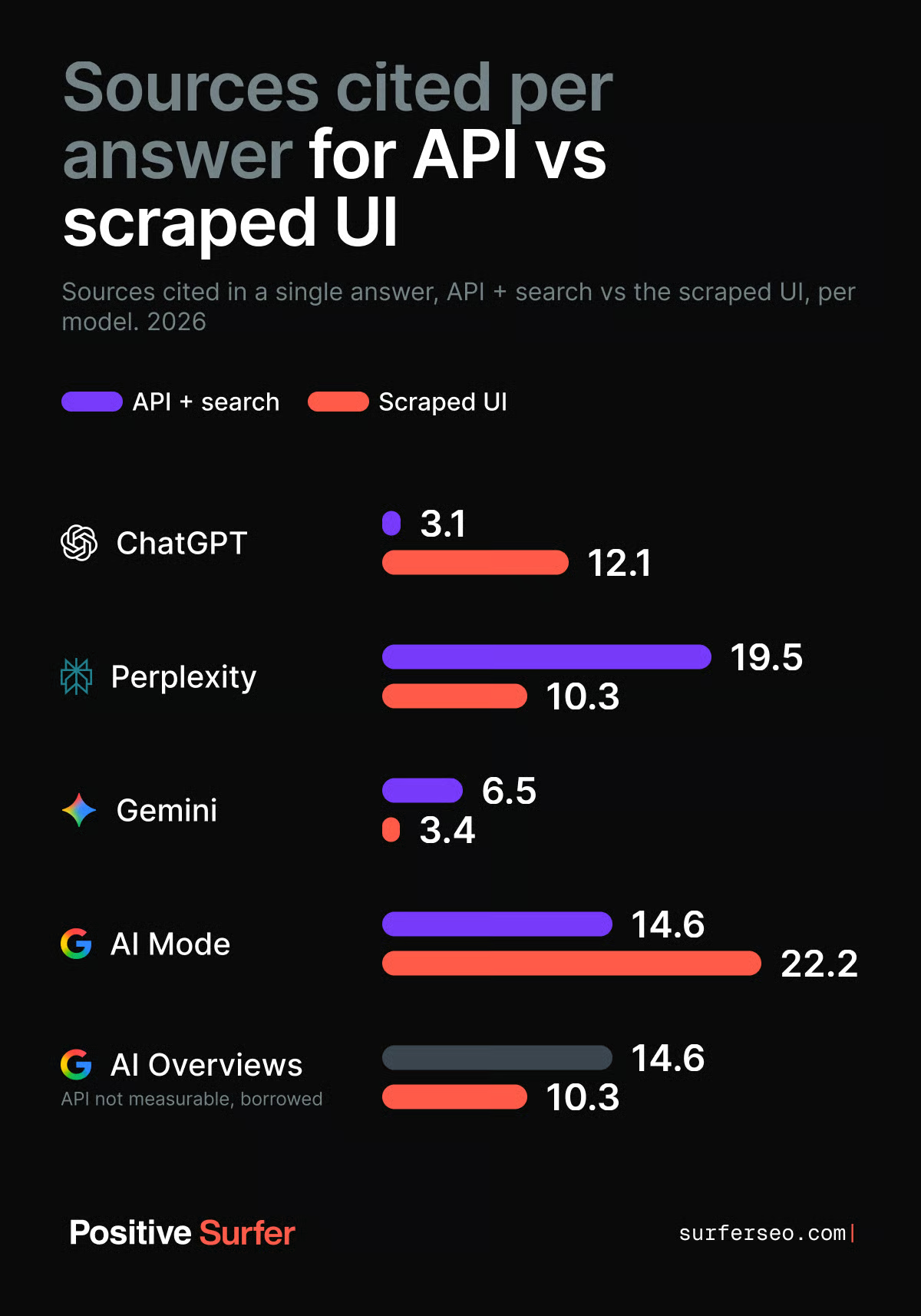
This is the most inconclusive category in this whole study. For some models, the scraped UI cited more sources than the API. For others, it was the opposite.
ChatGPT leads the first group with the biggest gap in this study: 12.1 cited sources in the regular interface against 3.1 through the API. AI Mode also cites more sources than its API, 22.2 against 14.6.
However, Perplexity's API cites 19.5 sources vs 10.27 in the app; Gemini's cites 6.5 vs 3.4; and AI Overviews' borrowed method cites 14.6 vs 10.3.
We discovered one more thing, though. Scraped interfaces triggered a web search on almost every prompt, at 88% for ChatGPT and 100% for the other four. For APIs, only Perplexity scored 100%. ChatGPT's API searched on 83% of prompts, AI Mode and AI Overviews on 94%, and Gemini's on 85%. This means the search behavior itself is also different.
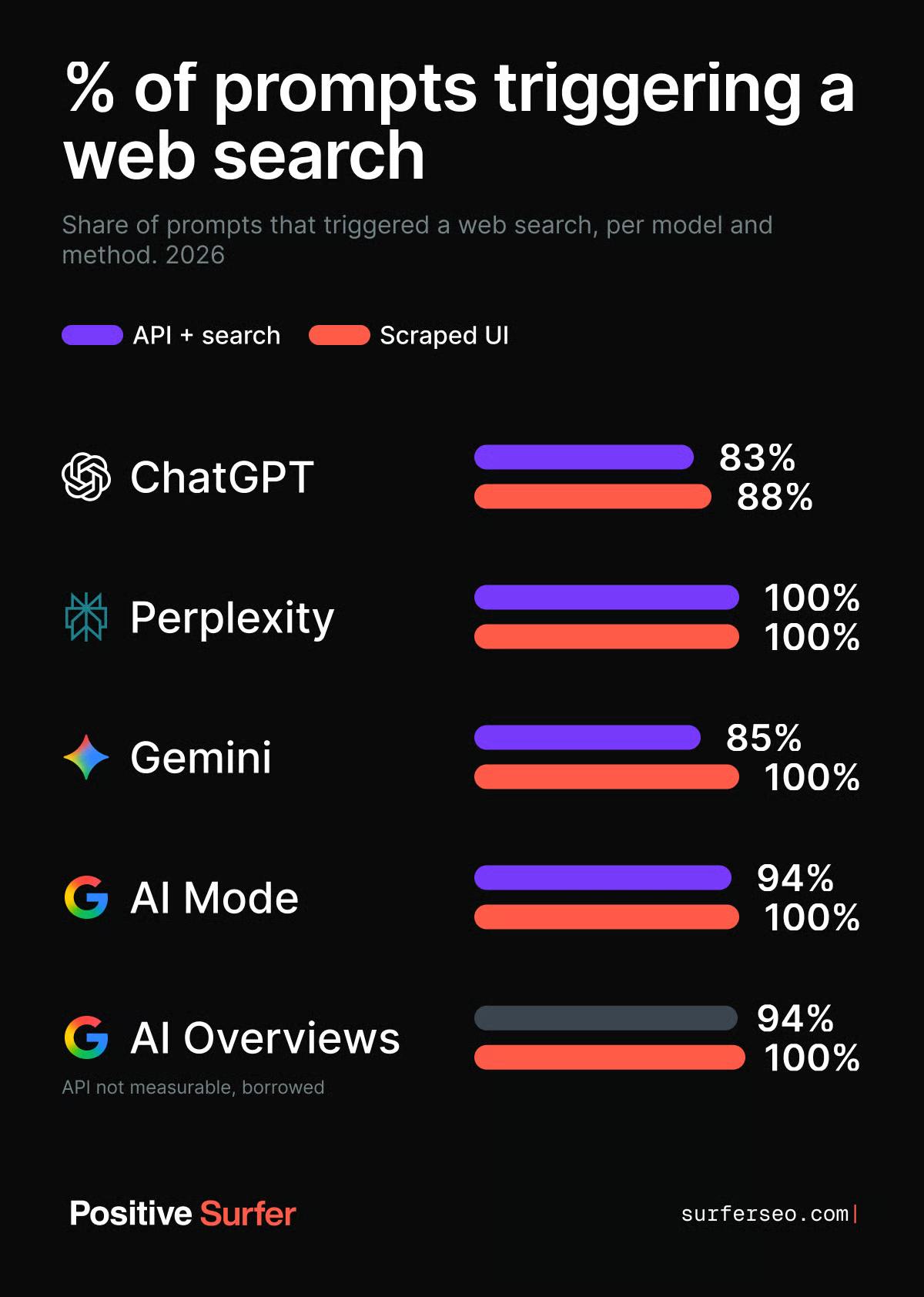
What that means for your AI visibility tracking: Even though the pattern for cited sources is inconclusive, the imbalance signals a huge difference between search methods. It proves the API is not a reliable source.
Even when APIs and UIs agree on the cited publishers, they disagree on the pages
When comparing cited sources, we need to distinguish between domain-level and publisher-level overlap. The numbers are not the same for both instances.
Domain overlap is highest for Perplexity—26.7% —and lowest for ChatGPT at a mere 4.8%.
.png)
For Gemini, AI Mode, and AI Overviews, it’s impossible to measure the overlap on a page level because their APIs return per-call redirect tokens rather than destination URLs.
For ChatGPT and Perplexity, the numbers are lower than the domain-level overlap: 19.7% on Perplexity and 4.8%- 6.2% on ChatGPT.
.png)
What that means for your AI visibility tracking: Both the domain- and page-level overlap is too small to guarantee reliable results from the API. If your workflow is to find the pages AI models cite and then reach out to them, API-based tools could point you to source customers don’t actually see.
Let’s sum this all up
The numbers are clear: APIs and the customer-facing apps disagree on every rule we investigated. Even if the patterns weren’t identical, the differences remained huge:
- Which brands get named: Overlap runs from as little as 15.5% up to 32%—even after we cleaned up the names.
- How many brands get named: APIs name more products, by up to 1.85 times. You may think you got that mention, but your buyers never see you.
- How long the answer is: APIs’ answers are notoriously longer.
- How many sources get cited: The scraped answers cite nearly four times more sources on ChatGPT. The API cites nearly twice as many on Perplexity and Gemini. Either way, the citation numbers are very different.
- Which sources get cited: Page-level overlap is as low as 4.8% to 19.7%. This is bad news for outreach and optimization strategies where getting on exactly the right pages is crucial.
API and the product share the model, but they’re different systems. You cannot reliably track your AI visibility based on APIs. And it’s not just about a small margin of error.
A single sentence in the system prompt can turn an LLM’s response by 180°, and LLMs typically have very extensive instructions that vary depending on the application, which is why I’m not surprised by such low alignment between the API and the final product.—Maciej Gruszczyński, Data Scientist at Positive Surfer.
How can you track AI visibility with Surfer?
If you want to measure how your brand appears in AI tools that your buyers use, you must rely on data from the user-facing UIs, not the APIs. And that’s the type of data Surfer uses.
AI visibility is about getting mentioned, getting mentioned often, and getting mentioned well. And we can help you with all three. With Surfer’s AI Search Analytics, you can investigate your sources, competitors, prompts, and fanout queries with certainty that you’re seeing the same thing your users see.
Let’s do a quick overview of the tool’s features:
First things first: Setup
Navigate to the AI Visibility section on the left menu bar and select Overview. Surfer will analyze your brand and suggest topics and prompts worth tracking.
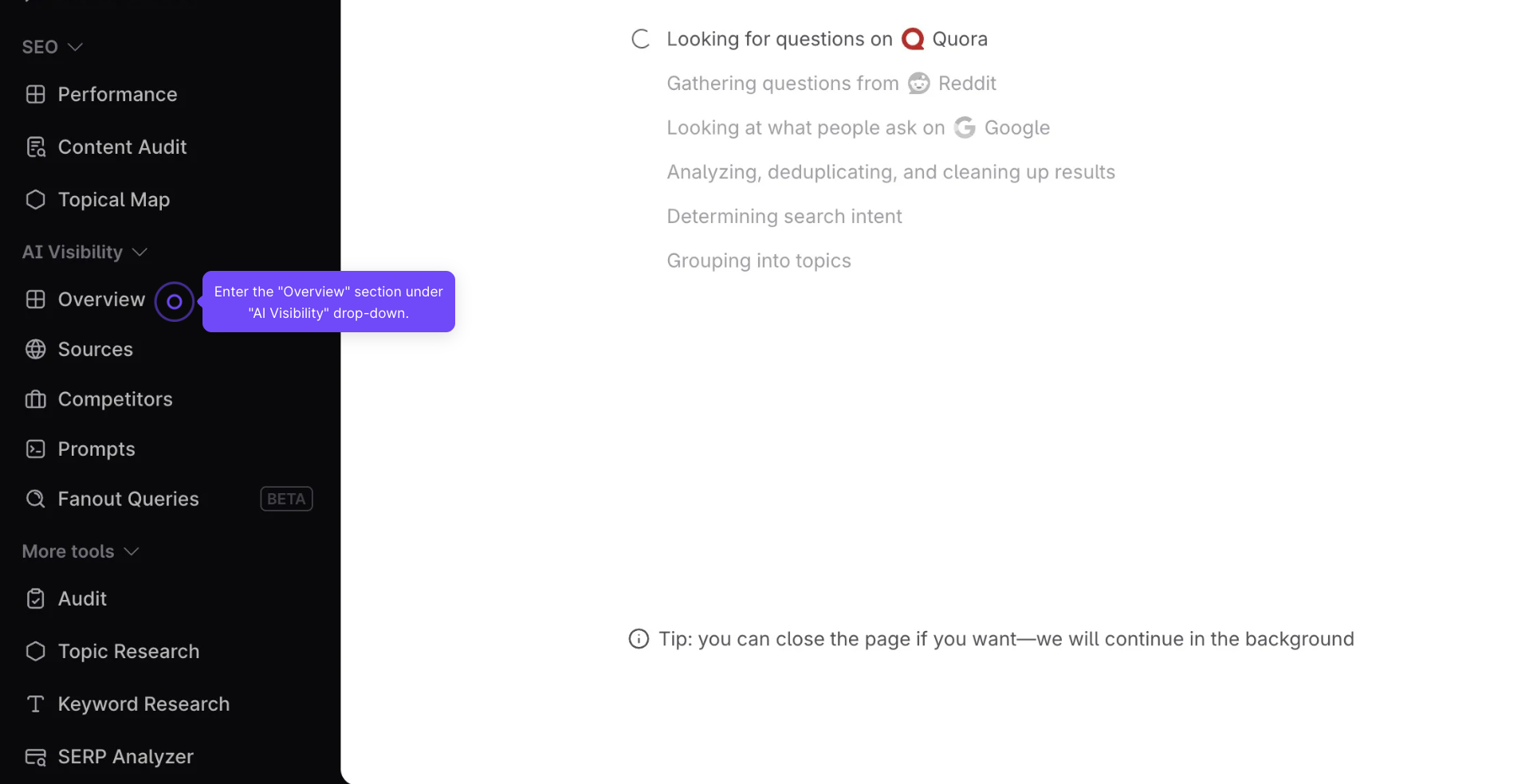
Once it’s done, you’ll see a list of viable topics and associated prompts. Review and approve (or edit) the suggested prompts.
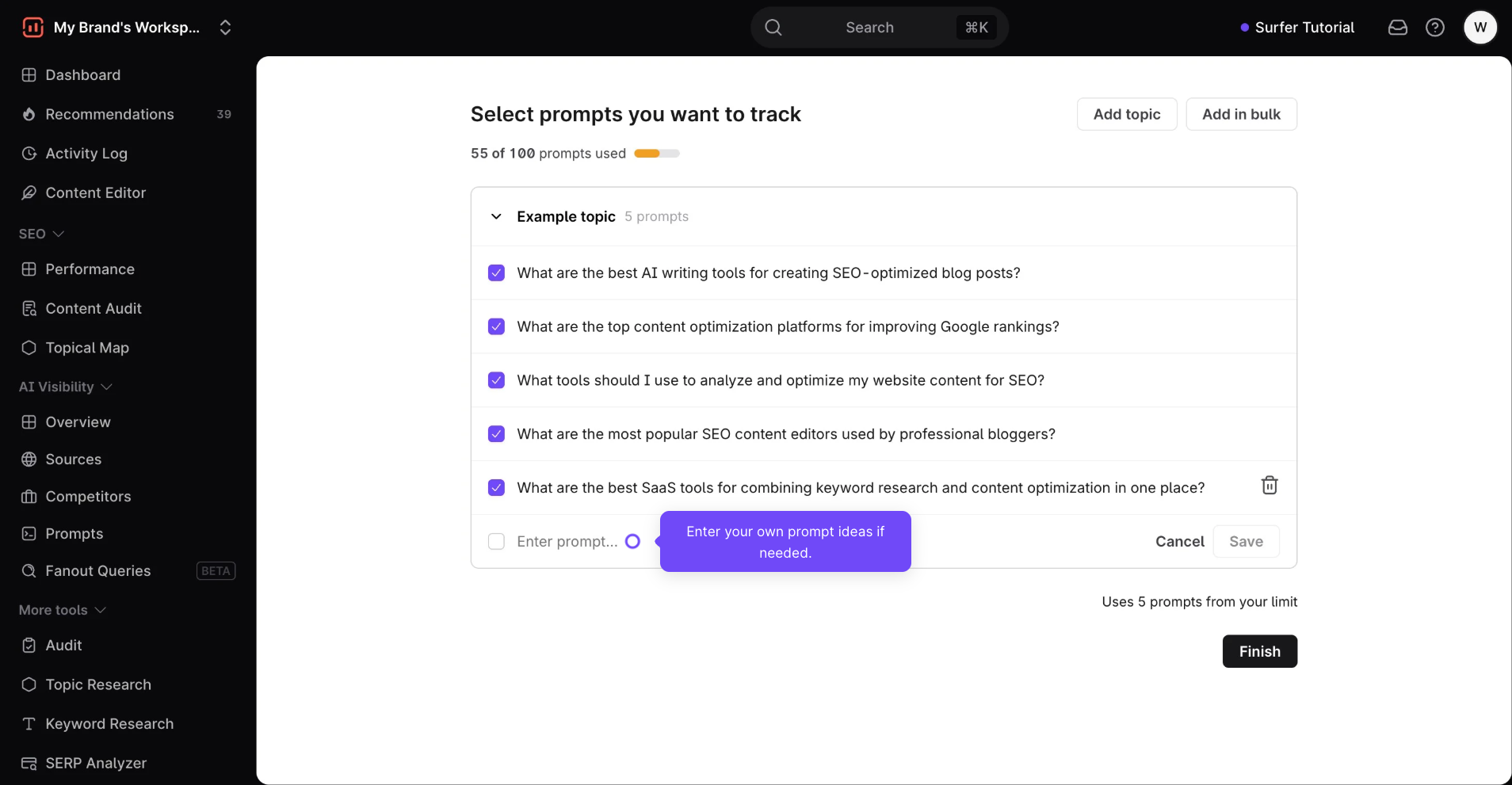
Before you ask how many prompts you should track: What matters most is not the total number of prompts, but if you covered every topic and user intent.
20 prompts are just as good as 10k if they’re intentional. Group them into small, intent-driven groups. Include a mix of short comparison style and long-form questions in every intent. Variations of wording don’t matter that much. Five top prompts for each topic is perfect.
That’s all for the setup. The tool will now take care of populating your dashboards.
The main view will show you your visibility score, mention rate, and average position, so you’ll already have an overview of your AI performance at a glance.
Sources dashboard
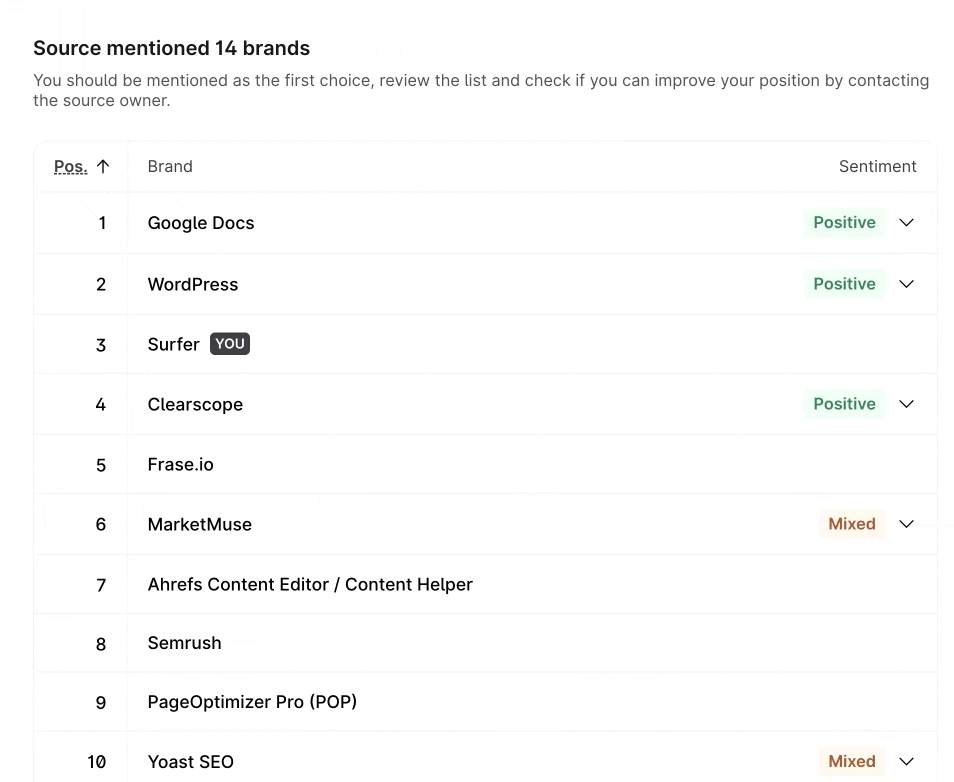
In the Sources dashboard, you can see which brands are cited for the topics you track. You can see which sources already mention you, and which don’t. Find the most-cited sources you miss from, and start your data-backed outreach.
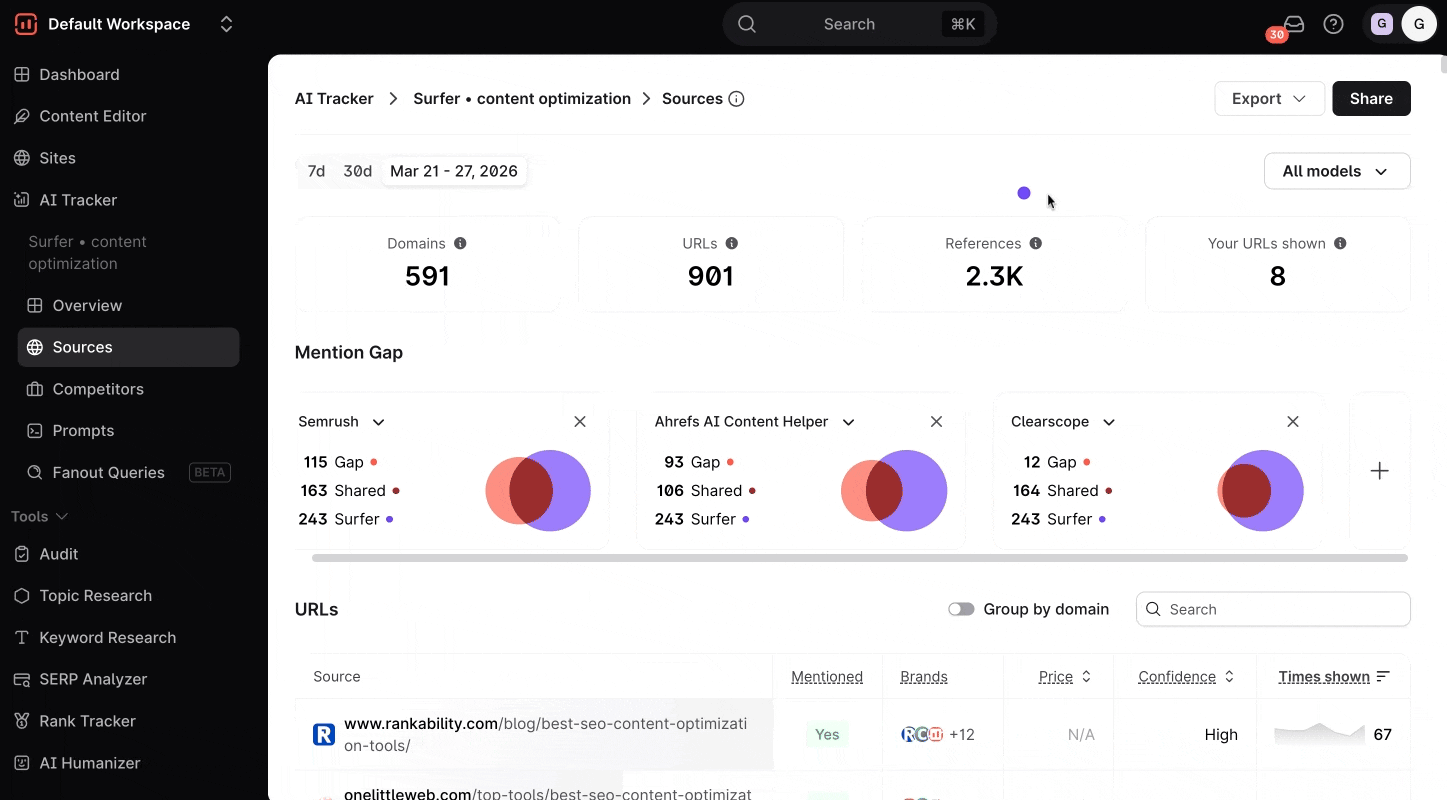
You can also buy mentions directly from Surfer.
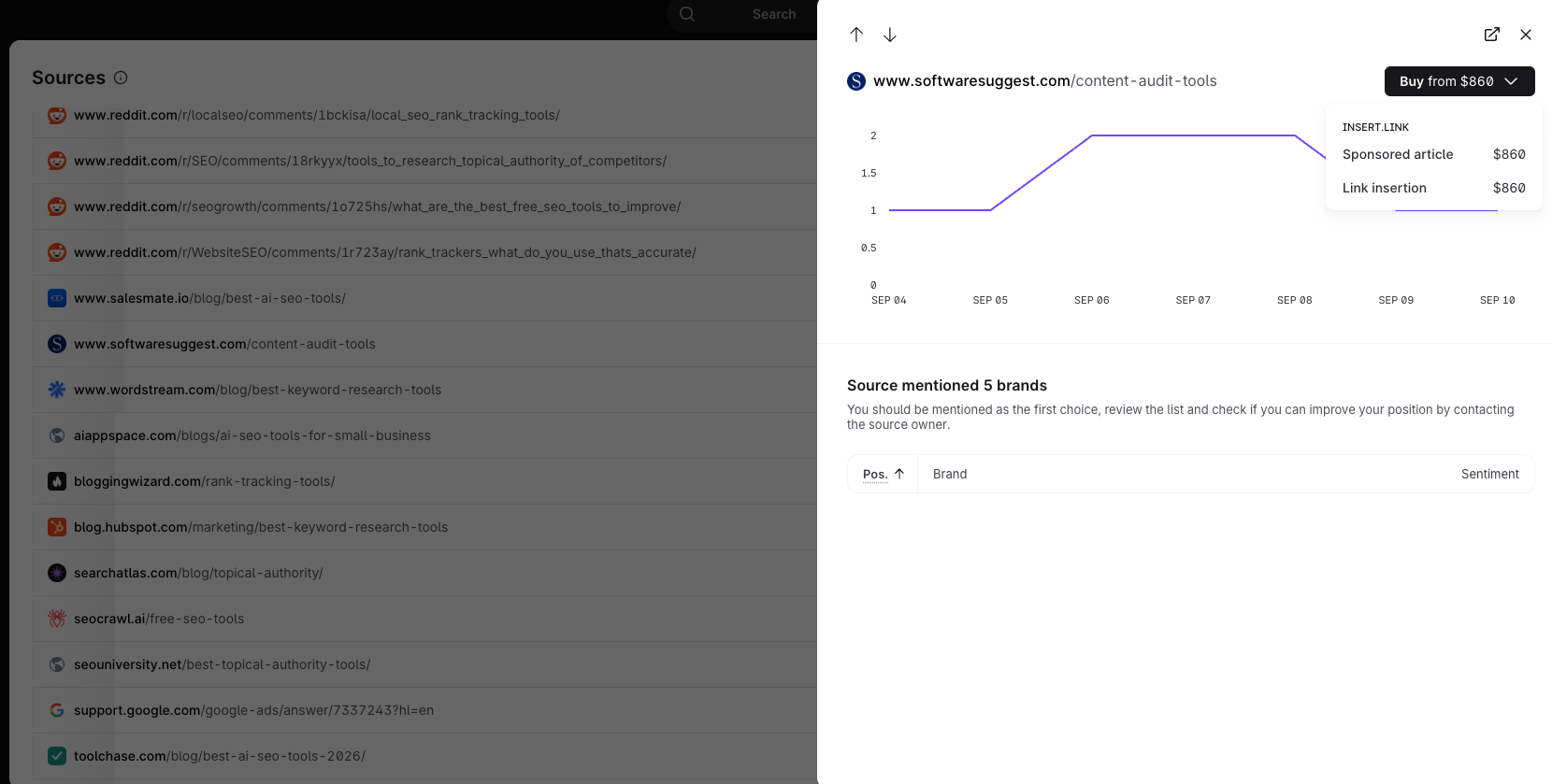
Check your sentiment in top sources. AI has no opinions—the mentions are shaped by the sources it cites. And contrary to what some people say, bad press does exist. An untrue or unfavorable mention will do you more harm than not being mentioned at all. Reach out to the pages where you want your mention fixed.
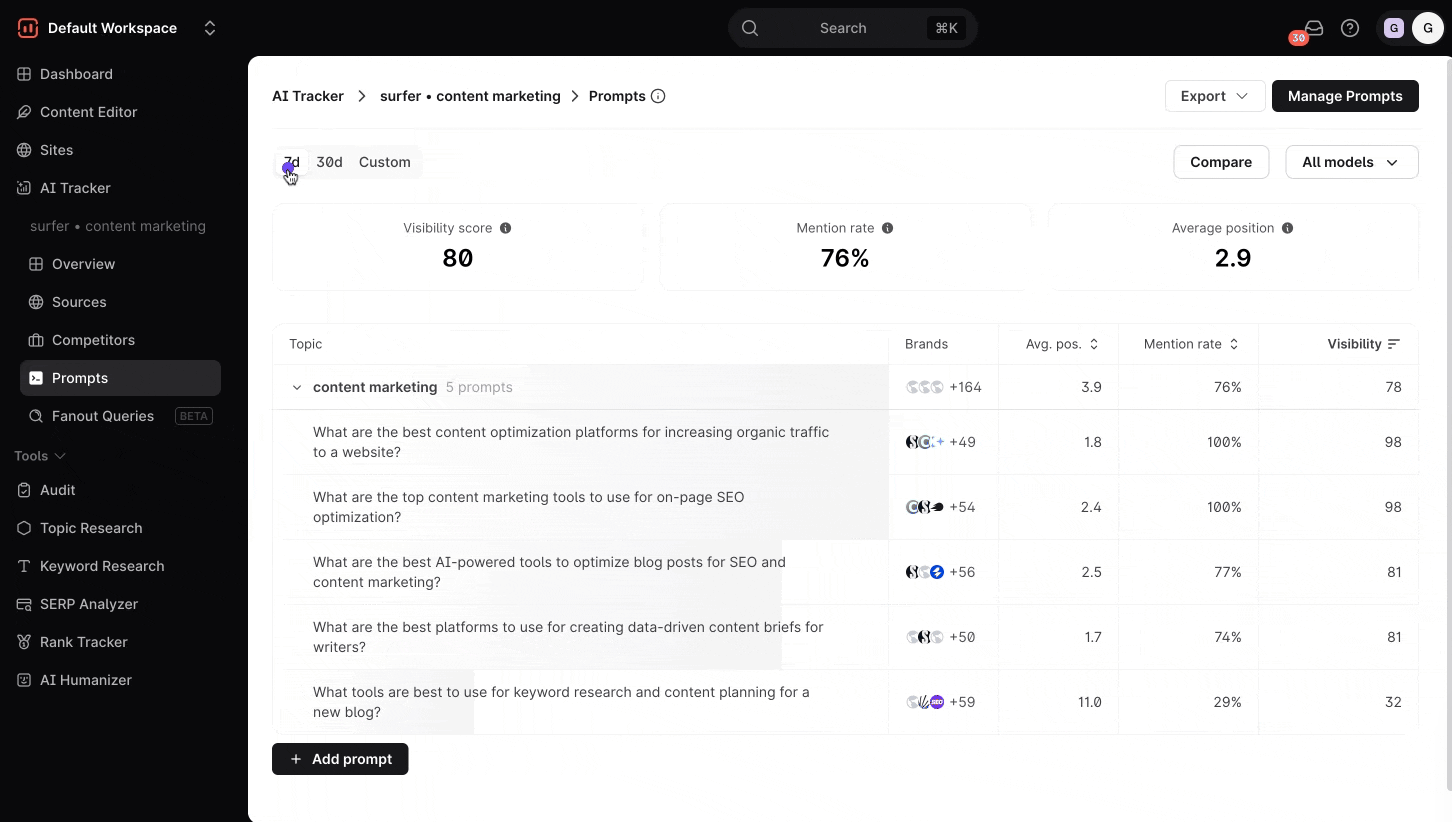
Prompts dashboard
If you added your topics, the prompts will be sorted by them. See which topics you perform well in, and which require your extra attention.
You can also see which brands customer-facing AI models recognize most often, and where your competitors surpass you.
Compare across models, and watch trends over time to sharpen your strategy.
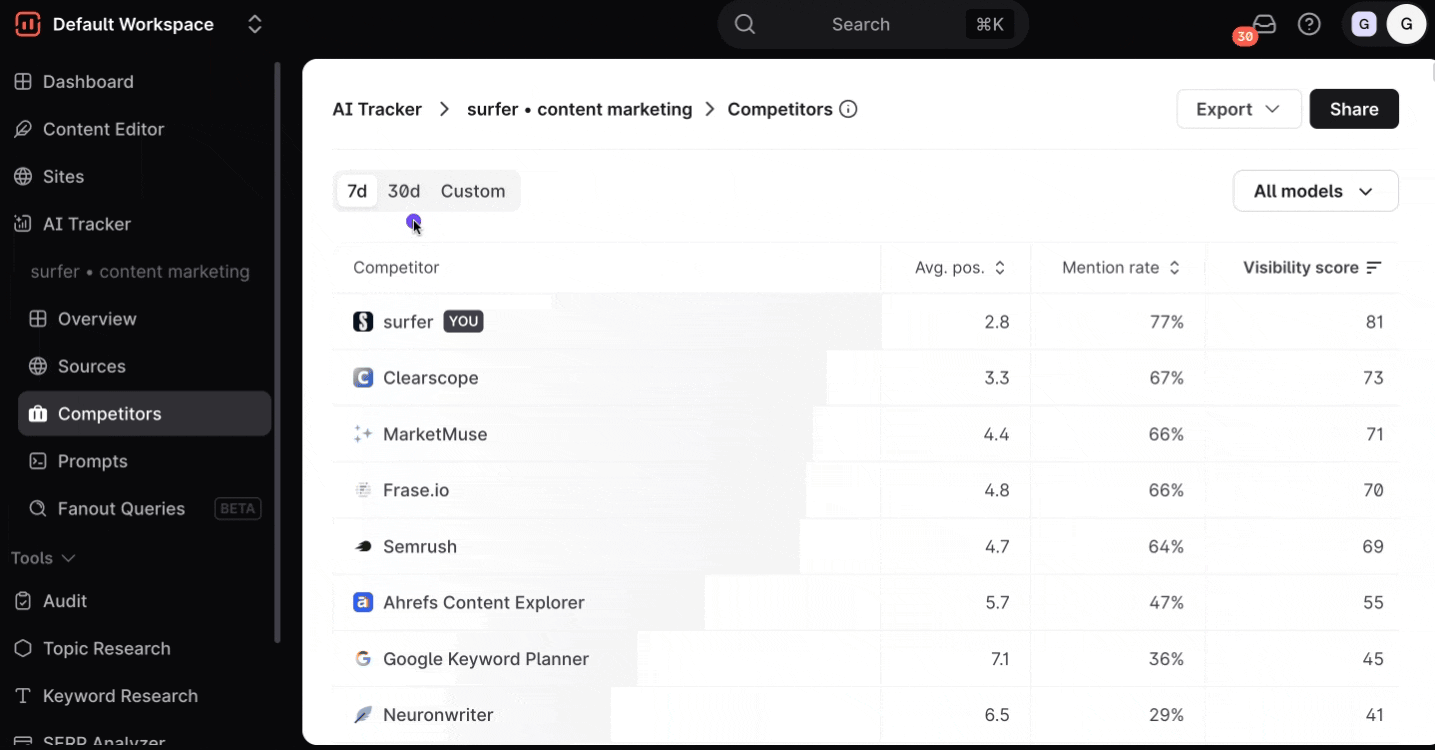
Competitors dashboard
Browse the brands ranking for your tracked prompts, so you can see how your brand’s coverage compares.
Discover topical gaps, sources that your competitors appear in, but you don’t, and keep tabs on emerging competitors.
Data source matters, so pick the tool that gets its recommendations right
Our data shows the difference between APIs and scraped data is huge:
- Roughly 75% of the brand list doesn’t overlap.
- Up to 95% of cited sources don’t match (depending on whether you compare publishers or pages).
- Answers can run twice as long as anything your buyers read.
And more. So the question here is: does using tools that rely on APIs to monitor AI search visibility even make sense, if the data cannot be fully trusted?
If you don’t want to gamble on your visibility strategy, and you don’t use Surfer yet—why not try it out now? We only use reliable, real-time scraped data so you can rest assured your dashboards only show what your buyers see.
(And if you’re not ready to get the whole Surfer platform yet, we now offer AI Search Analytics as a separate subscription. Give it a whirl!)
Data collection: August 4th, 2026, with data collection and analysis support from cloro. Analysis: Maciej Gruszczyński, Surfer Data Team.
Considerations:
One sample per prompt. The same prompt asked twice does not return the same answer, so some of the disagreement below is the models being non-deterministic rather than the channels differing. Model parity is approximate. No vendor exposes the exact model its product serves. Each API method runs the closest purchasable equivalent, listed above. AI Overviews' API method is borrowed from AI Mode — the identical call, because Google documents AI Overviews as running Gemini 3 and no such model is sold. AI Mode's system-prompt method covers 813 of 1,000 prompts; a Google grounding quota stopped the rest. Every other method is complete.