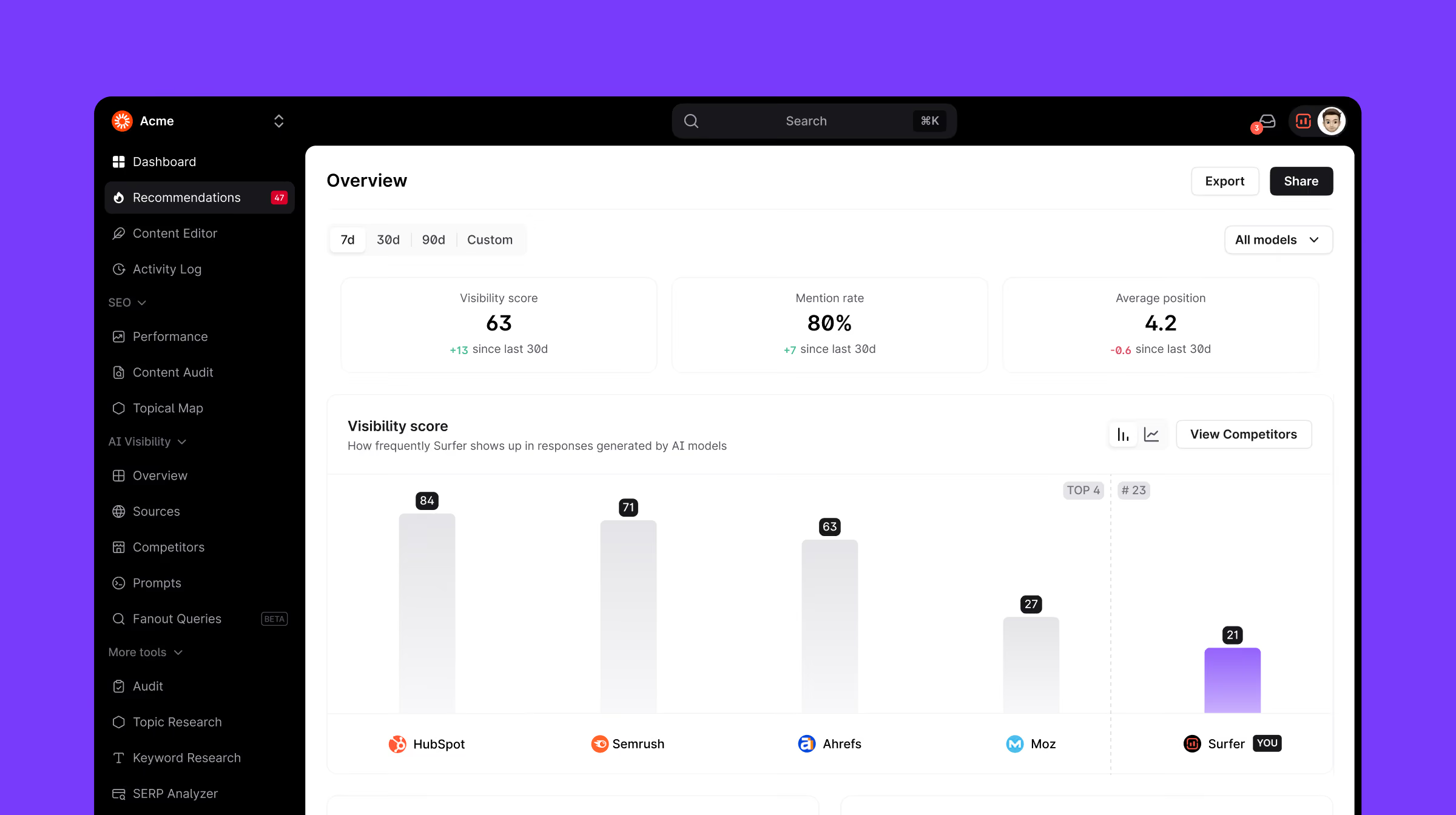
The AI Tracker Overview has been redesigned for immediate value. The default view now shows a competitor visibility bar chart and topic-level performance insights instead of a trend line and individual prompts — so the data is actionable from day one, even without historical context.
If you’ve ever set up a tracking tool only to be met with a flat line or a single dot because there’s "no historical data yet," you know how frustrating it feels. You're ready to optimize now, not in fourteen days.
We've redesigned the AI Tracker dashboard to be useful from the moment you open it.
What's changed
The old AI Tracker dashboard showed a line chart that, for most new users, looked like a flat line or a single dot — not because your visibility was low, but because there simply wasn't enough historical data yet.
Now, the default view leads with what actually matters immediately — how your brand compares to competitors — rather than a trend chart that needs weeks of data to tell a story.
- Competitor bar chart as the default view so you can see your visibility score stacked against top competitors the moment you log in — no historical data required.
- Topic-level insights replace top prompts as the default widget, giving you a cleaner, more strategic view of where your brand performs. Topics group related prompts into meaningful clusters, making it easier to see which categories you excell at and which need improvement.
Here’s an example topic-prompt split for Surfer:
Topic: Content Optimization
Prompts: What is the best content optimization tool in 2026?, What are the top content optimization tools available today?, What are the most popular tools for content analysis and optimization?, Which content optimization tool is best for improving SEO?, What tools do experts recommend for optimizing website content?
Topic: AI Visibility
Prompts: What are the top ai visibility tools available today?, Which tool is the best for improving ai visibility?, What tools do experts recommend for improving ai visibility?, What are the most popular tools for increasing ai citations?
Topics let you quickly grasp whether or not your brand does well in a broader category. Prompts within topics let you pinpoint specific gaps that, when covered, improve your position in the general category. **
- Toggle between views to switch from the competitor bar chart to the historical trend line when you have the data to back it up, or drill from topics into individual prompts when you need that level of detail.
Instead of an empty chart and a list of noisy prompts, you get a clear competitive snapshot on day one.
Why it matters
AI Tracker's job is to show you where you stand. A new user shouldn't have to wait weeks before the dashboard feels worth checking. And a busy manager shouldn’t waste time clicking through reports to know their competitive position.
This is a game-changer if:
- You're launching a new project: Competitive context is immediately visible, making it easier to build a case for action from the first session.
- You want strategic clarity over raw data: Topic-level performance is faster to read, easier to brief upward, and more directly tied to content decisions. Use it to identify broad content gaps that impact dozens of related AI prompts at once.