I recently had ChatGPT find a tshirt similar to an old favorite I’d worn to death. It surfaced a brand I’d never heard of and found a near-identical match. The fact is, AI now plays a major role in shaping people’s buying decisions. If you want to maximize your brand's organic visibility, relying on traditional SEO alone won't cut it anymore.
AI search visibility tools help you track how LLMs like ChatGPT and Perplexity reference your website or product, including which prompts trigger those mentions and the types of users that see them.
But these platforms have been popping up like hotcakes, and not all of them are worth your time. I spent the past few weeks scouting for the best AI visibility tools.
This article lists my favorites.
Best tools for AI Visibility
- Best overall: Surfer AI Tracker
- Best free option: Amplitude AI Visibility
- Best for spotting weaknesses before tracking: Rankscale AI
- Best for finding AI prompts fast: Otterly AI
- Best for large-scale brand mentions: Ahrefs Brand Radar
I spent time using each tool with the same sites, similar prompts, and comparable competitors to see how consistent the data was and how useful the insights actually were in practice.
I also cross-checked my impressions with friends and colleagues over at Surfer, along with people working in SEO and content in general, who are also actively experimenting with AI search, and have had the chance to work with the different tools out there.
The full list of criteria I tracked across each platform is extensive and varies from tool to tool, since some excel at certain features while others don’t offer them at all. But here are a few factors that I took note of more closely than anything else:
- whether you can see and control the exact prompts being tracked,
- how clearly they show why a brand appears or doesn’t appear,
- and whether the data leads to concrete next steps to improve visibility.
1. Surfer AI Tracker
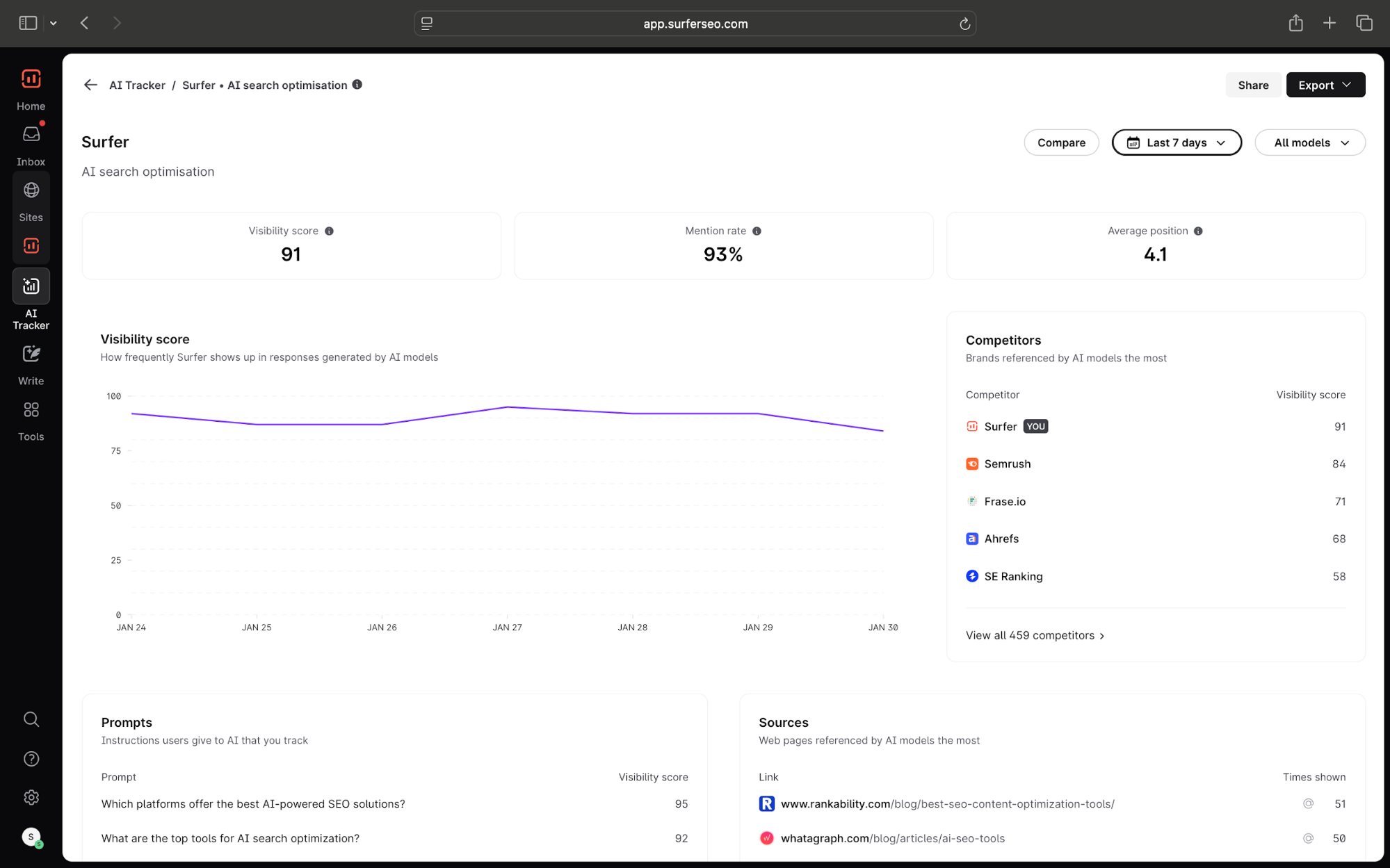
Surfer AI Tracker lets you get a measure of how often you're showing up in AI answers, which websites are being cited in responses, and—more importantly—helps you create content that is more likely to be mentioned by LLMs.
First, here’s what you can actually do with Surfer’s AI Tracker.
To get started, enter your site’s domain and list your focus topics. Surfer then automatically generates a set of prompts your ICP is likely searching for on LLMs. You can also manually add any prompts you think are worth tracking.
Keep in mind that Surfer tracks prompts directly by scraping LLM answers, which is the same interface you, as a user, would interact with. Other tools use API access which dont reflect actual AI mentions accurately.
We’ve found there to be upto a 25% distinct difference in LLM responses you get through the UI and those returned via the API, yet many other platforms rely solely on the API to track results, so the metrics aren't very accurate.
This was a big plus in Surfer's favor.
On the Overview page, you get a rundown of the essentials. Surfer shows your brands:
- Visibility score: how often you appear in LLM responses for your tracked prompts
- Mention rate: how frequently your brand is mentioned across AI models
- Average position: how prominently your brand is placed in AI responses
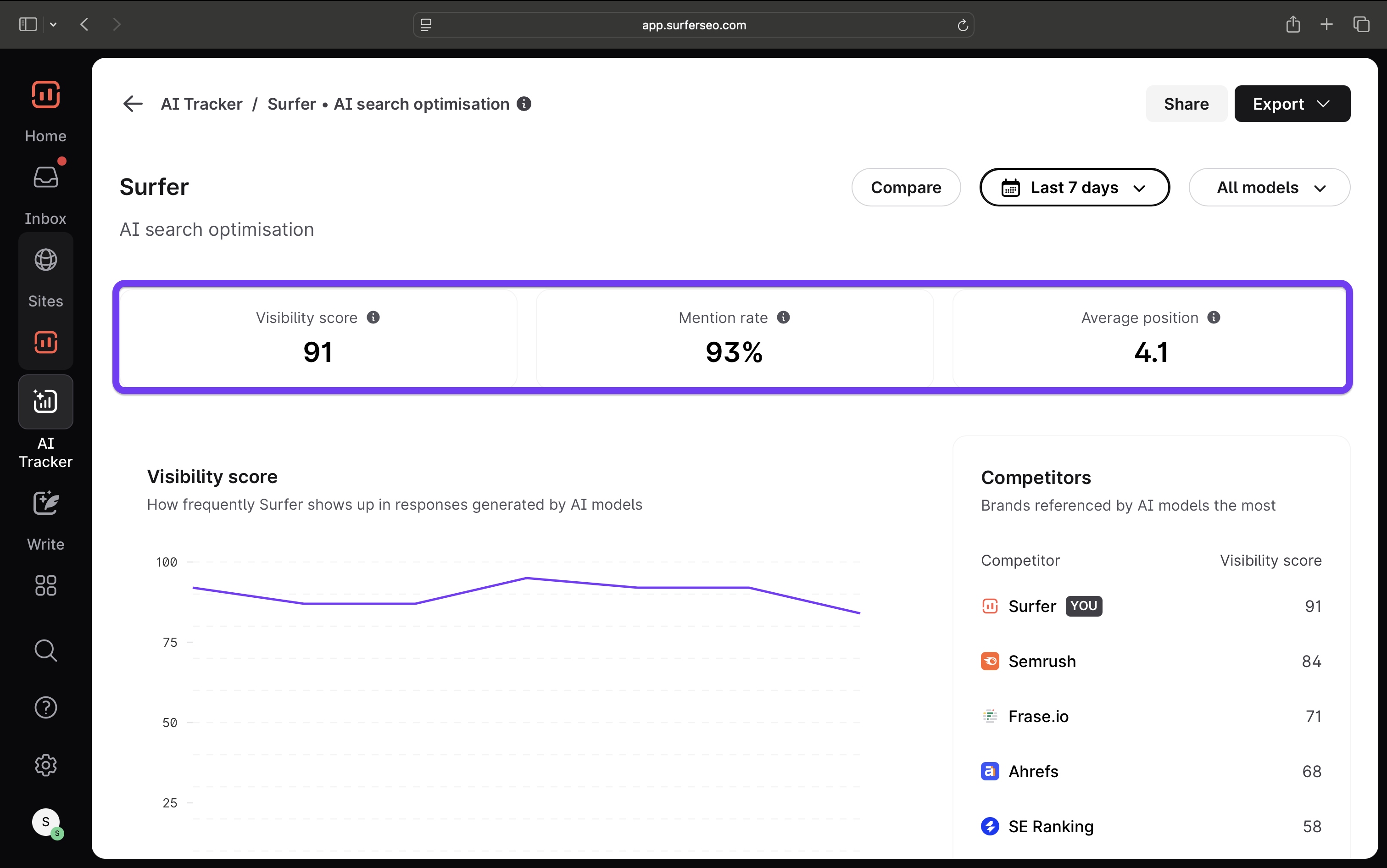
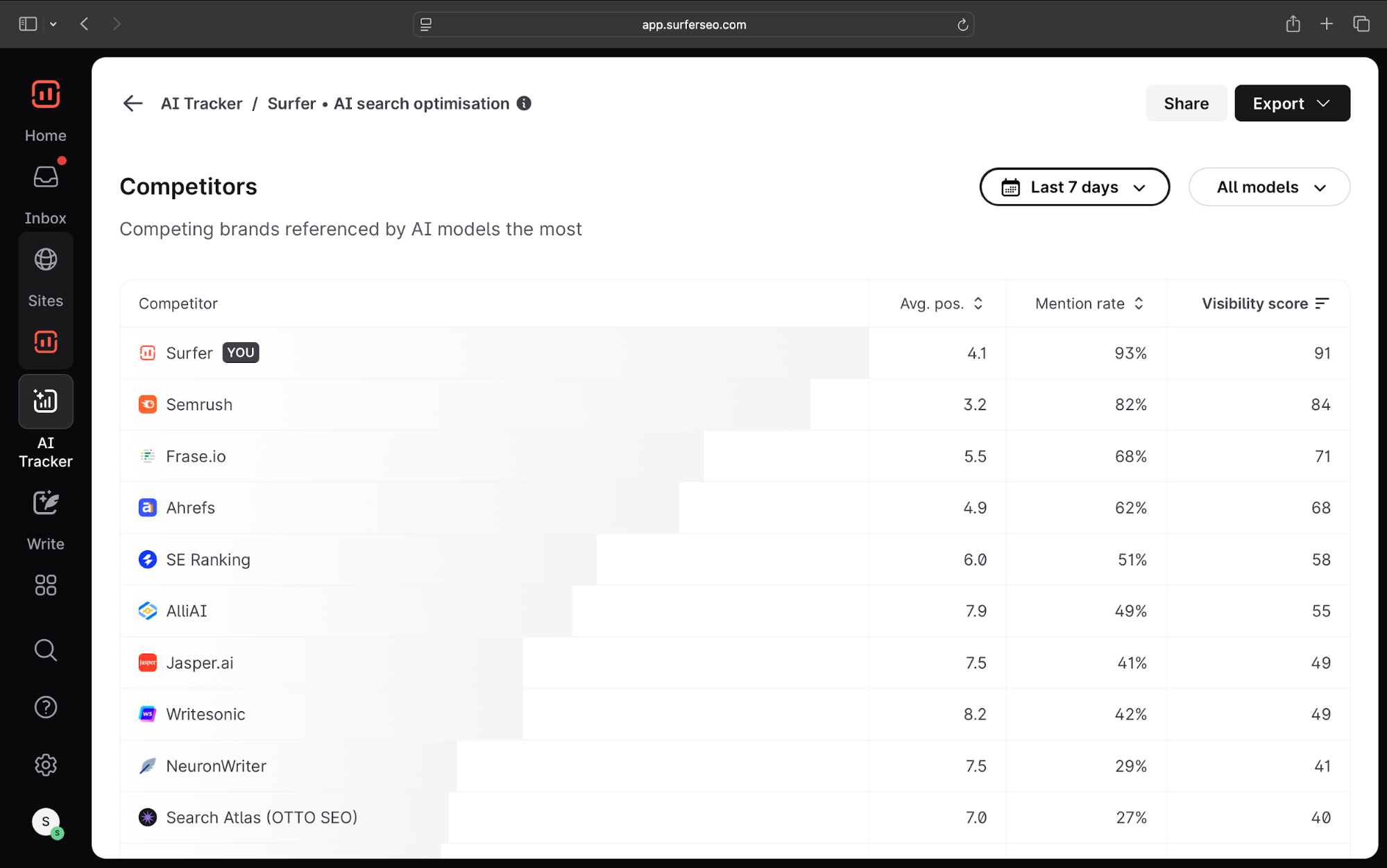
You can also compare your LLM performance directly against competitors.
Surfer tracks which other brands appear for your tracked prompts and lets you filter to focus on the ones you want to monitor. From there, you can see how their visibility score, mention rate, and average position stack up against yours.
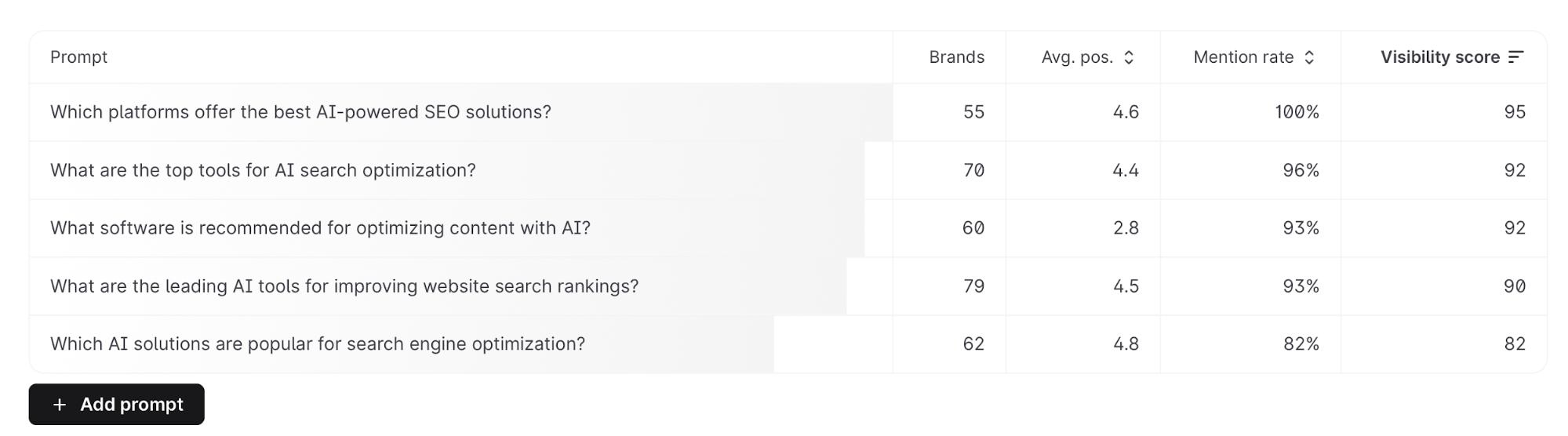
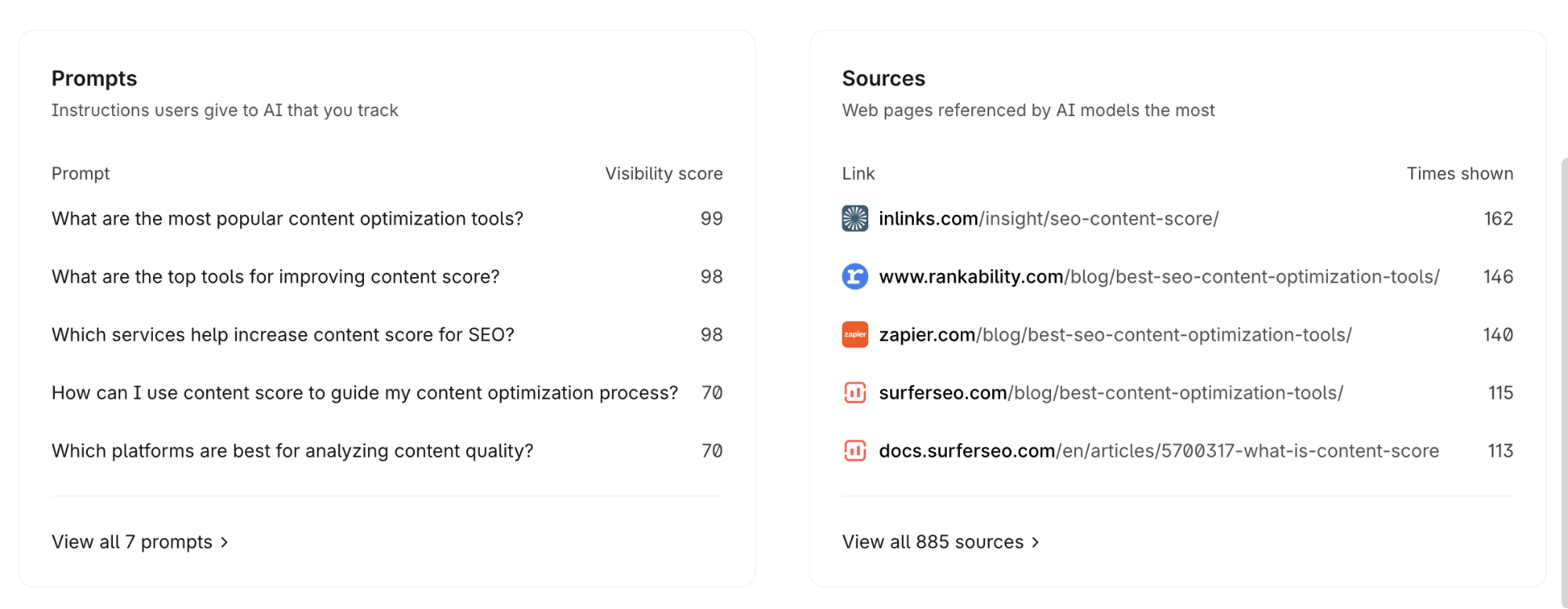
You also get a quick glance at visibility scores for individual prompts, along with the sources most frequently cited by LLMs in responses to those prompts on the Overview page.
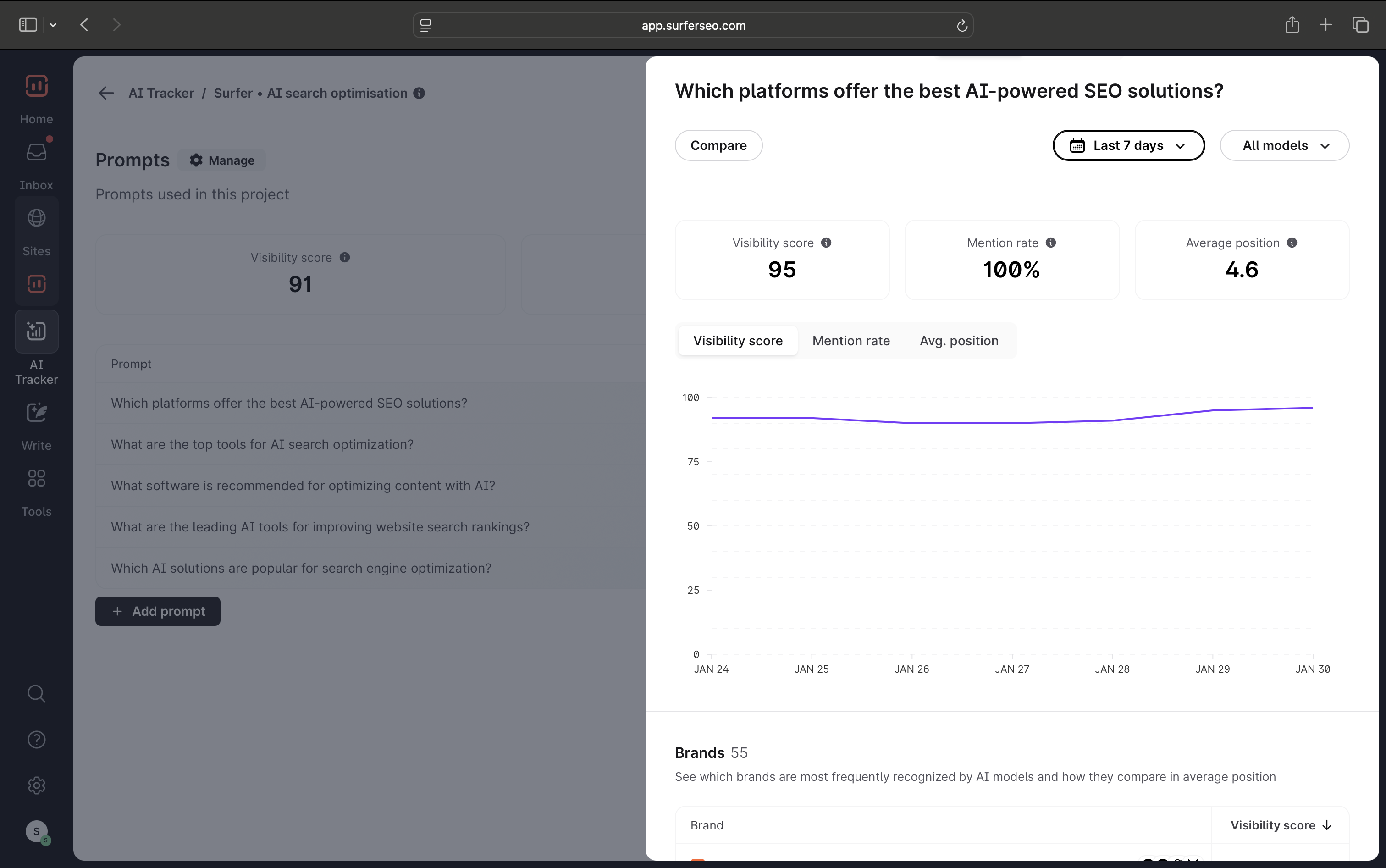
You can always move to the dedicated tabs on the sidebar for a more detailed look at either. I especially like this view because I can see multiple details for each prompt including metrics for brand mentions, source citations and query fan-outs.
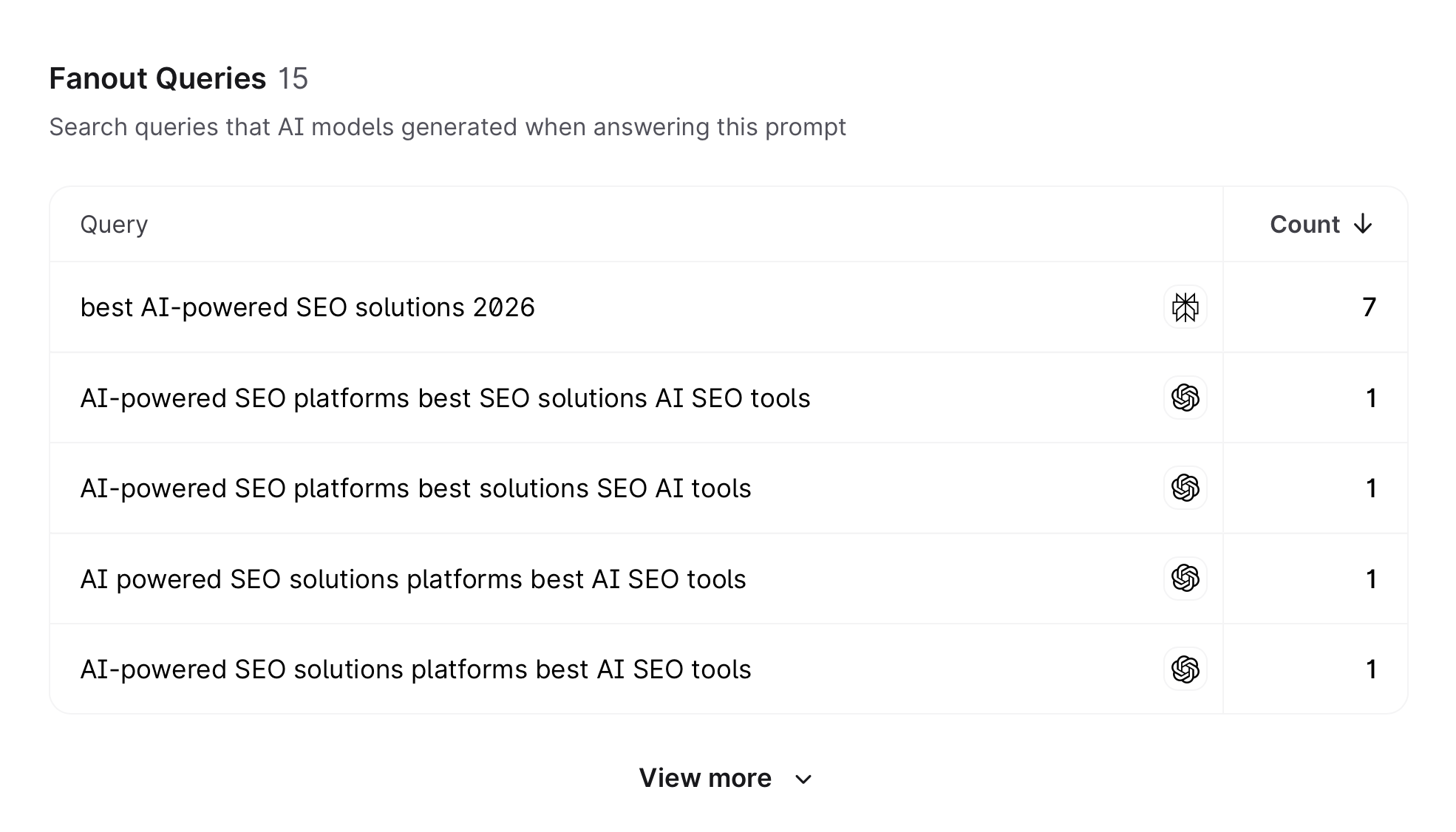
I use the query fan-outs data to help me write and research outlines and articles, so my content is optimized for both AI SEO and blue-links results.
That covers tracking your performance in AI search, and it’s where most other AI tracking tools stop. But that alone doesn’t help you improve your LLM's visibility.
Surfer lets you optimize content for AI search by adding "facts" relevant to your topic. The broader your topic coverage, the more likely you are to be cited by AI search engines.
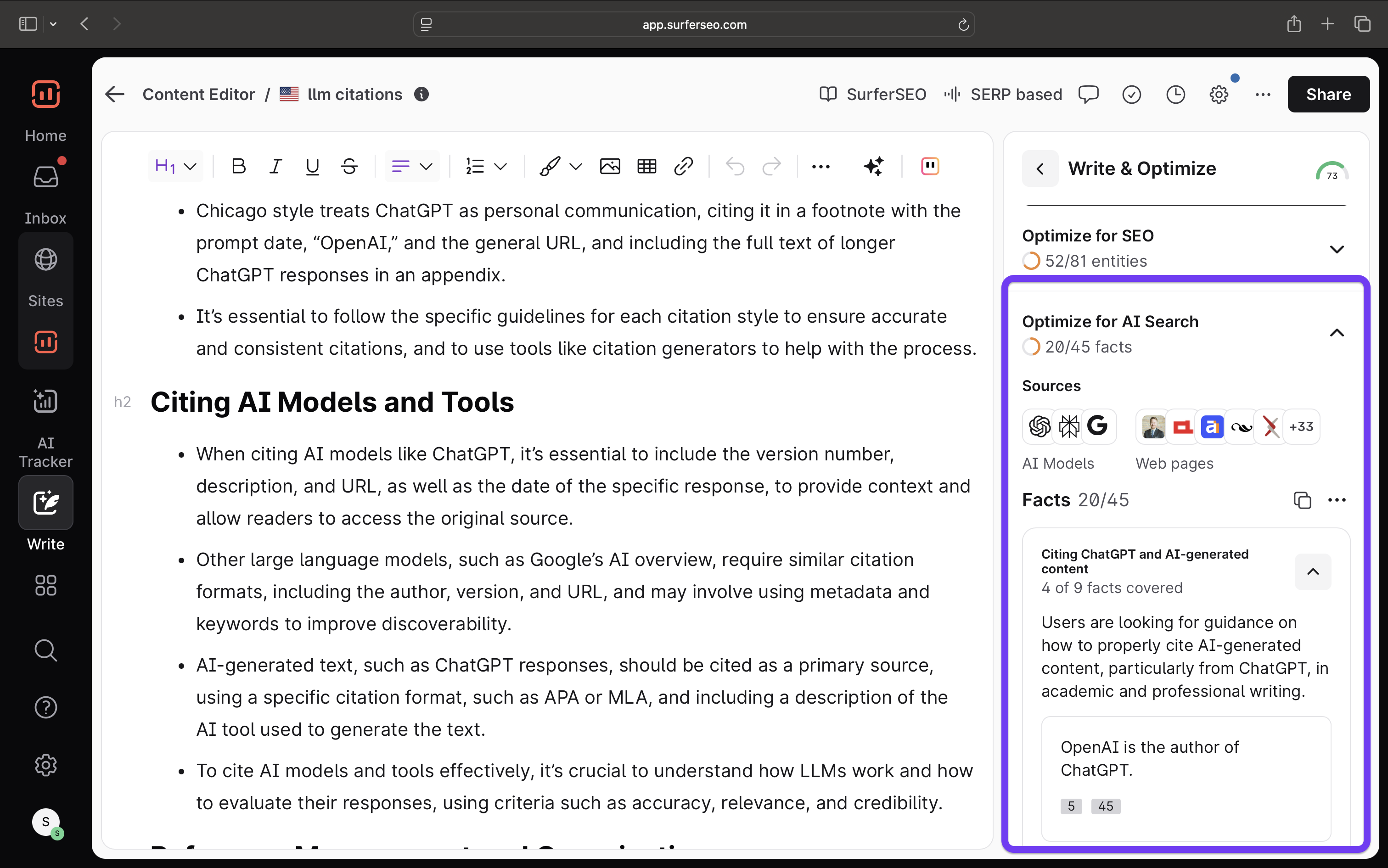
And this is the other major reason I ranked Surfer on top of the list: the fact that AI SEO is still closely tied to traditional search - something most other visibility tools tend to overlook. If your content ranks on SERPs, AI tools are more likely to cite it as well.
My recommendation stems from having used the tool personally (as have the others on the list), and these are a few pointed reasons why Surfer ranks better in my books than the others.
With Surfer, you get access to our proven SEO features to help your content rank on Google search, plus AI visibility tools that give you the best chance of appearing in LLM responses.
Pros:
- Tracks actual LLM answers, not just the API
- More cost-effective than buying separate SEO and visibility tools
- Integrates traditional SEO insights with AI visibility
Cons:
- Better suited for prosumer and enterprises than starter websites
2. Amplitude
Amplitude recently launched its free AI visibility tool that can help track how you're performing on various LLMs.
To get started, you simply enter your website URL and run the AI visibility tool. It doesn’t push you to define an angle or manually choose which prompts to track, either. If you want more control over the prompts being tracked, along with the target region and language, you’ll need to sign up for an account.
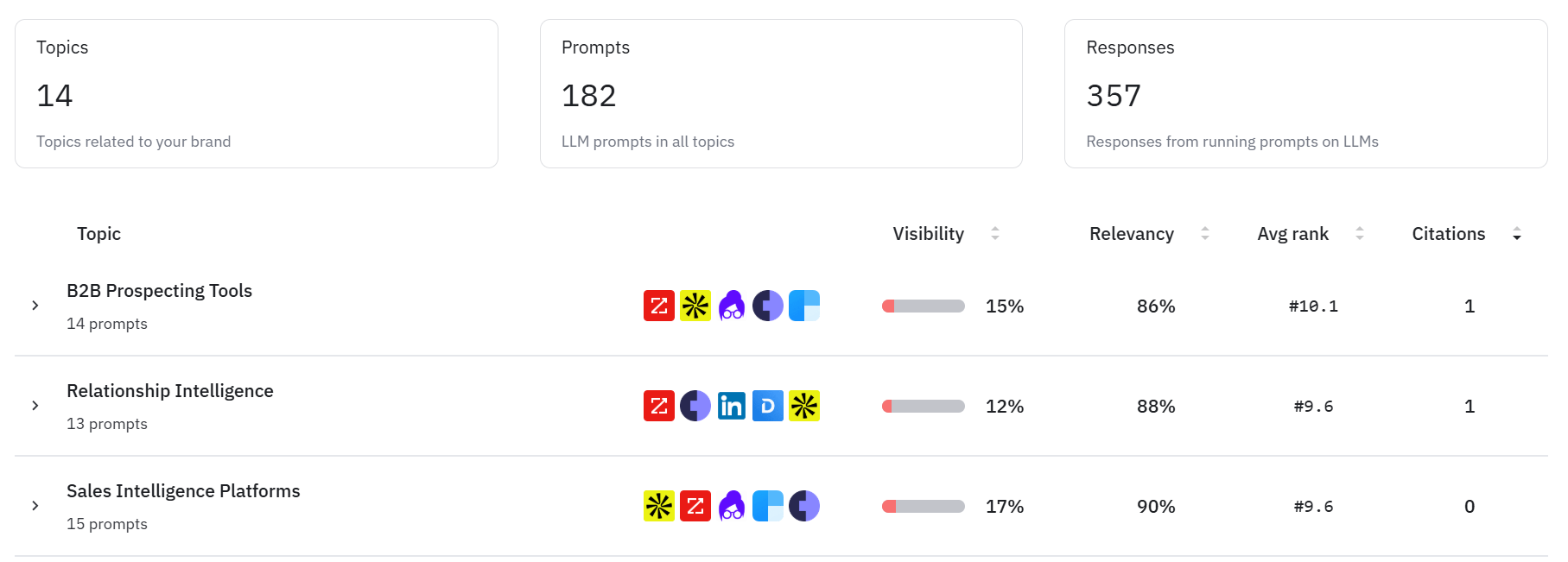
There are three main tabs aside from the dashboard: Prompts, Sources, and Competitors. Under Prompts, you get a more detailed view of the topics you’re performing best for, along with the individual prompts within each.
This includes metrics like visibility, relevancy, average rank, and how often your site is cited. This is also where you can tweak existing prompts or add your own manually.
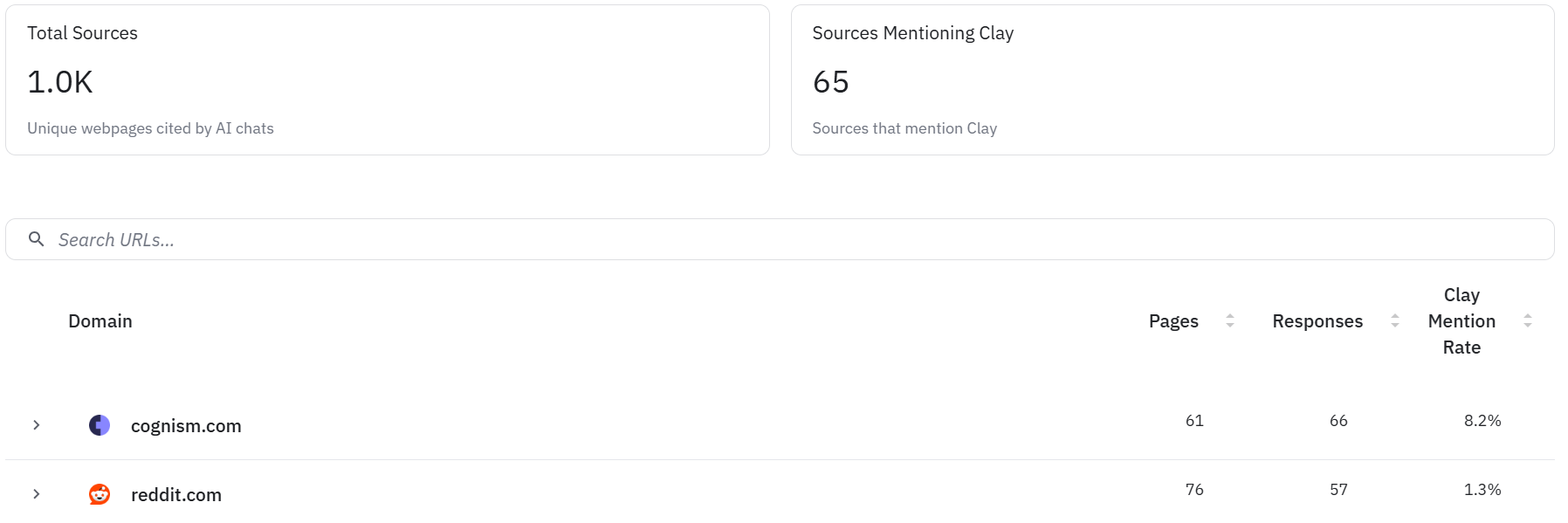
In the Sources tab, you can view either all cited sources or just the prompts where your site was used as a reference. You’ll also see how many pages from a site were cited, how many responses they appeared in, and what percentage of those citations mention your brand.
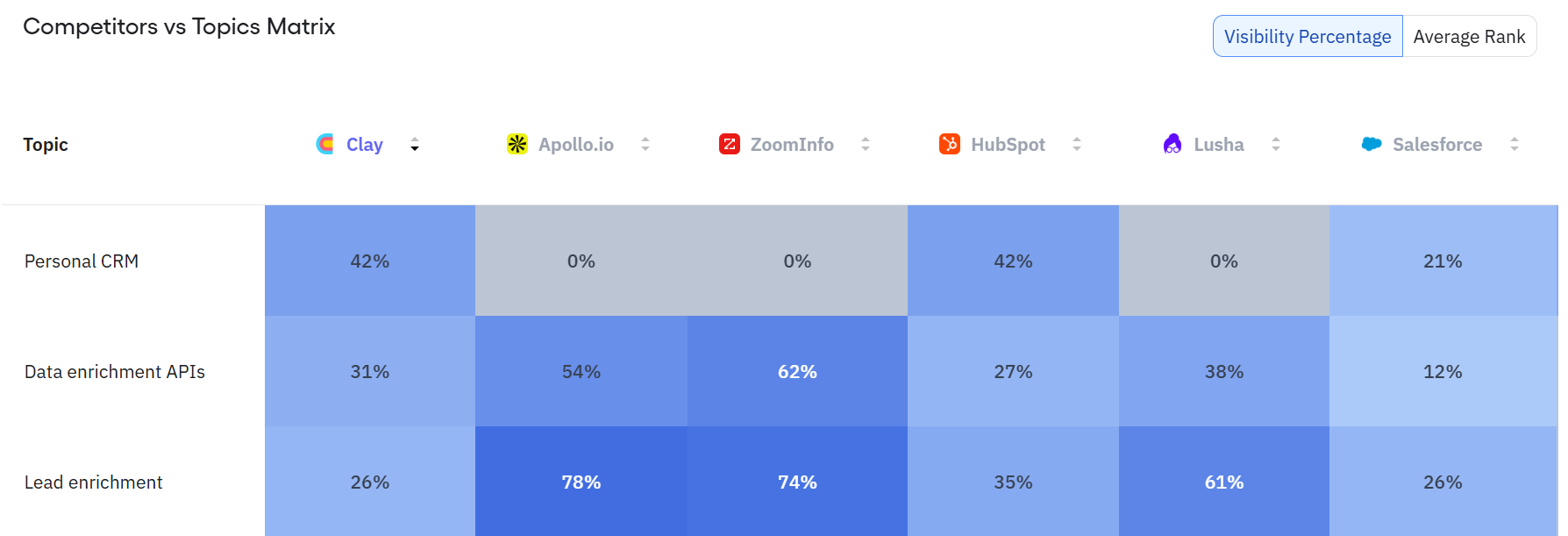
Last is the Competitors tab, where you can choose how you want to view the data. You can opt for a one-to-one breakdown, which compares your visibility against each competitor individually and shows which topics you lead on and where they outperform you. Or you can switch to the matrix view, which gives you a broader comparison across all competitors, letting you toggle between visibility percentage and average rank for each topic.
Amplitude also has a few other features that are currently in beta, including an analysis mode that tracks AI visibility for a single page.
Pros:
- Free AI visibility tool with no sign up required to start
- Solid competitor and source analysis across prompts, topics, and domains
Cons:
- Lacks deeper SEO features to help improve visibility, beyond tracking
- No sentiment analysis to measure the quality of AI responses
3. Rankscale AI
Rankscale positions itself as an AI search monitoring platform.
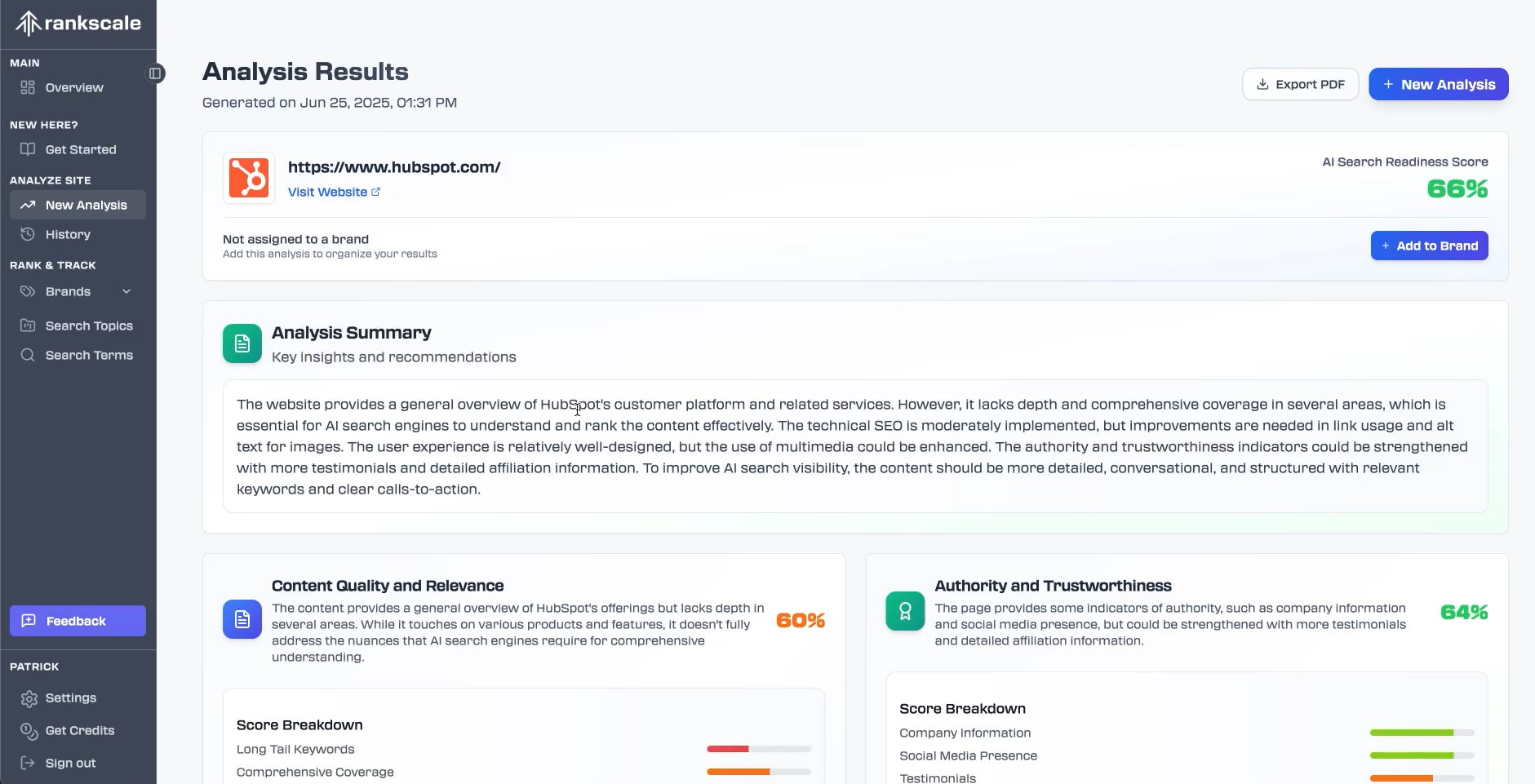
You start by running a website analysis. After entering your domain and choosing how deep the crawl should go, Rankscale assigns an overall AI search readiness score. That score is broken down across four categories:
- content quality and relevance
- authority and trustworthiness
- technical SEO and page structure
- engagement
But to actually track your AI visibility, you’ll need to set up a “Brand” first. This follows a similar process to what I’ve covered with other tools. You enter your brand name, select the features it covers, and add a short description of your product.
Once you’re set up, you can add the topics and search terms you want to track across LLMs. Frontend tracking is limited to a smaller subset of models supported: ChatGPT, AI Overviews, and Perplexity. API access is what you get for the rest. Which, as we covered, is not very reliable.
When adding a search term, you can choose the usual settings: which models to track, the tracking interval (hourly, daily, weekly, and so on), the target region, and language. Something that's more unique to Rankscale is the ability to set how long a term is tracked. You can define a cloud run limit, after which the tool automatically stops tracking that term.
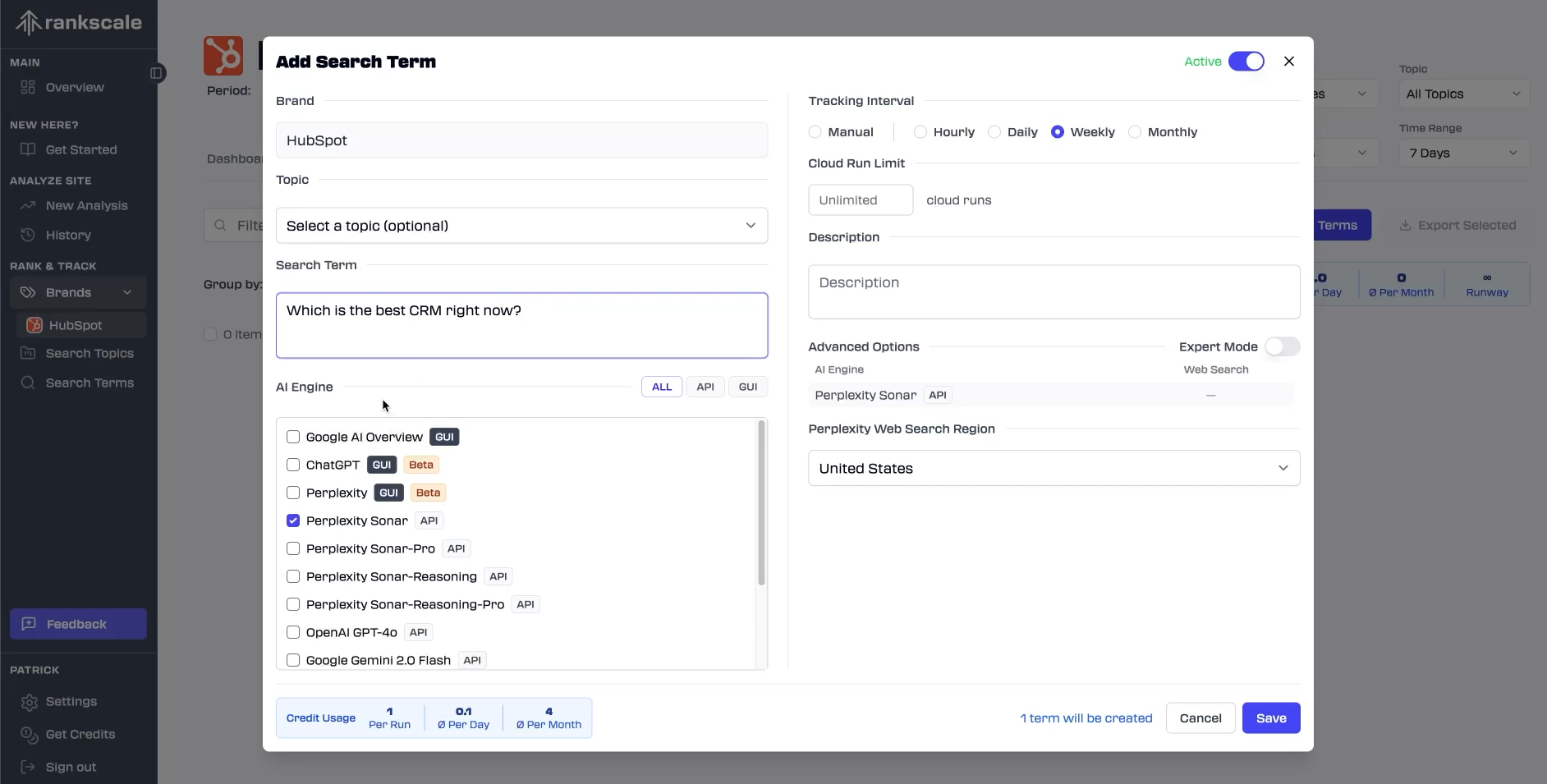
You can also cluster these search terms under different topics. And if you aren't keen on handling it manually, Rankscale can also automatically generate some for you.
Once the tool has had time to run searches across your topics and search terms, you get access to the usual set of metrics. These include an overall visibility score, mentions, and citations, along with a sentiment score, which is usually a hit or miss with visibility tools, so points in favour of Rankscale here.
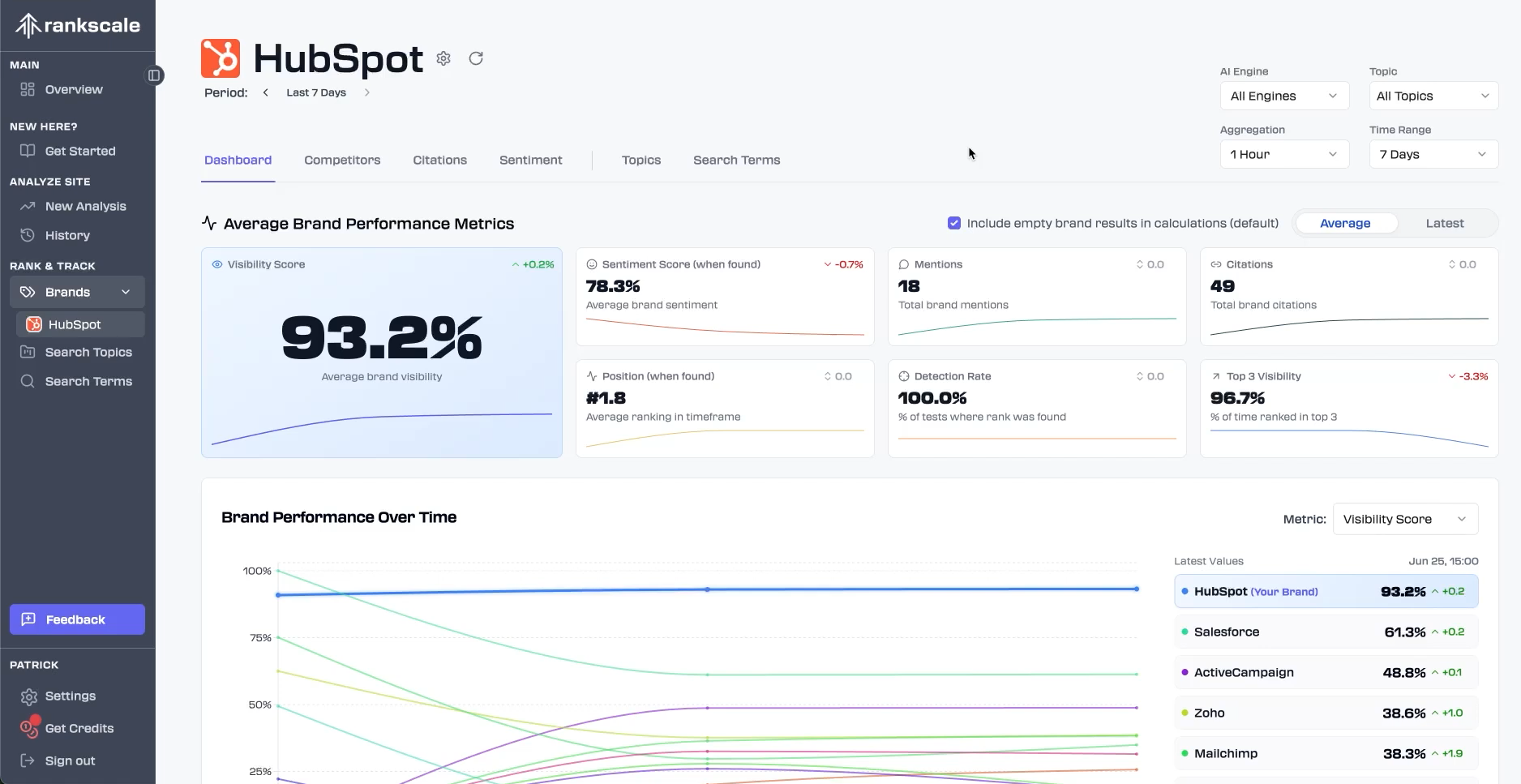
You can also switch between the Competitors and Citations tabs to dig deeper into each view. This covers the usual comparisons, like how your mentions stack up against competitors and how many queries they appear in the top three responses for versus your brand. Citations offers a similar breakdown, showing total citations, unique URLs, the number of brands cited, your appearances, and more.
Pros:
- Includes an AI readiness score that highlights strengths and gaps before tracking
- Easy to navigate, with all the general visibility features a user is likely to be interested in
Cons:
- Frontend tracking is limited, with most models only available through the API
4. Otterly AI
Otterly AI is another tool designed to help you track how your brand shows up in AI-generated answers, with a strong focus on simplicity and speed over depth.
Getting started with Otterly looks a bit different from the other platforms I’ve covered so far. There are three ways you can begin tracking AI visibility:
- Using a set of prompts you already have
- Using a set of SEO keywords that Otterly automatically turns into prompts
- Discovering which prompts are already driving traffic to a specific URL
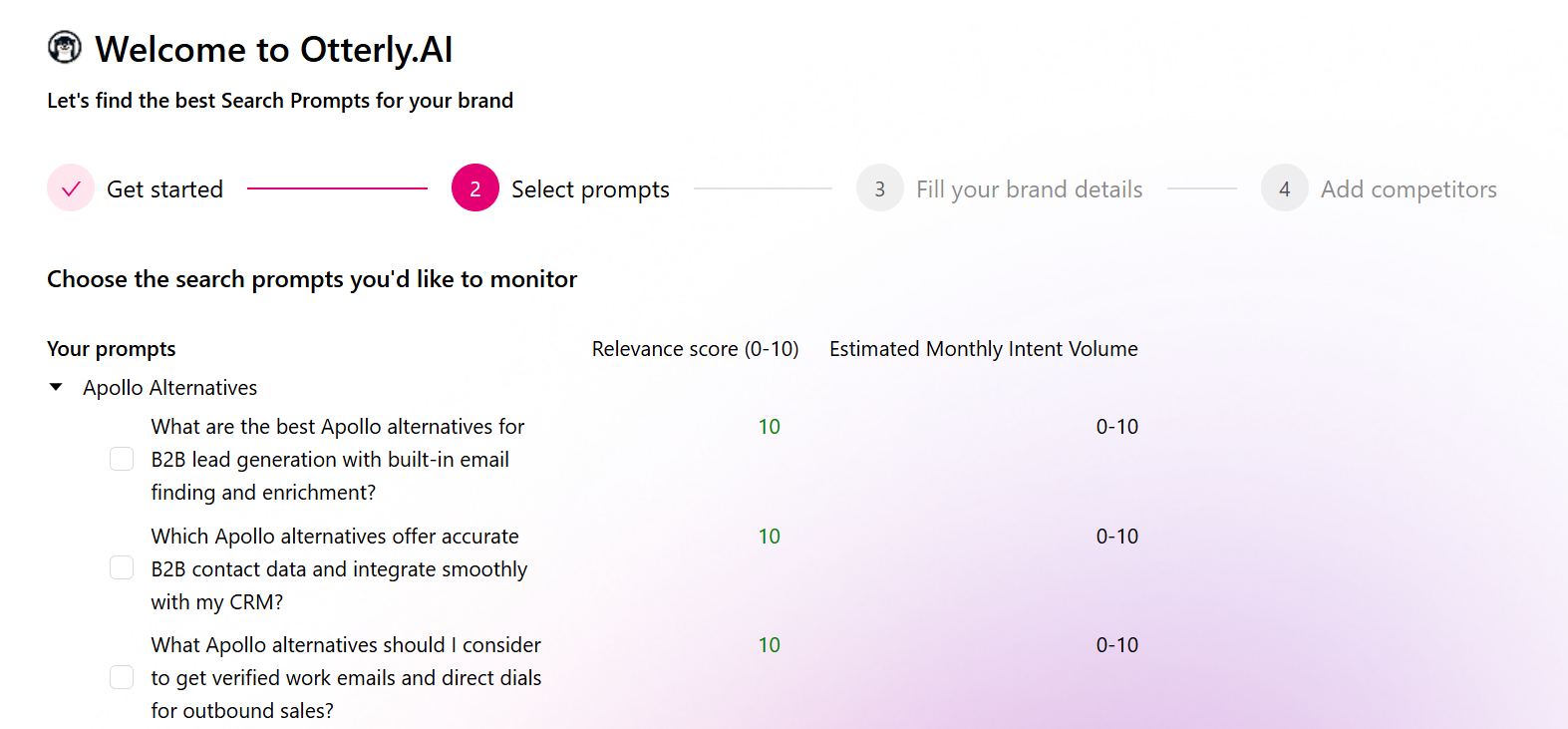
Once you’ve selected an option, the rest of the onboarding process is fairly standard. Otterly suggests prompts it thinks are worth tracking, asks for a few additional brand details, and then has you define your competitors.
I went with the option to turn SEO keywords into AI prompts. I gave the tool five keywords, and it returned around 10 prompts for each, along with what Otterly calls a Relevance score and Monthly Intent Volume. You can sift through these and decide which prompts you want to track. I ended up selecting three per keyword.
Once data starts coming in, the dashboard gives you a high-level snapshot of your AI presence. You’ll see total brand mentions, your average position, the prompts you’re ranking best for, and how all of that stacks up against the competitors you defined during onboarding.
If you want a deeper analysis of your prompts or citations, you can navigate to the relevant tab on the left sidebar.
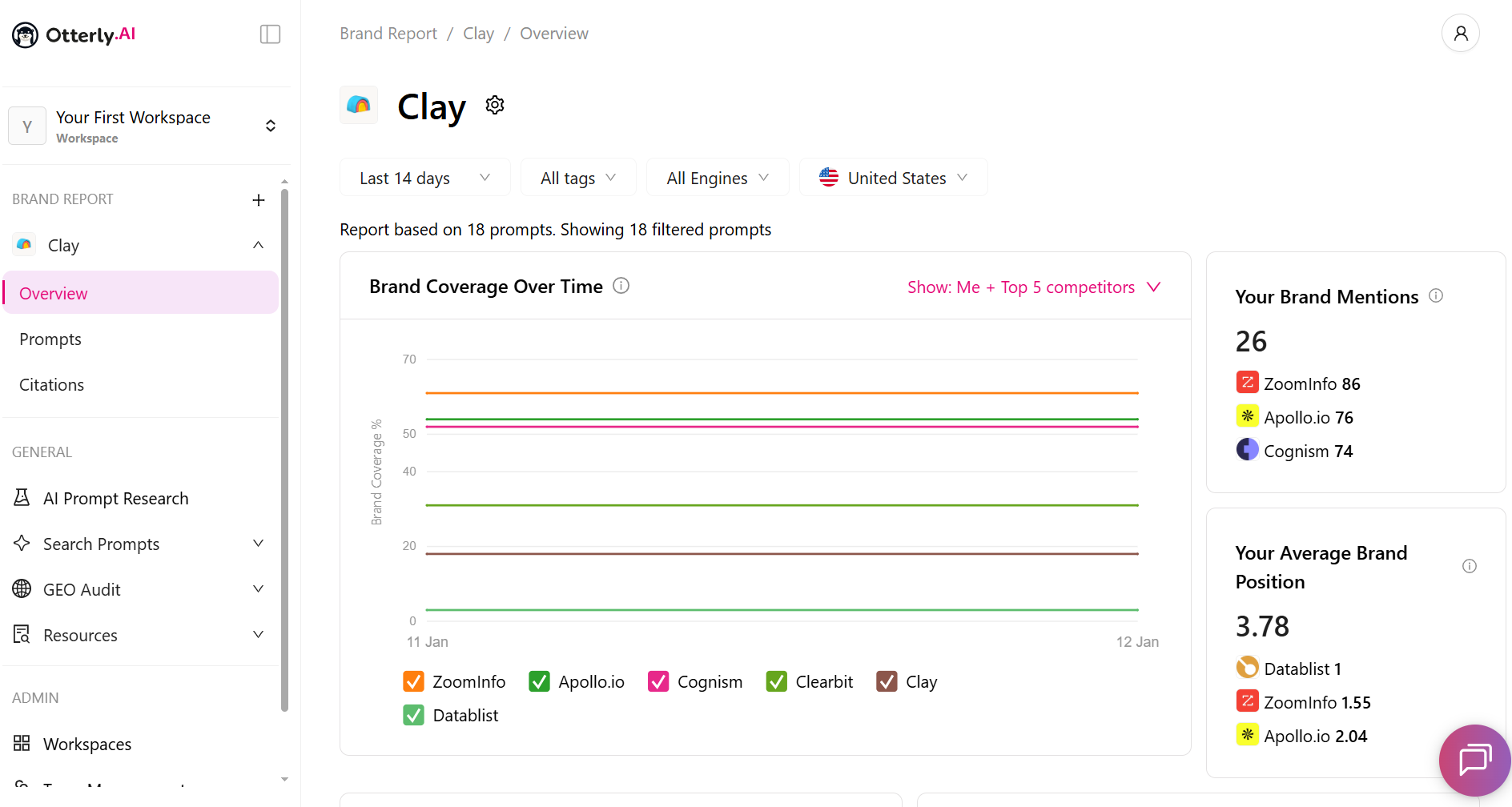
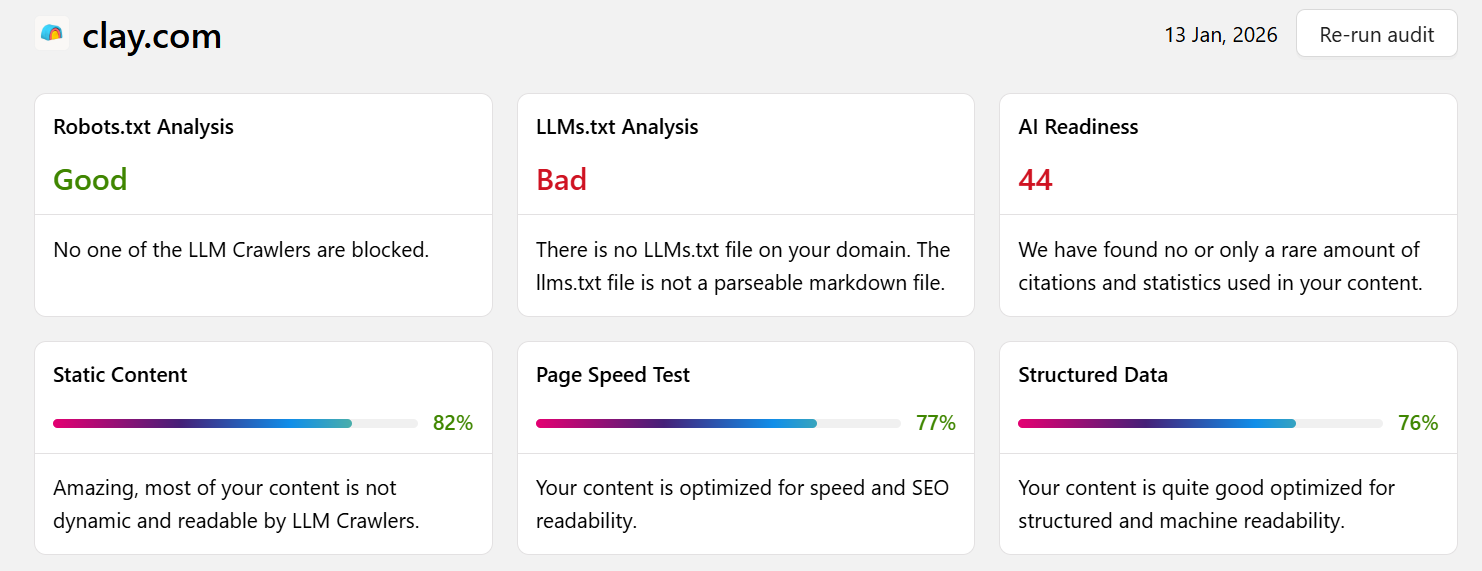
That’s more or less the standard setup. Where Otterly stands out is its GEO Audit feature. You enter your website URL, and the tool analyzes it to assess how readable your site is for AI search. The audit covers general SEO best practices, like robots.txt, page speed, and structured data, alongside checks that are more specific to AI search. For example, it looks for things like an llms.txt file on your domain.
That said, it’s worth noting that the reliability of llms.txt is still questionable at best, and it hasn't been proven to support AI visibility in any meaningful way.
Pros:
- More flexibility when getting started with AI search tracking
- Clear breakdown of AI visibility, competitor comparisons, and citation rates
Cons:
- No control over how often prompts are run
- Focused on tracking only, with no built-in options to improve AI visibility
5. AIclicks
AIclicks is one of the few platforms in this space that treats AI visibility as an off-site problem first. Instead of suggesting more content on your domain, it tells you which third-party pages AI engines already trust, then hands you a plan to feature on these pages.
Setup is quick. Enter your brand name and website domain, and AIclicks will analyze your site to auto-suggest prompts based on your content and industry.
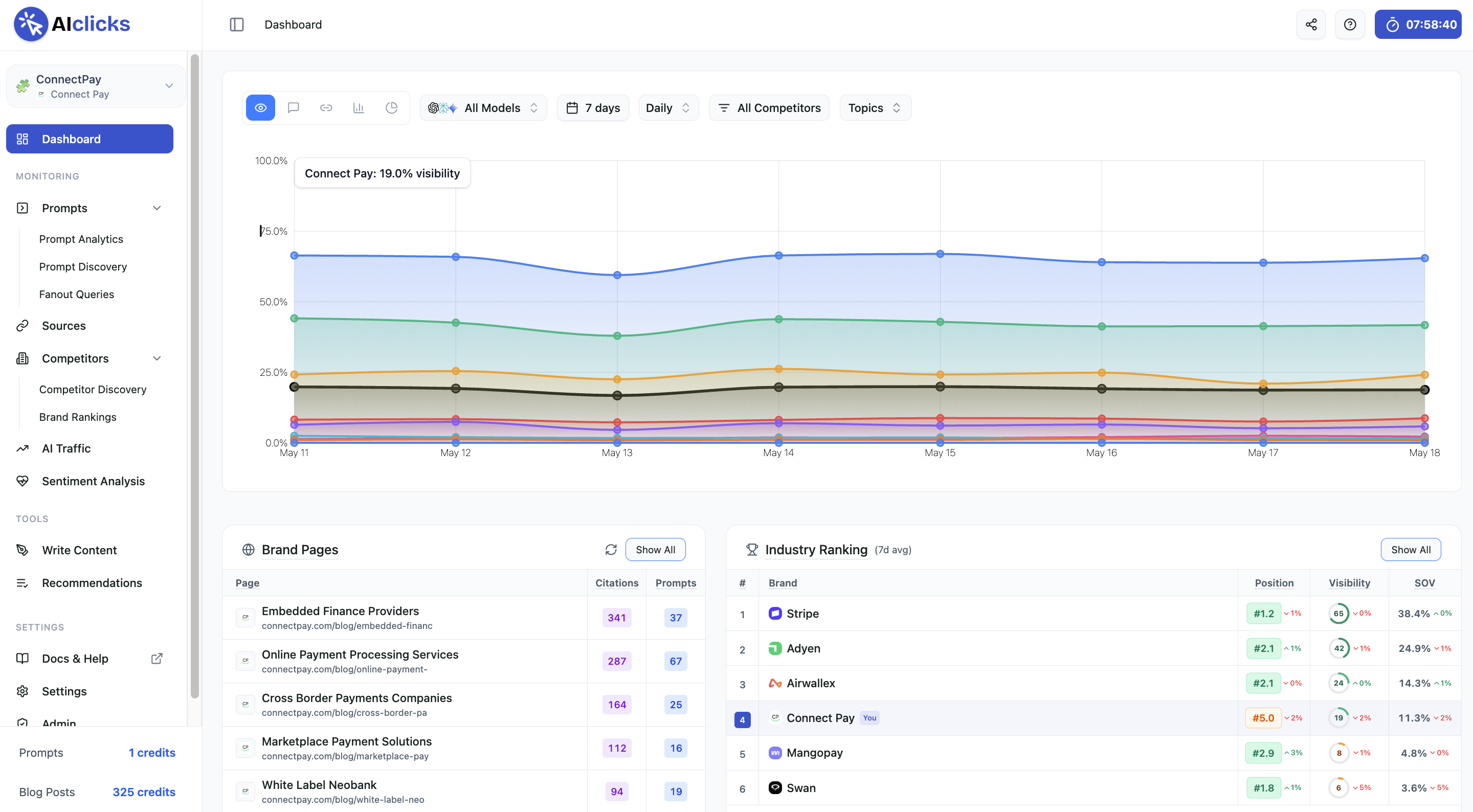
You can accept the suggestions, reject them, expand them, or upload your own list manually or via CSV. Data starts populating within minutes and the tool covers the most popular AI platforms including ChatGPT, Perplexity, Gemini, Claude, Grok, DeepSeek, Meta AI, and Google AI Overviews.
The main dashboard centers on an AI visibility score that measures how often your brand appears versus the median competitor, along with mentions, citations, and sentiment trends.
From there, three core tabs do most of the work. Under Competitor Discovery, you can add competitors manually or pick from the most frequently appearing brands across your tracked prompts. You see their visibility score, the prompts they appear in, and the topics they win that your brand does not.
The Sources tab shows the most cited URLs influencing AI answers in your category.
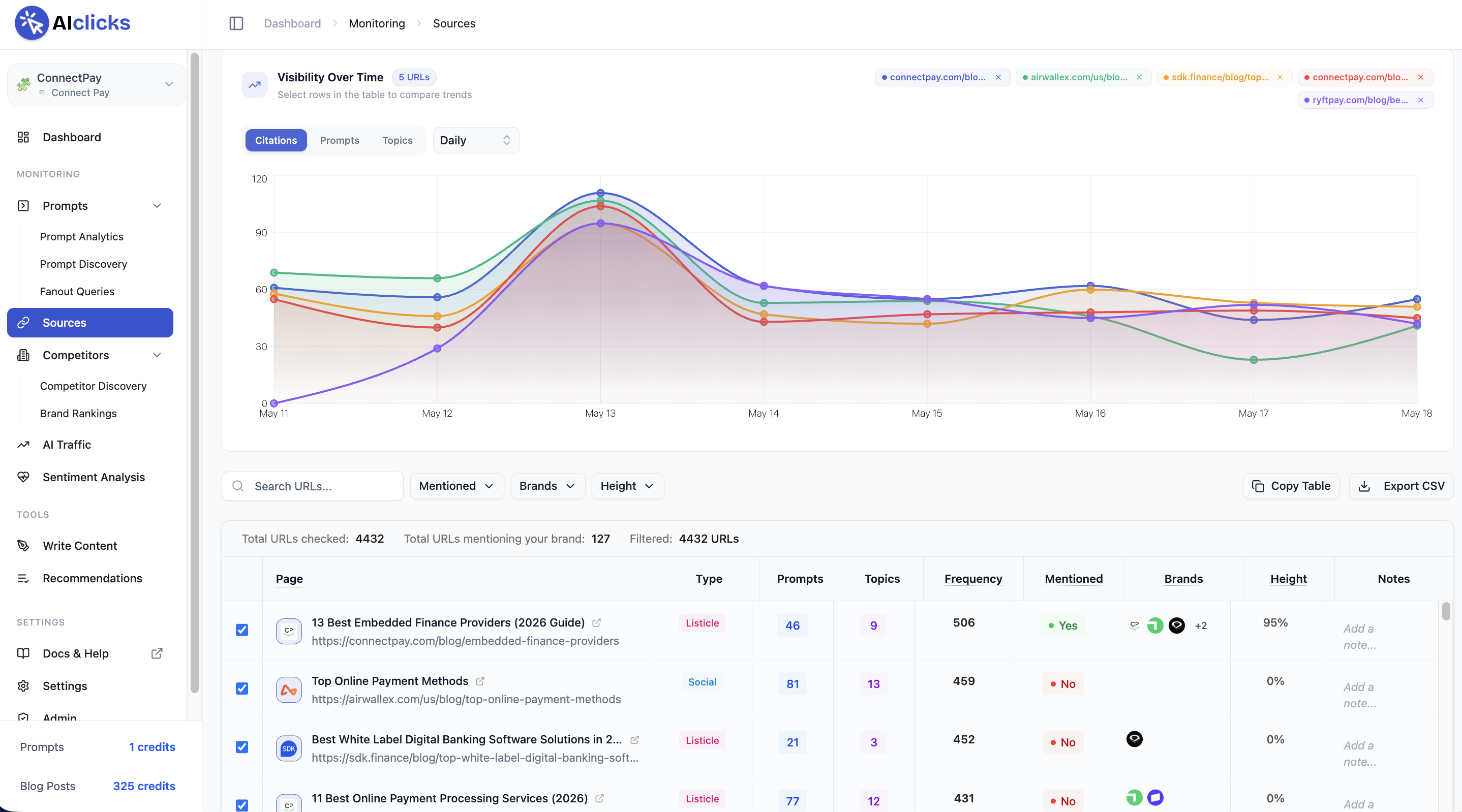
These are scored based on how many prompts the URL appears in, how many topic categories it covers, and how frequently it is cited. Treat this list as your outreach priority queue, telling you exactly which third-party pages to target to close source coverage gaps with competitors.
Where AIclicks separates itself from pure trackers is the Recommendations tab. It offers three action types:
- AI content generation (creates fully structured, AI-optimized articles you can copy into your CMS, in 100+ languages)
- prioritized outreach to cited sources
- and suggested conversations to join on Reddit, LinkedIn, and X.
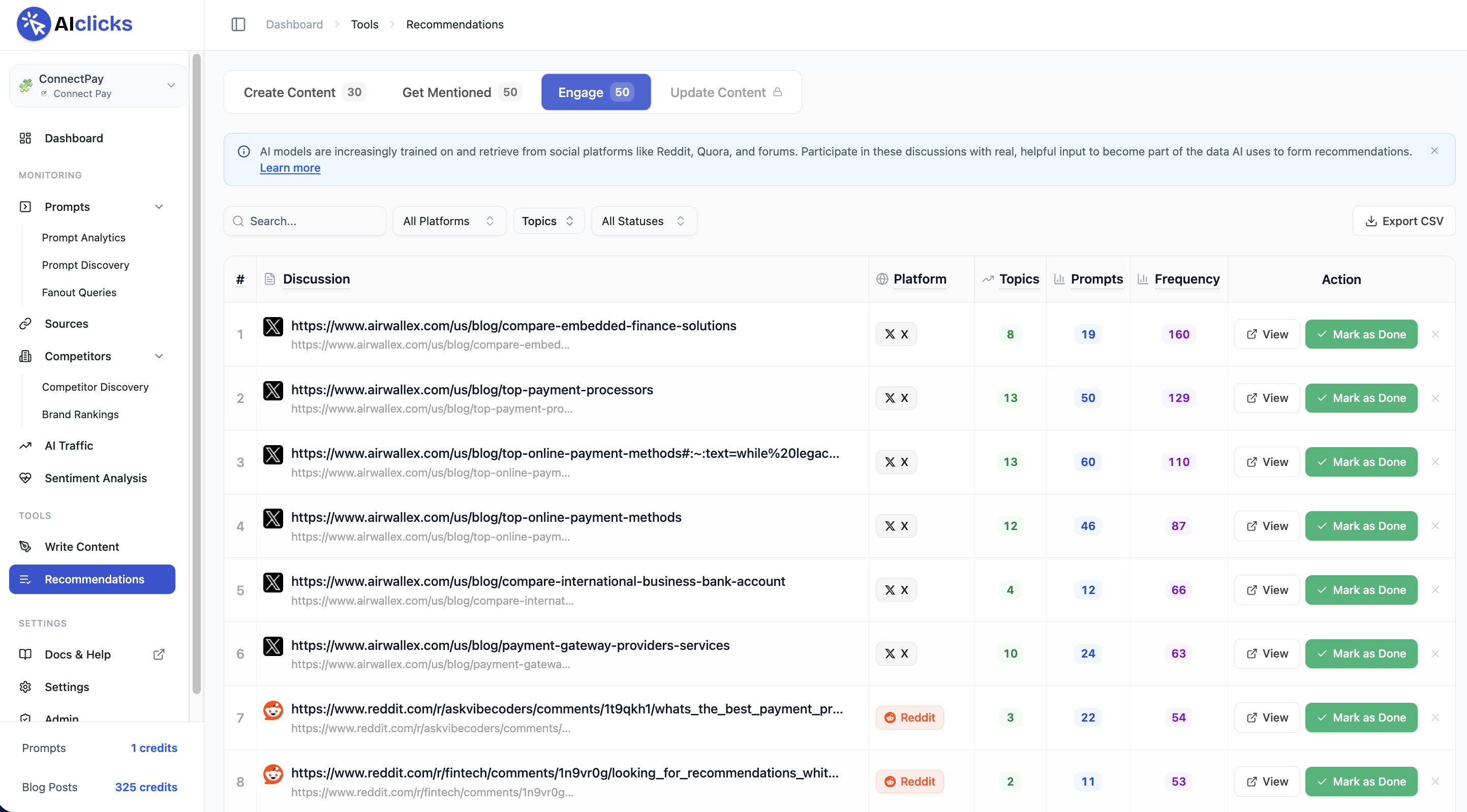
You can also connect Google Analytics to see which AI engines send real traffic to your site, which pages they land on, and what commercial actions those visitors take.
Data updates daily, and weekly reports show what moved, what dropped, and where competitors shifted.
Pros:
- Combines visibility tracking with built-in content creation, outreach lists, and community engagement recommendations
- Supports 10+ LLMs and 100+ languages, with daily refreshes and a fast setup that doesn't require sales calls
Cons:
- Prompt allowance on the entry tier limits how widely you can track without upgrading
- AI-generated articles still need human editing for tone and accuracy before publishing
6. Ahrefs Brand Radar
Brand Radar is Ahrefs’ AI visibility tool, built as an extension of its existing SEO product ecosystem.
Getting started is one of the simpler setups I’ve covered. You head to the Brand Radar tab, enter your brand domain, list your competitors, and select your market or niche.
Ahrefs takes a slightly different approach to AI visibility tracking. Instead of relying on a fixed set of prompts you define, it pulls from a large database of prompts across a wide range of topics that Ahrefs has already tracked. As a result, you get an AI visibility score almost immediately after entering your brand, rather than having to wait for the tool to run fresh prompts and return AI search results.
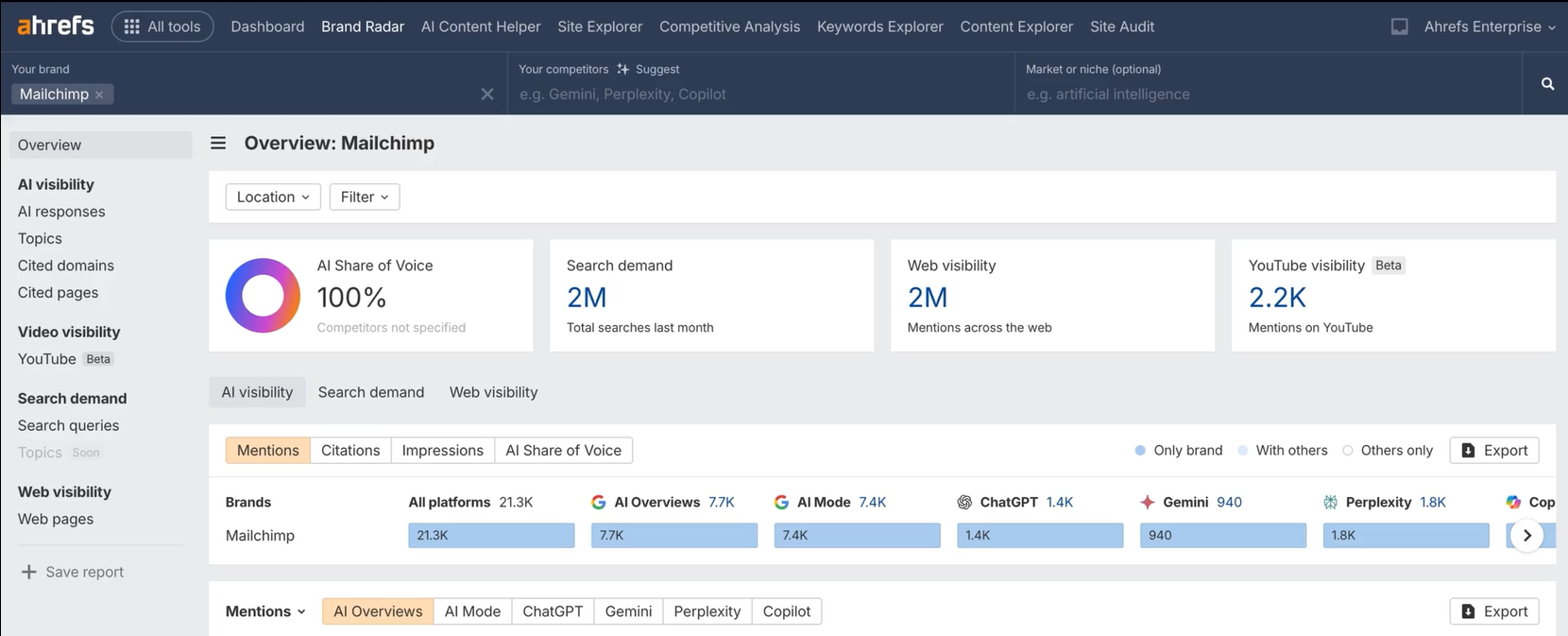
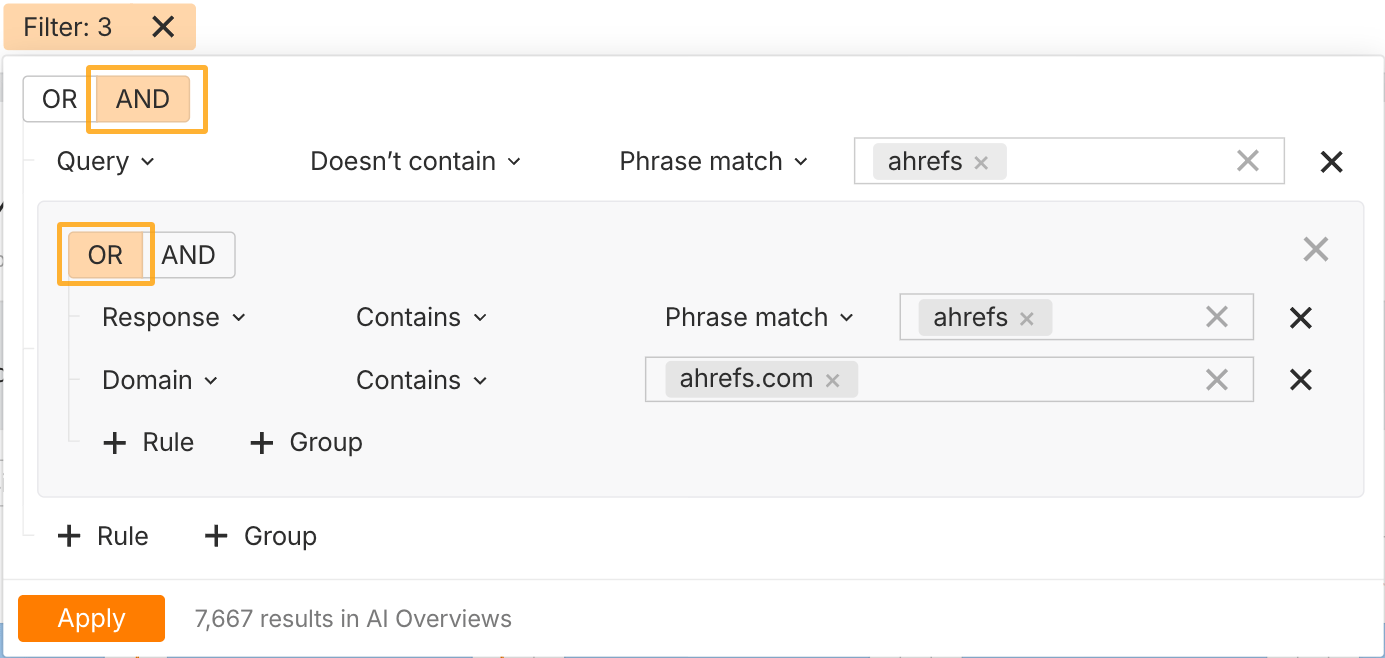
Once inside, you'll see metrics like an overall AI share of voice score, search demand, web visibility, and even YouTube visibility. You can also filter results by brand mentions, citations, domains, pages, or topics. This lets you answer questions like where your brand is mentioned but not cited, where competitors appear instead of you, or which third-party sites are shaping how AI describes your product.
The biggest drawback is that Brand Radar isn’t a standalone product. You need an Ahrefs subscription to begin with, and Brand Radar is sold as a paid add-on on top of that, which quickly drives the price up, even if you’re only tracking a small number of LLMs. For teams already embedded in the Ahrefs ecosystem, that’s a reasonable trade-off. For everyone else, it can feel like a heavy investment.
Pros:
- Large-scale AI visibility data without needing to predefine prompts
- Great filtering options that let you analyze thousands of results quickly
Cons:
- Very steep price point with tracking for additional LLMs at an even steeper price
7. Semrush AI Toolkit
Semrush’s AI Visibility Toolkit approaches AI search from a familiar angle. Setup starts by adding a domain and defining competitors, after which Semrush begins aggregating how those brands appear across AI-generated responses.
The main dashboard centers around an overall visibility score out of 100 that scores your current AI visibility, plus other metrics like total Mentions, Cited Pages, and Monthly Audience. You can drill down by region or AI platform (covers ChatGPT, Google AI overviews, AI mode, and Gemini) to see where your brand is being referenced and which topics and prompts tend to surface your brand's mentions.
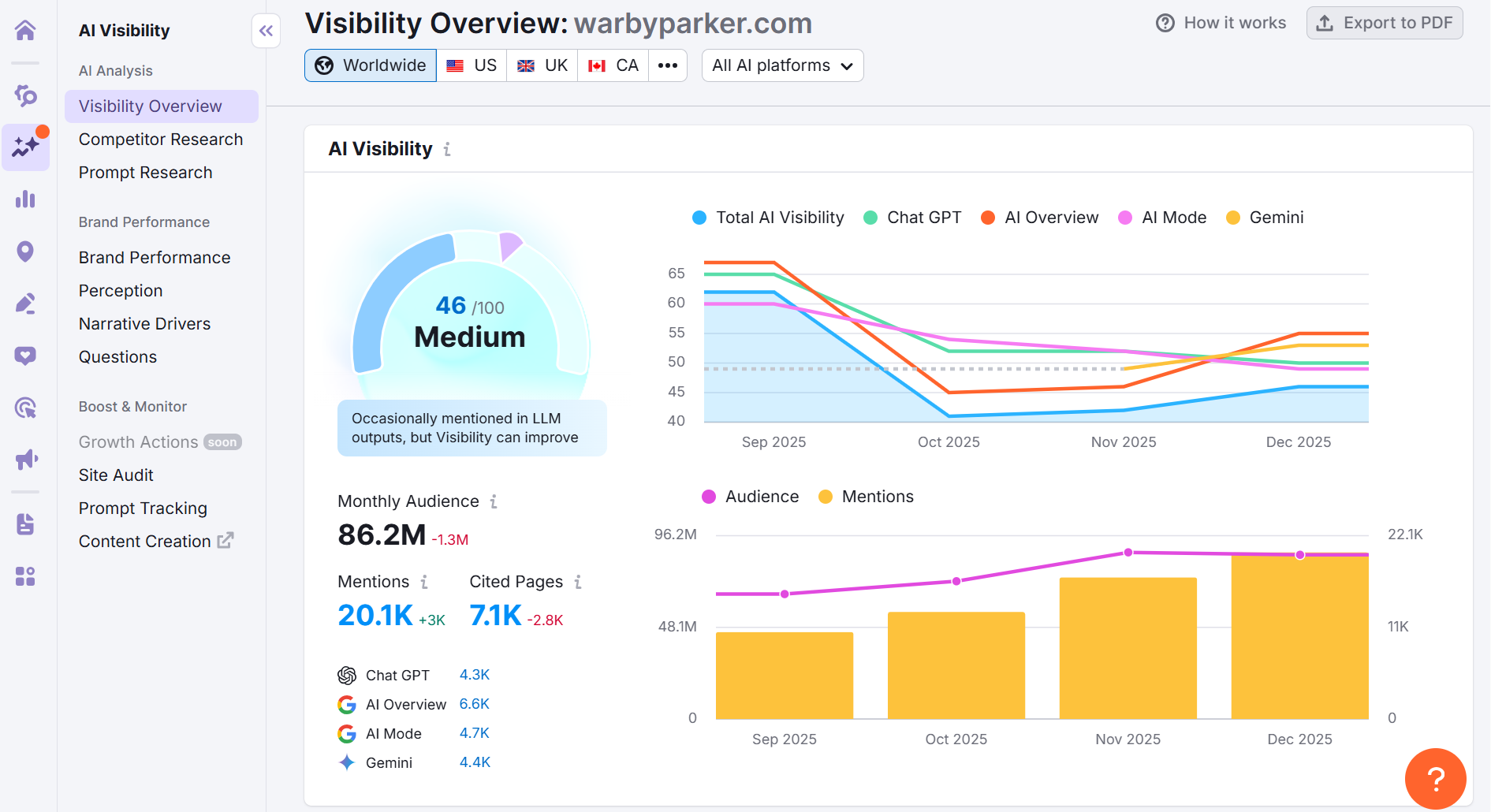
On the left sidebar, you'll notice plenty of other tabs. Under Competitor Research, you can add your domain along with your competitors’ to compare LLM visibility. In Prompt Research, you enter a broad topic and get clusters of AI-related questions, along with relative demand and difficulty signals. That gives you a bit more control in tracking competitors and identifying which prompts you should be targeting than you'd get with most of the other platforms covered, which is nice.
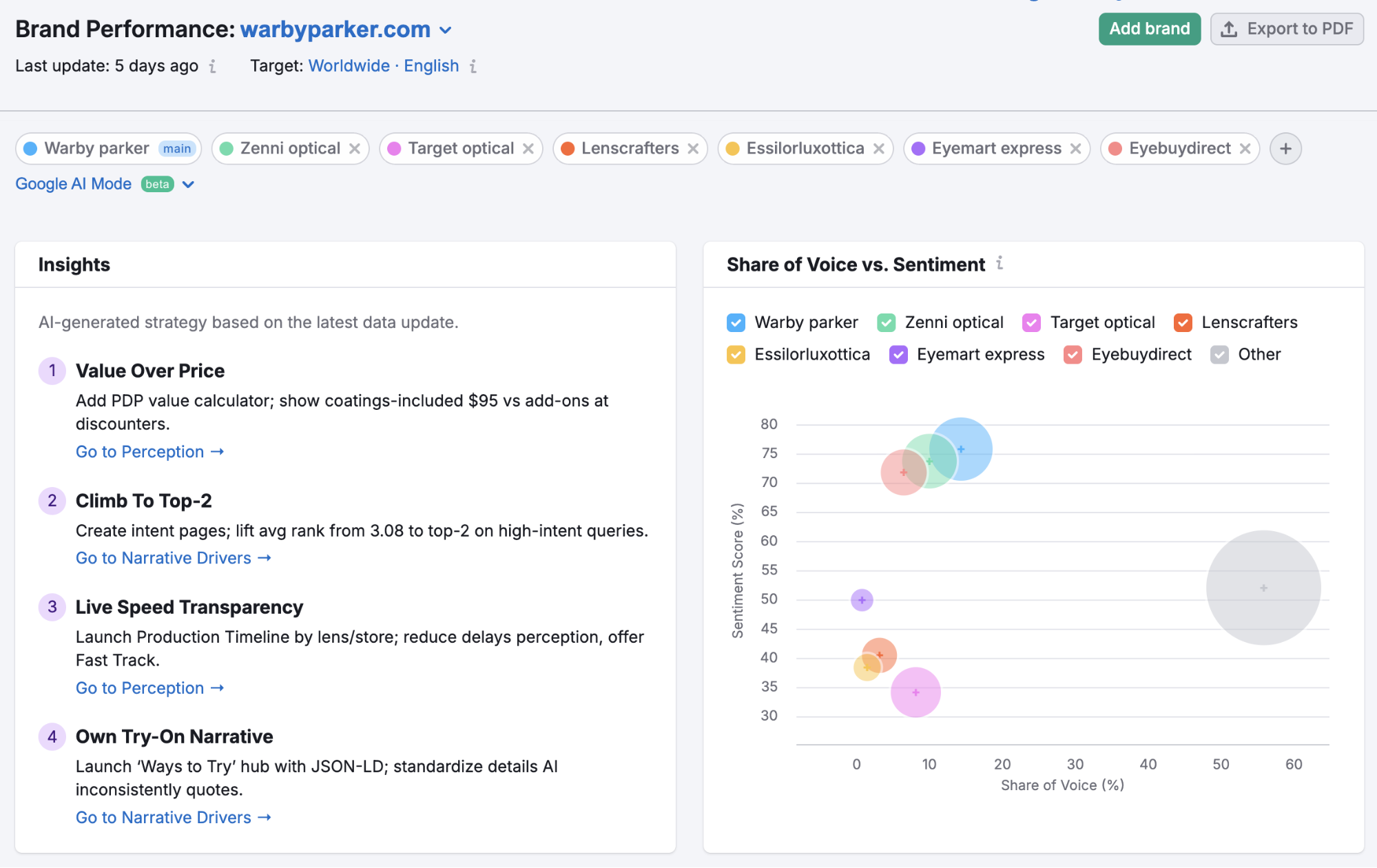
Another unique feature I loved is within the Brand Performance tab, where you get a quick list of insights that guide you through what you’re doing well and what needs improvement regarding your brand’s AI visibility, in plain language.
The other tabs under this subsection cover:
- Share of Voice to compare how often your brand appears relative to competitors,
- Sentiment to track whether those mentions skew positive or negative over time,
- Narrative Drivers to surface the domains and questions shaping how AI describes your brand,
- and Questions to show the specific prompts where your brand and competitors are referenced.
Pros:
- Strong brand and competitor-level visibility analysis
- Useful for identifying topic and question gaps at scale
Cons:
- Limited prompt-level control and transparency
- Focused on analysis, with optimization handled elsewhere
8. Similarweb
Similarweb takes a very different approach to AI visibility than the other tools on this list.
Instead of tracking how often your brand is mentioned in AI-generated responses, it focuses on referral traffic from AI chatbots. The goal is to understand how much traffic tools like ChatGPT and Perplexity actually send to a website, and not to measure visibility inside LLM answers.
To access the feature, you enter a domain and navigate to Website Performance → Referrals, then apply the AI Chatbot Referrals filter. This isolates traffic coming from AI platforms and shows visit volume, engagement metrics, traffic share, and trends over time.
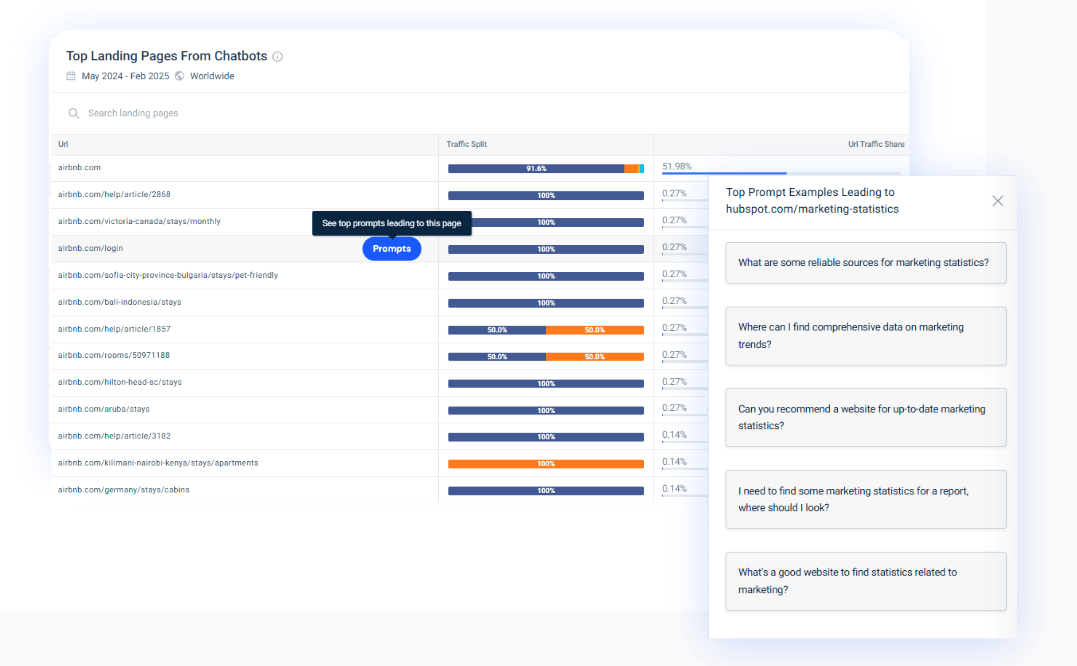
You can also view the Top Landing Pages from Chatbots report. This shows which pages AI tools are directing users to and how those visits perform, and helps in understanding whether AI recommendations are driving any meaningful traffic or just isolated visits.
And as I touched on earlier, where Similarweb falls short is visibility tracking itself.
There is no custom prompt monitoring, no visibility or mention score, and no way to see how often your brand appears in AI answers when no click occurs. You cannot track which questions trigger recommendations, compare prompt coverage against competitors, or identify gaps that would help improve your presence in AI responses.
Pros:
- Tracks real referral traffic from AI chatbots
- Useful for validating AI as a traffic channel
Cons:
- No prompt-level or mention-level AI visibility tracking
- You don't get competitor analysis
9. Gracker AI
Gracker AI helps you improve your online visibility by going a step further than a lot of AI search tracking tools to automate content that gets you cited.
It is built specifically for B2B SaaS & cybersecurity companies to create content at scale, optimize it for AI search engines, and track how often you get mentioned.
When you sign up, Gracker AI extracts required information and suggests a few prompts where your brand should be mentioned in LLM searches. You can also add custom prompts to check your AI visibility across different LLMs like ChatGPT, Perplexity, Claude and Google AI Overview.
GrackerAI also suggests the type of content to publish and can automate content generation.
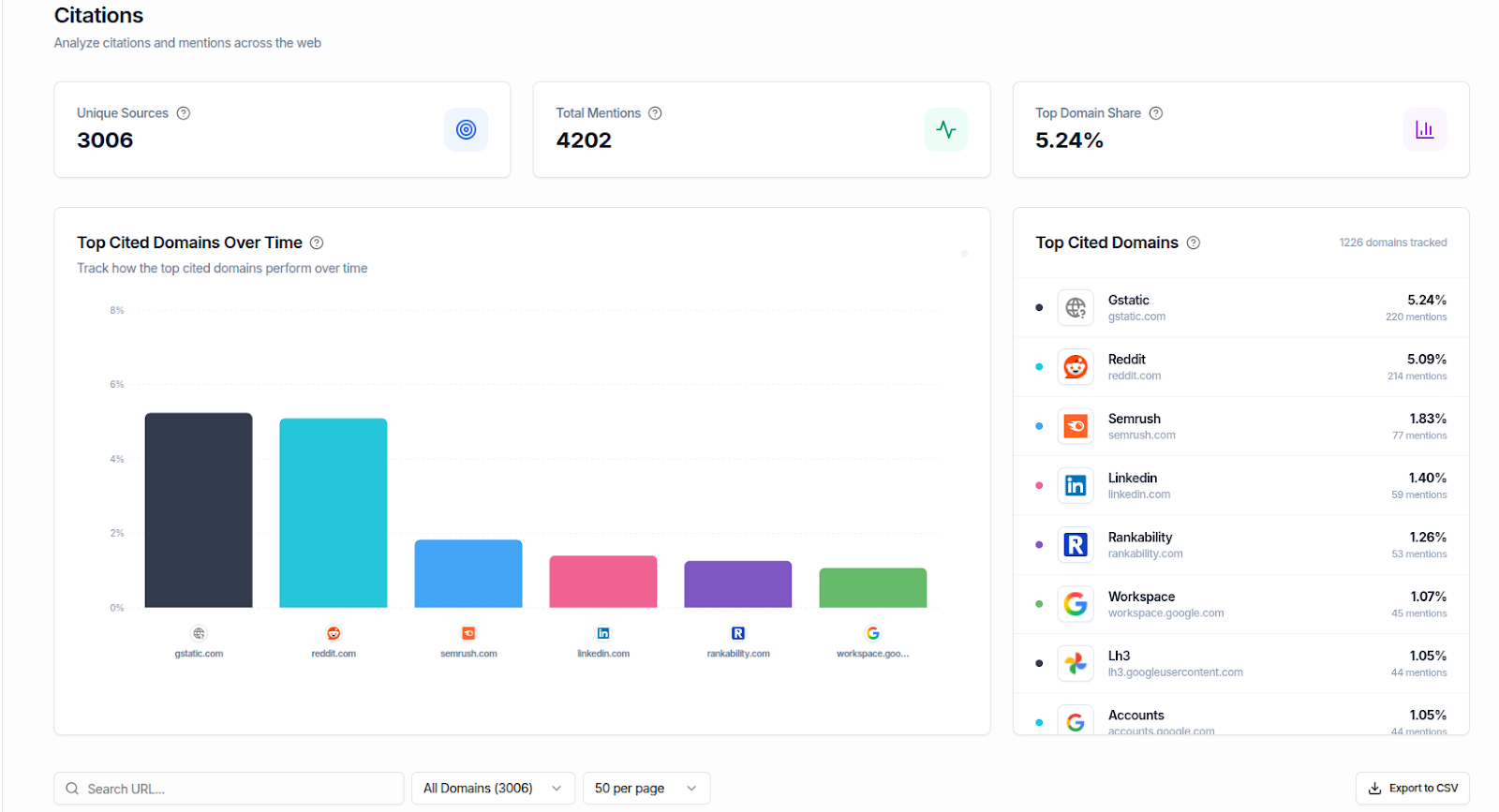
Along with the visibility score, citation tracking, and competitor comparisons, Gracker also displays insights into content driving LLM citations and missing content gaps.
The tool also offers a programmatic SEO feature that can generate content hubs and even specific types of content, like comparison pages, use case libraries and glossaries.
I appreciate how the platform ties traditional SEO and AI visibility together. Content that ranks well on Google is more likely to be cited by AI engines, so Gracker AI optimizes for both.
If you're looking for an AI visibility tracker that includes content generation, Gracker AI can be particularly useful.
Pros:
- Combines content automation with AI visibility tracking in one platform
- Programmatic SEO features help you scale content without sacrificing quality
Cons:
- Suited for B2B SaaS brands, may not fit other verticals as well
Which is the best AI visibility tool?
There isn’t a single “best” AI visibility tool for everyone. The right choice depends on what you’re trying to measure and how much control you want.
My advice is simple. Pick the tool that seems closest to your needs, use the free plans to test it on your own site and competitors, and see whether the data actually changes how you work. If it helps you make better decisions or improve visibility, stick with it. If it just gives you dashboards you never act on, move on.
Here’s how I’d choose based on common scenarios:
- If you want the most complete picture and a clear path to improving AI visibility, start with Surfer AI Tracker.
- If you want to see how you show up in AI search engines without committing to a paid tool, try Amplitude first.
- If you want to understand what’s broken before investing in tracking, Rankscale AI is a good starting point.
What are AI visibility tools?
AI visibility tools help you track how often your brand, website, or product appears in AI-generated answers across platforms like ChatGPT, Perplexity, and Google AI Overviews.
They typically show the prompts that trigger mentions, which pages or sources are being cited, and how often competitors appear instead of you. The goal isn’t just “ranking” — it’s understanding whether AI assistants recommend you, reference you, or use your content as a source.
How are AI visibility tools different from traditional SEO tools?
Traditional SEO tools track rankings and traffic from search engines, while AI visibility tools track mentions and citations inside AI-generated answers.
SEO tools help you measure performance in Google’s blue links (keywords, backlinks, positions, clicks). AI visibility tools focus on how LLMs surface information — which brands they mention, what sources they cite, and what prompts you show up for. In many cases, you can be “visible” in AI answers even when there’s no click to your website.
What metrics should I look for in an AI visibility tool?
Look for prompt-level tracking, mentions, citations, visibility scores, and competitor comparisons. The most useful AI visibility tools go beyond a single dashboard score and show why you’re appearing (or not). Key metrics to prioritize include:
- Visibility score (how often you appear across tracked prompts)
- Mention rate (how frequently your brand is named)
- Citations / cited sources (whether AI links to your site or just mentions you)
- Average position / prominence (how high you show up in the answer)
- Prompt coverage (which questions trigger your visibility)
- Competitor overlap (where others appear instead of you)
If a tool can’t tell you what prompts matter and what sources AI is pulling from, it’s hard to turn insights into action.
Why do some AI visibility tools show different results for the same prompts?
Because tools collect AI answers differently (API vs UI), and AI responses change by model, region, and timing. For example, Surfer AI tracker scrapes actual AI generated responses unlike other AI visibility tools.
AI visibility tools don’t all “observe” the same output. Some rely on API responses, while others track what a real user sees in the interface. On top of that, AI answers vary depending on the model (ChatGPT vs Perplexity), the user’s location, language settings, and even the day/time the prompt is run. This is why two tools can track the “same” prompt and still report different visibility results.
Do AI visibility tools track traffic from ChatGPT and Perplexity too?
Some do, but many AI visibility tools focus on mentions and citations rather than traffic. There are two categories here:
- Visibility tracking tools → measure mentions, citations, and prompt coverage inside AI answers
- AI traffic tracking tools → measure referral visits from AI platforms (ChatGPT, Perplexity, etc.)
Traffic tracking is useful for proving whether AI is sending real visits, but it won’t tell you how often you appear when no click happens. Ideally, you want both: visibility (mentions) + impact (traffic).
How do I improve my AI visibility once I start tracking it?
Use AI visibility insights to create content that matches high-value prompts, expands topical coverage, and becomes easier for LLMs to cite. Tracking is just the starting point.
To improve visibility, focus on:
- Prompt-driven content: write pages that directly answer the prompts your audience is using
- Topical completeness: cover related subtopics so your site becomes a “best source” for the topic
- Strong fundamentals: technical SEO, internal linking, and search performance still matter because AI often pulls from high-ranking sources
- Citable content: include clear definitions, facts, examples, comparisons, and structured sections
The best improvements happen when you treat AI visibility like a content strategy problem — not a reporting problem.
What’s the best AI visibility tool?
The best AI visibility tool depends on whether you care most about tracking, competitor insights, prompt discovery, or AI traffic.
A good rule of thumb:
- If you want a strong mix of tracking + improving AI visibility, start with Surfer AI Tracker
- If you want a free way to check visibility quickly, try Amplitude
- If you want to diagnose readiness before tracking, use Rankscale AI
- If you want to measure AI as a traffic channel, use Similarweb