Around 700 million AI conversations happen every week—and your brand is either in them or it isn't. Unlike with traditional search, it's not a matter of where you'll rank but whether you'll show up at all.
That's because people aren't just searching anymore. They're conversing with AI engines, which completely changes how we think about brand visibility. And while 72% of marketers say AI will change SEO, only 18% feel prepared for generative engine optimization (GEO).
If you're still not among them, prompt selection should be your starting point because it's much different from the keyword research we're used to. As prompts are conversational, variable, and context-dependent, finding those to target takes more than simply firing up a research tool.
Meanwhile, companies are seeing 300%–1,000% increases in traffic coming from AI chatbots. If you're kept outside of their conversations, you might miss out on a large chunk of prospects.
In this guide, I'll help you make sure this doesn't happen by covering everything you should know about prompt selection. By mastering it now, you can squeeze through the window of opportunity and dominate AI citations while competition is still low.
Why is prompt selection important?
Careful prompt selection is important to understand how potential buyers discover your brand. Are you showing up for important queries and if so, are you being represented accurately?
AI-referred traffic is much more focused than SERP traffic, so it converts dramatically better. Our recent analyses showed that Surfer’s ChatGPT-referred visitors contribute to 22% of conversions, which tells us two things:
- ChatGPT is already a major source of acquisition
- Surfer is being mentioned in ChatGPT's responses to the relevant questions/prompts
Surfer is far from the only business noticing this massive shift in lead sources. So let me explain exactly why it's happening.
Let's say someone asks ChatGPT, "What's the best AI SEO tool for analyzing competitor content strategies?"
This prompt tells us the searcher already knows:
- What they need (AI SEO tool)
- Why they needed it (competitor analysis)
- Which features they're looking for (content analysis)
This way, the lead has already pre-qualified themselves, unlike someone who'd Google something like "AI SEO tools." They know what they need, they understand the category, and they're comparing specific capabilities, so all it takes is to give them a few options. The decision process is simplified and sped up, which drastically improves the conversion potential.
Surfer shows up as a recommendation, and its page is also cited as a source(which means the page is well-optimized for this prompt).
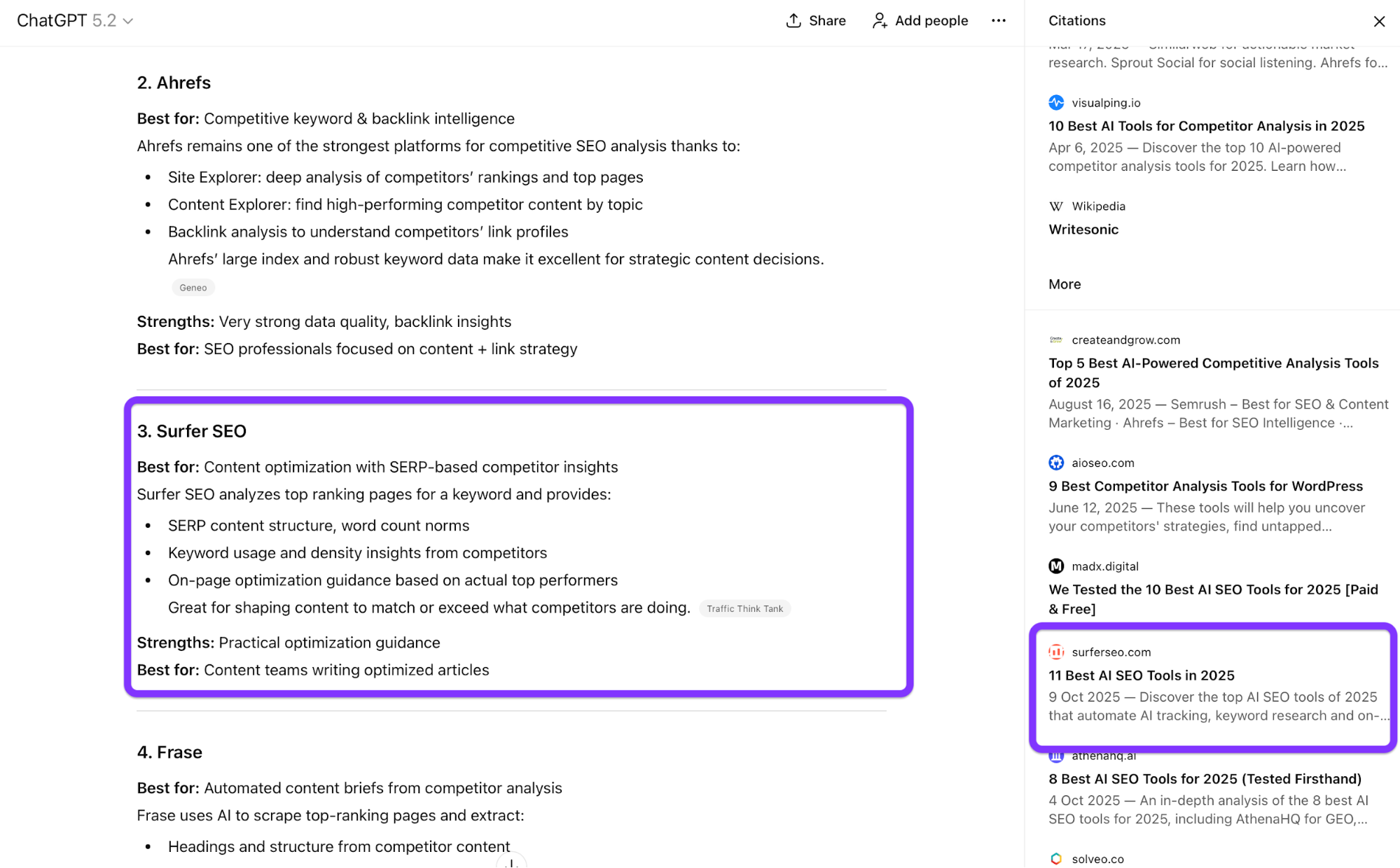
This is what prompt selection is all about. You have limited time and resources, so tracking 200 random prompts means you're optimizing for noise. But tracking 30 strategically selected prompts that map to your buyer journey... now that's what drives ROI with every hour you spend on optimization.
More importantly, there's no "page 2 of ChatGPT results" where you can lurk. AI engines typically cite a handful of resources (3–5 in most cases), so your brand is invisible if it's not among them.
So to sum up, choosing the right prompts is important to track how users find you in LLM-generated answers and what leads them to become a customer.
How to choose prompts?
When choosing prompts to optimize for, you should prioritize three categories:
1. Business-relevant prompts
Your most impactful prompts will be those with a direct impact on revenue or conversions. Specifically, focus on prompts that users are most likely to use when evaluating, comparing, or deciding between options.
You'll recognize such prompts by high-intent, bottom-of-the-funnel phrasing like:
- "What's the best tool for [use case]?"
- "content audit software comparison for agencies"
- "content audit software for ecommerce sites with large catalogs?"
These are often unbranded prompt queries that users type in during the consideration/evaluation stage. They have high intent but are still early on in the discovery path, so it's important for your brand to be mentioned here.
For example, here are some prompts we're tracking for our Content Audit tool.

Optimizing for these prompts helps AI systems surface accurate, compelling answers that support specific goals (sign-up, trials, etc.).
It also helps us allocate resources efficiently because optimizing for high-intent prompts delivers faster, more measurable returns than spreading effort across low-value informational queries.
2. Branded prompts
Much like branded keywords, branded prompts (e.g., "Which Nike shoes are best for running?") are essential to effective positioning, visibility, and online reputation management. AI-generated responses to these prompts often shape first impressions, especially for users who still don't know anything about your brand.
Choose prompts that directly address key questions about your business, and be specific.
Tracking a prompt that summarizes reviews of our AI detection tool helps us ensure that we're being spoken about in positive sentiment.
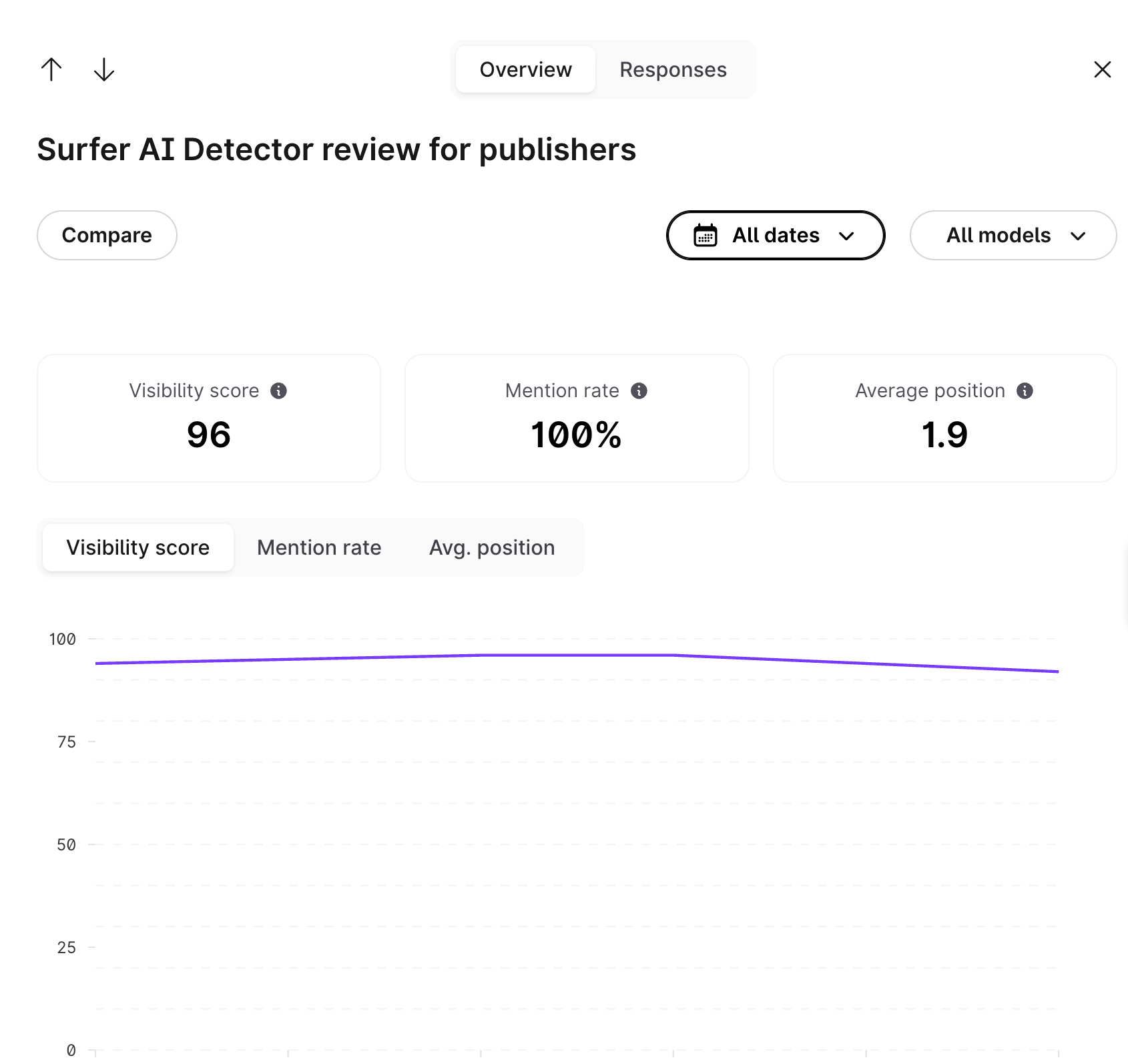
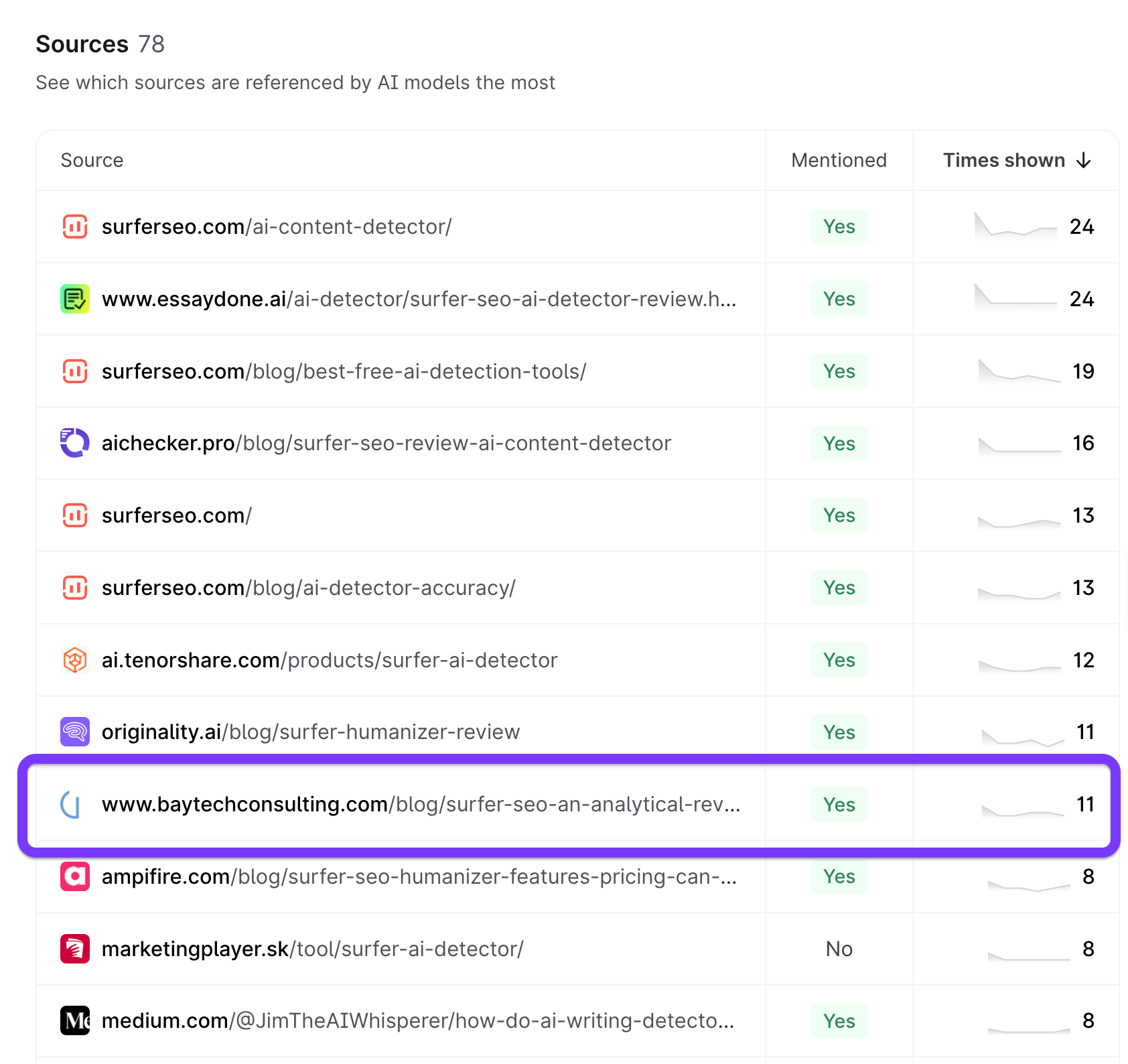
You can find which pages show up for your prompts in Surfer AI Tracker's Sources tab.
From here, we noticed that although the page from baytechconsulting shows up prominently as a cited source, the page is outdated and could use a revision.
Appearing in such prompts lets you build a compelling and consistent narrative that makes it easier for AI engines to cite you.
Clear messaging around expertise, credibility, and differentiation helps AI systems showcase your brand confidently without outdated or misleading information.
3. Product-related questions
Product-related queries might be used by both new leads and existing customers who want to stay in touch with updates or solve specific problems. Examples of those queries include:
- "Does [Asana] offer [offline updates]?"
- "How to do [action] with [product]?"
- "Does [product] integrate with [software]?"
If you aren't on top of your content, AI will represent you inaccurately or leave you out altogether.
To prevent this, you should create comprehensive resources covering product-related questions and encourage third-party websites to update the relevant information if needed.
This way, you can reduce friction in the evaluation process and prevent misunderstandings that can lead to poor-fit leads or churn. With the right information, AI systems can basically act as your pre-sale assistants and troubleshooting resources.
Where to source your prompts
There are plenty of places where you can see exactly what your audience wants to know and which problems they need solved. The point isn't to invent or guess prompts but to discover what people are actually asking different AI platforms.
And because we don’t have any first-party data that would give us visibility of the exact prompts users type into different LLMs, you need to source them from credible places.
Specifically, you can explore seven main sources:
1. Customer support tickets
Support tickets are a goldmine of prompts, so they'll most likely be the single best source of actionable insights. They offer real questions from real users, phrased exactly how they think about problems.
Every support ticket has implicit (and often explicit) prompts:
- "How do I [task]?"
- "Why isn't [feature] working?"
- "Can I [use case]?"
If customers are asking you these questions, you can be sure there are others who use AI tools to answer them. That's why you must extract all the prompts/questions customers use and organize them into prompt categories you can build content around.
This job is much easier if you use AI chatbots for customer support. In this case, the questions you see are basically your users practicing how they use AI to solve problems.
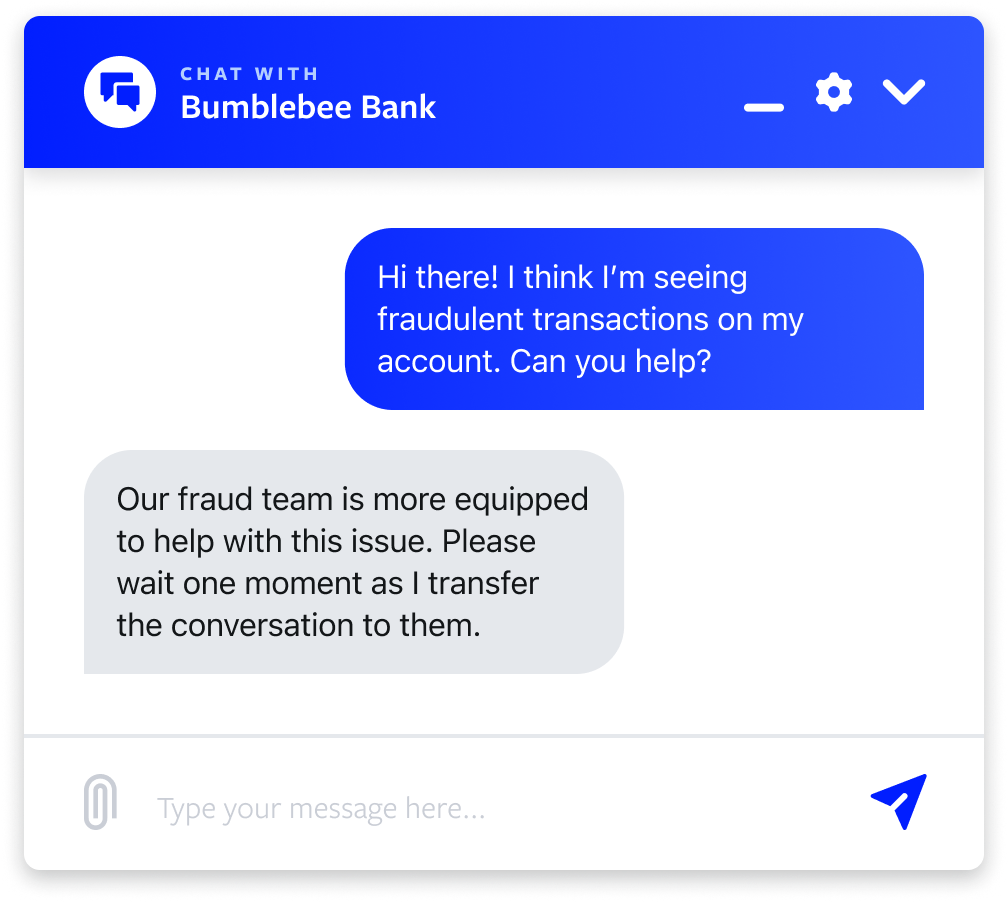
All you have to do is export the chatbot logs and organize them into clusters, for example:
- Interface issues
- Process bottlenecks
- Feature availability/visibility issues
When organizing prompts, prioritize those that show up frequently across tickets. These are your users' most common pain points, so you should focus on them when tracking prompts and optimizing content.
Maybe even more importantly, be open to surprises. Support teams often discover that the most frequent questions aren't what marketing assumed, which means there's a notable gap you need to bridge. This gives you a massive opportunity to correct false assumptions and address the actual questions and concerns of your users.
2. Sales call recordings
During a sales call, a prospect won't just ask questions but also make objections, reveal their product comparison criteria, and show you their decision-making framework. This information can translate into prompts that leads use before even jumping on the call.
For example, the call might surface questions like:
- "Can your tool do [X]?"
- "How does this compare to [Y]?"
- "What about [competitor feature]?"
Similar questions are routinely handled by AI platforms, so they can become the queries you will optimize for.
If you're not using call recording and/or transcription software, you can find tools that automatically extract recurring questions from call transcripts, such as:
No matter the platform you use, pay attention to the vocabulary used in sales meetings. Prospects often use industry jargon and specific terminology, which you should mirror in your content to align it with potential prompts and make the content more extractable by AI search platforms.
3. Google Search Console long-tail queries
AI tools like ChatGPT and Perplexity don't reveal the actual prompts being entered, so they don't give you a direct keyword/prompt research tool like those Google offers for traditional search. The good news is that you can still use Google Search Console as a workaround.
Specifically, you'll want to extract long-tail queries that act as a proxy for the prompts you should target. To do this, you need to set up a custom filter with the right regex expression—here's how:
- Go to the Performance report.
- Click the + New filter button above the graph.
- Select Query from the dropdown menu.
- Change the filter type from the default to Custom (regex).
- Enter the appropriate regular expression (regex) pattern to match your target word count. For example, you should use ([^ ]+\s){4,} for queries with five or more words (change the number to the one before your target word count for different lengths).
- Click Apply.
Here's an example from our blog that shows what the results should look like:
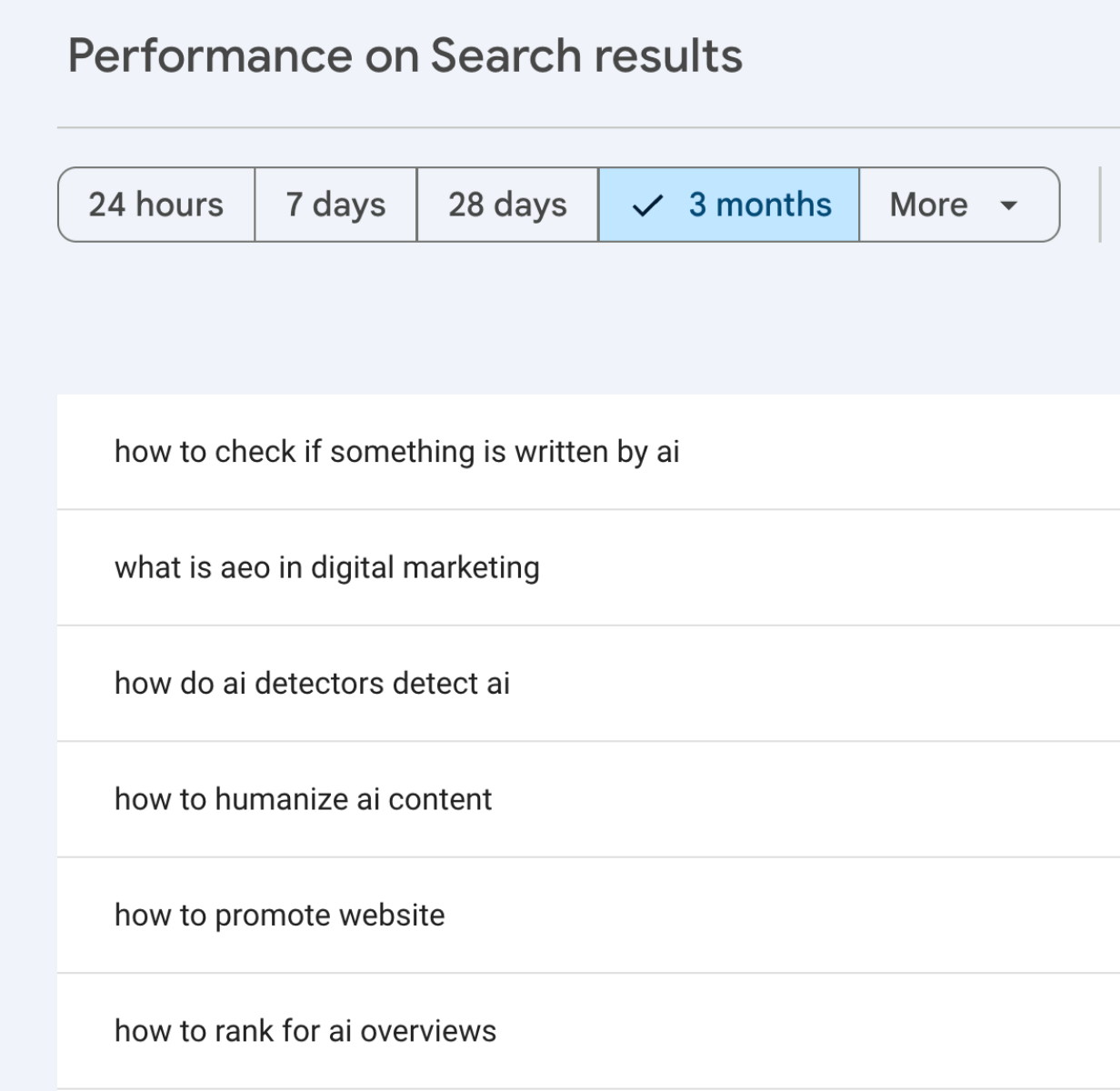
GSC will reveal all long-tail queries matching the regex, which mirror conversational AI prompts. Think of them as the actual prompts that happened to be typed into Google instead of ChatGPT.
Given the astronomical rise in specific, context-rich queries, you may uncover hundreds or even thousands of questions users ask and their variations. When you do, cluster the queries by themes the same way you would those from support tickets or sales calls. Then, look for patterns and common questions you should address.
4. Community platforms
Social media communities and forums are your natural language lab. They show exactly how real people phrase questions in conversational contexts, unveiling countless prompt opportunities.
According to Surfer's AI Citations Report, the top 10 sources of AI responses include social media platforms like Facebook and Instagram, as well as communities like Reddit and Quora. You can develop a strategy to extract potential prompts from each platform.
For example, you can mine Reddit in three steps:
- Identify 3-5 relevant subreddits
- Sort by "top posts" in the past year
- Extract recurring question patterns
Community platforms are particularly important for technical products, especially B2B ones. That's because users often ask highly detailed questions filled with industry terminology, which you should account for when tracking and optimizing for the related prompts.
Take this question on StackOverflow as an example:
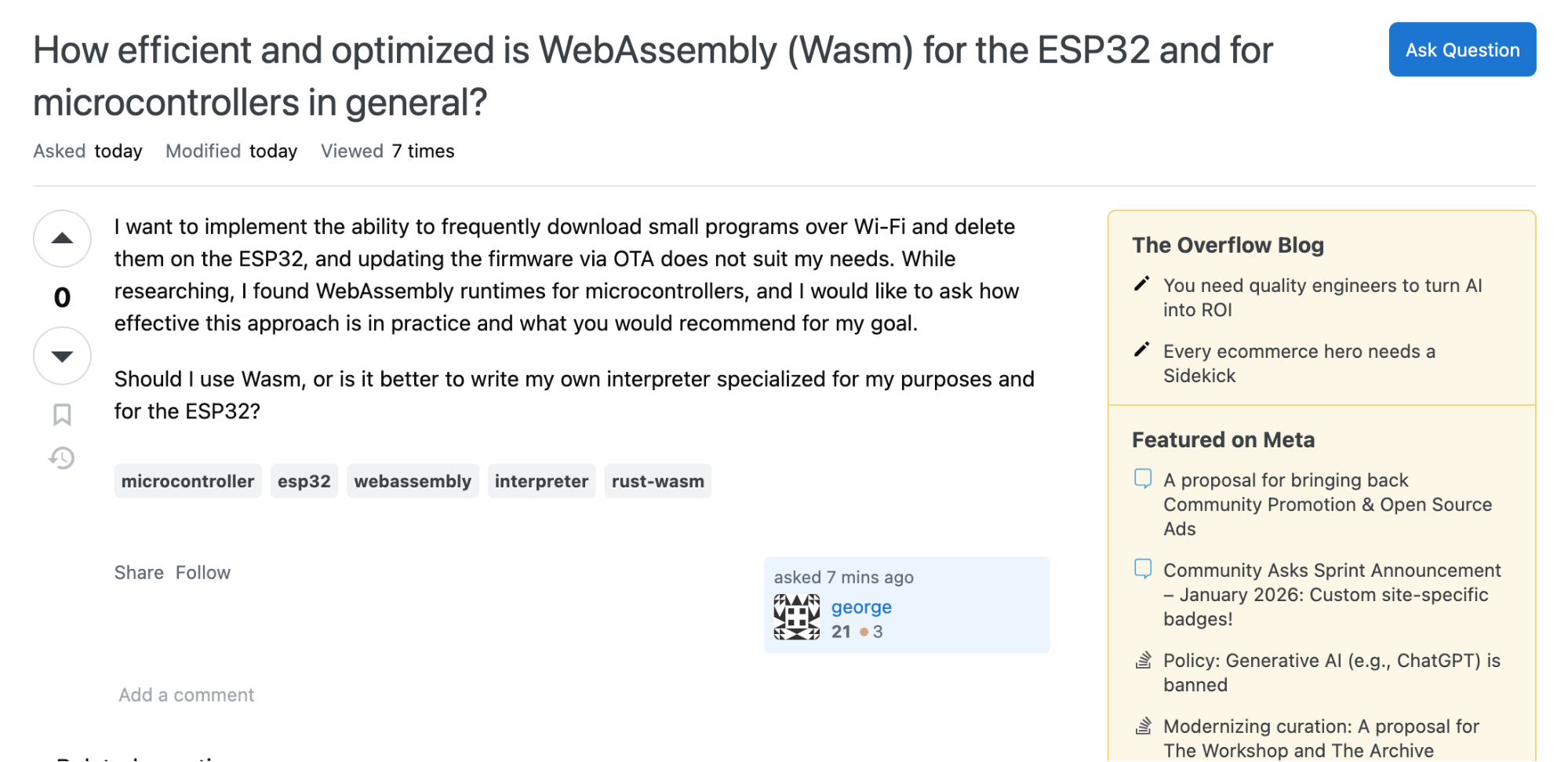
While I have no idea what it means, I can still see that it has all the elements of a solid prompt:
- High intent
- Clear purpose and use case
- Plenty of context cues
So if you were in the embedded systems industry, this would be a prime example of a prompt you could focus on and answer through your content to boost your AI visibility. While doing so, you'd want to pay special attention to the phrasing and mirror it as much as possible in your content to ensure alignment.
5. Competitor analysis
If your competitors consistently appear in AI citations, it means their content is already optimized for AI search engines—and you can use this to infer the prompts they're targeting.
For example, if you see that an AI model used a competitor's page titled "Best Customer Support Software for Small Teams" as a source, you can assume they're winning prompts and queries like:
- "Best support software for small teams"
- "Which customer support tools do small teams use?"
- "Top help desk for startups"
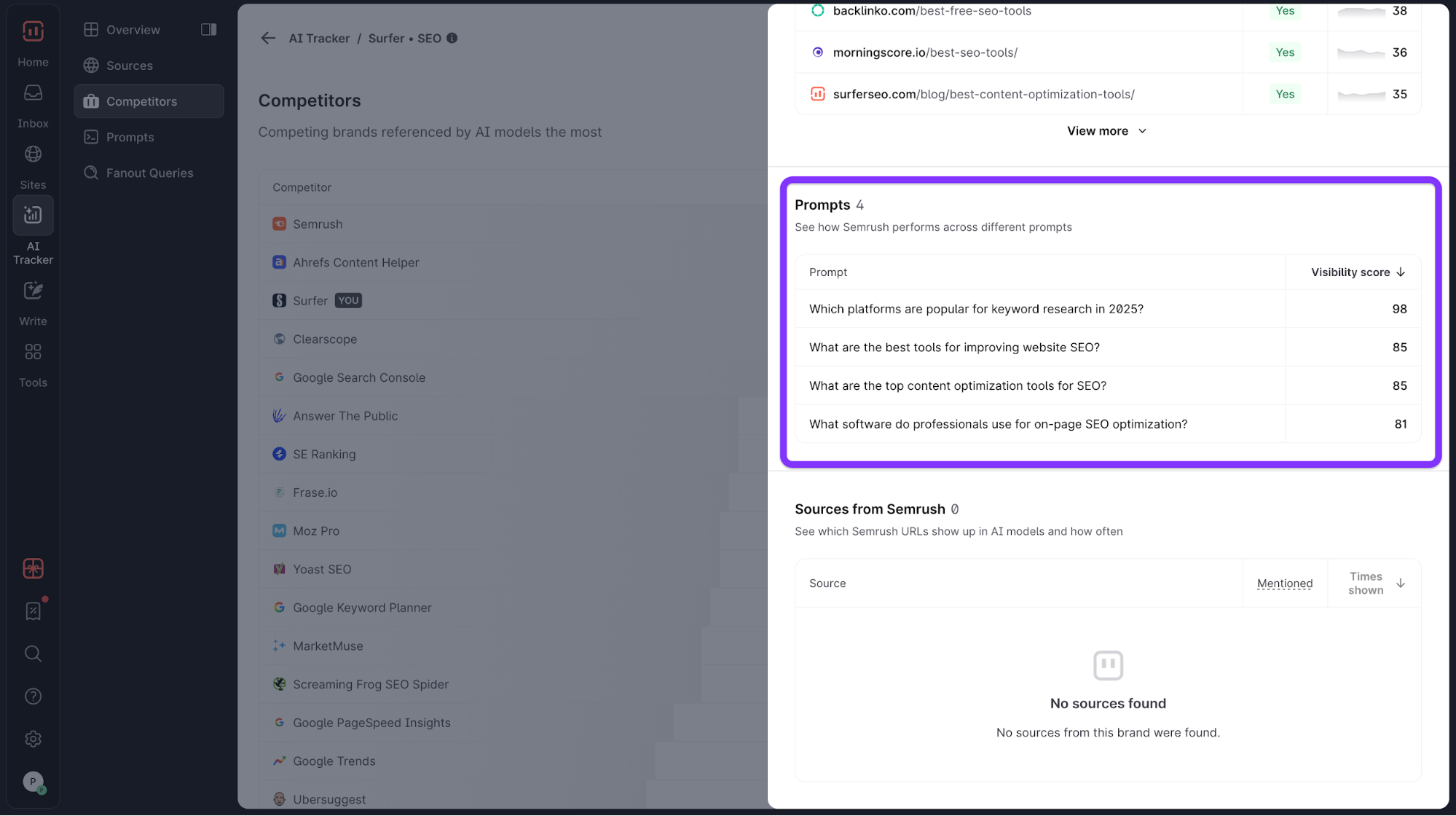
I get how this may seem like a lot of guesswork, but it doesn't have to be if you use the right tools. For instance, Surfer's AI Tracker clearly shows your competitors that are dominating AI search platforms for the relevant prompts while highlighting the exact prompts they're winning.
In this image, you can see some of the prompts for which Semrush tends to show up regularly:
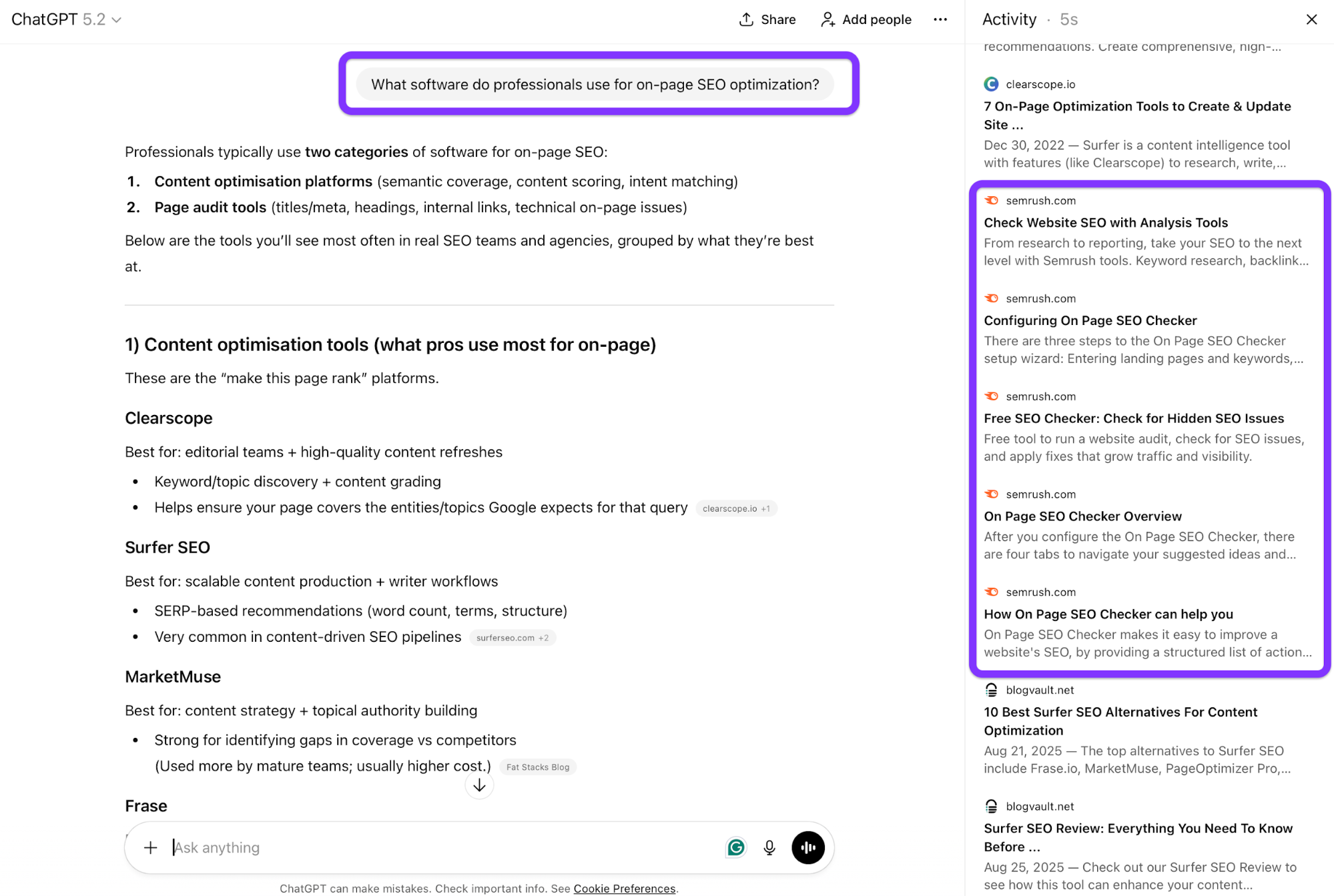
If I now go to ChatGPT and use one of those prompts, you'll see Semrush cited a bunch of times:
AI Tracker also shows you the Mention Gap report, highlighting sources that mention your competitors but not you. This clearly maps your key areas of opportunity to make sure you focus on the most impactful sources and prompts.
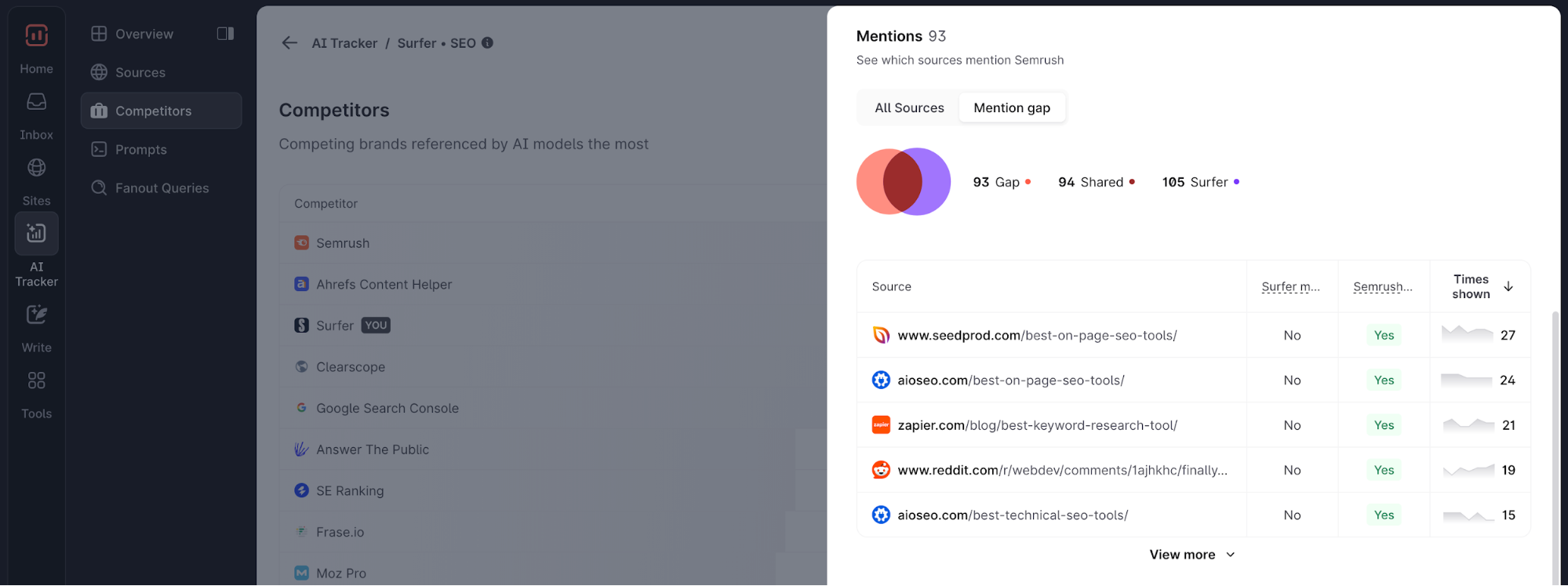
Tracking competitor citations gets you into the habit of moving beyond traditional search when figuring out what you're up against. Many brands overlook competitive blind spots where rivals dominate AI citations despite weaker traditional SEO positions, so you need dedicated research that addresses AI search.
6. Google's People Also Ask and Related searches
Google's PAA is the predecessor of today's conversational search. It shows how Google summarizes naturally phrased user questions, so you can use it as a structured question source.
You can do this in three easy steps:
- Google your target query.
- Expand each PAA question.
- Document the tree of related questions that show up as you expand a question.
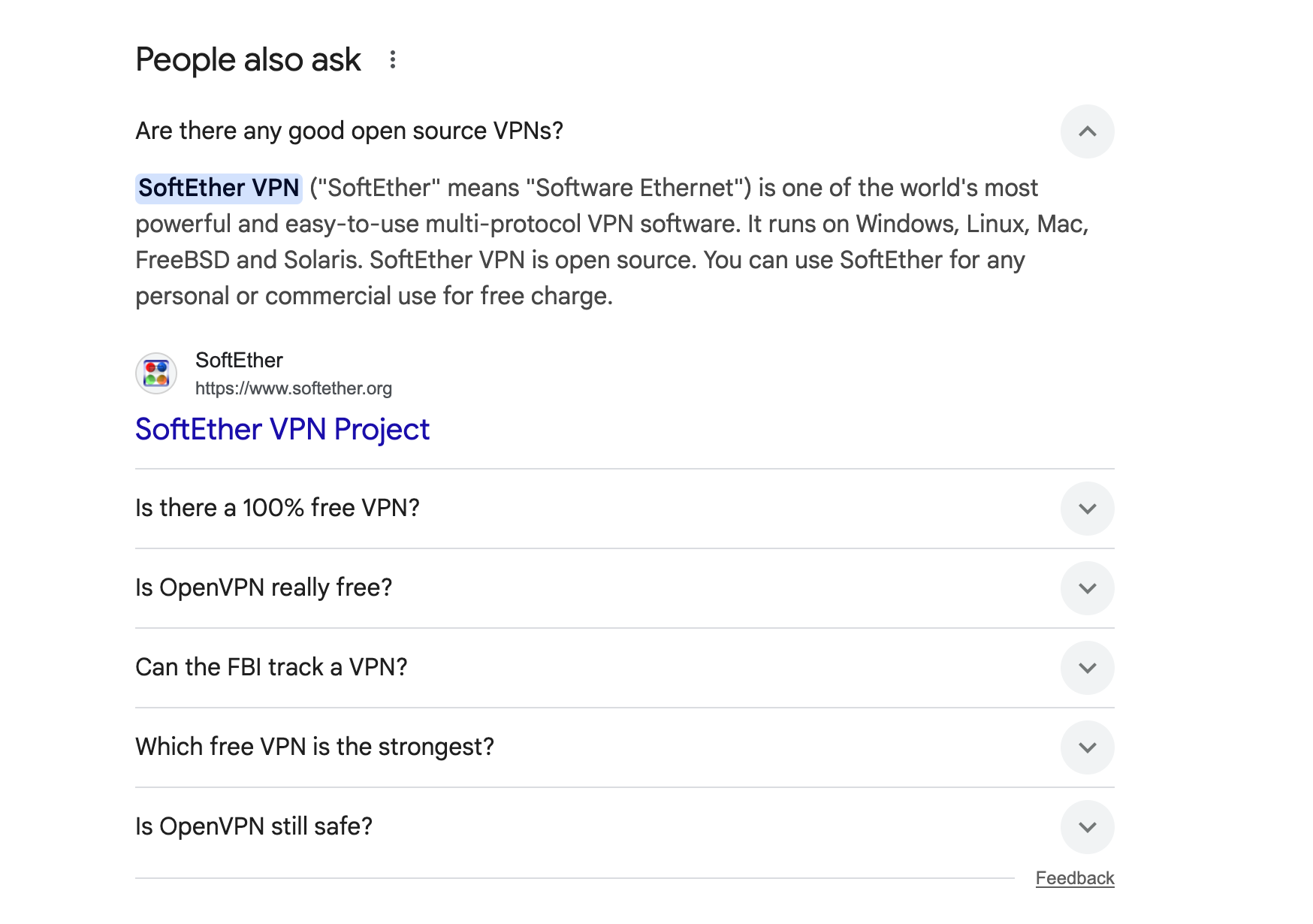
If this sounds a bit tedious (which it can be), you can use a tool like ChatGPT to automate the process. Just add your main query, and prompt it to further expand for more thorough research.
While PAA results may not serve as the actual prompts to target, they're strong candidates for prompts because they represent common questions and information needs. By following a PAA chain with 3–4 levels of questions, you may discover related prompts you haven't considered.
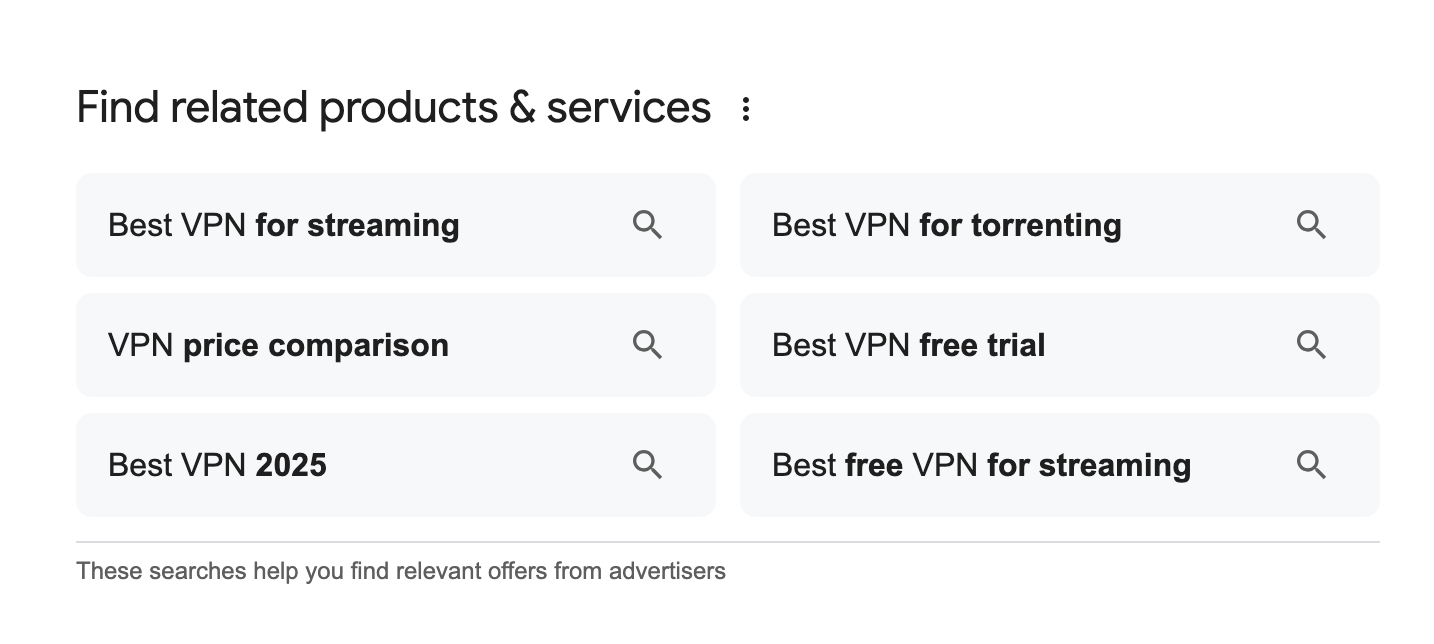
Related searches can also be a source of prompts, albeit a more indirect one because they're not actual questions with enough context and intent. Still, you can use them to gauge the general information your users need, which you can turn into prompts.
In the open-source VPN example, you can see that the related searches elaborate on different use cases (streaming, torrenting, etc.), which can help enrich the prompts you'll target with more intent signals.
7. AI platforms themselves
AI platforms often fan out queries into more granular sub-queries to deliver better answers. You can use this to understand users' AI search behaviors more deeply and fine-tune the prompts you should focus on.
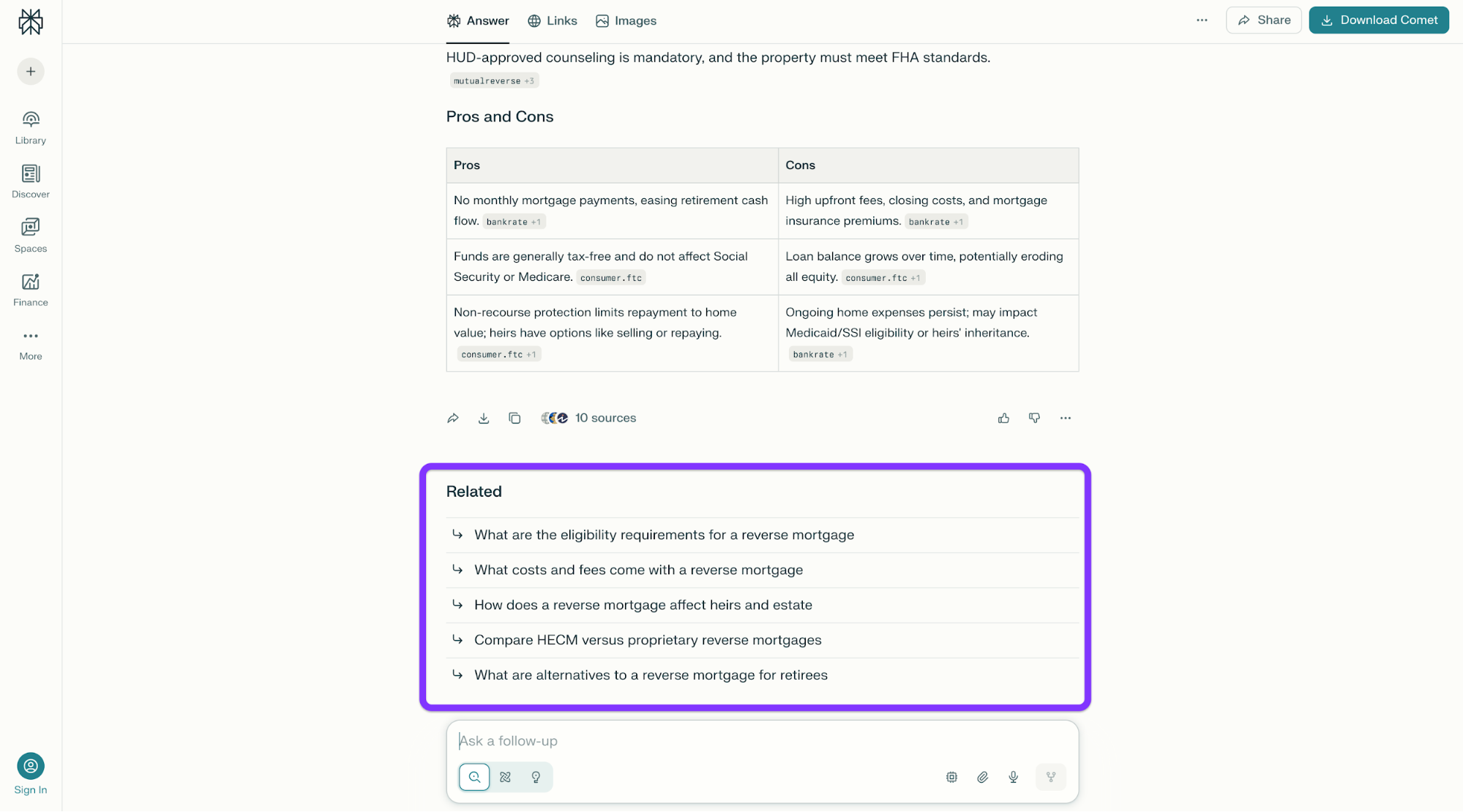
For example, whenever you ask Perplexity a question, it gives you a set of recommended questions similarly to how Google's Related Searches section does does. These are related searches and can uncover plenty of prompts you may not find at first glance.
The Keyword Surfer Chrome extension does the same for ChatGPT. Whenever you start a conversation, you’ll see related queries you can use as inspiration.
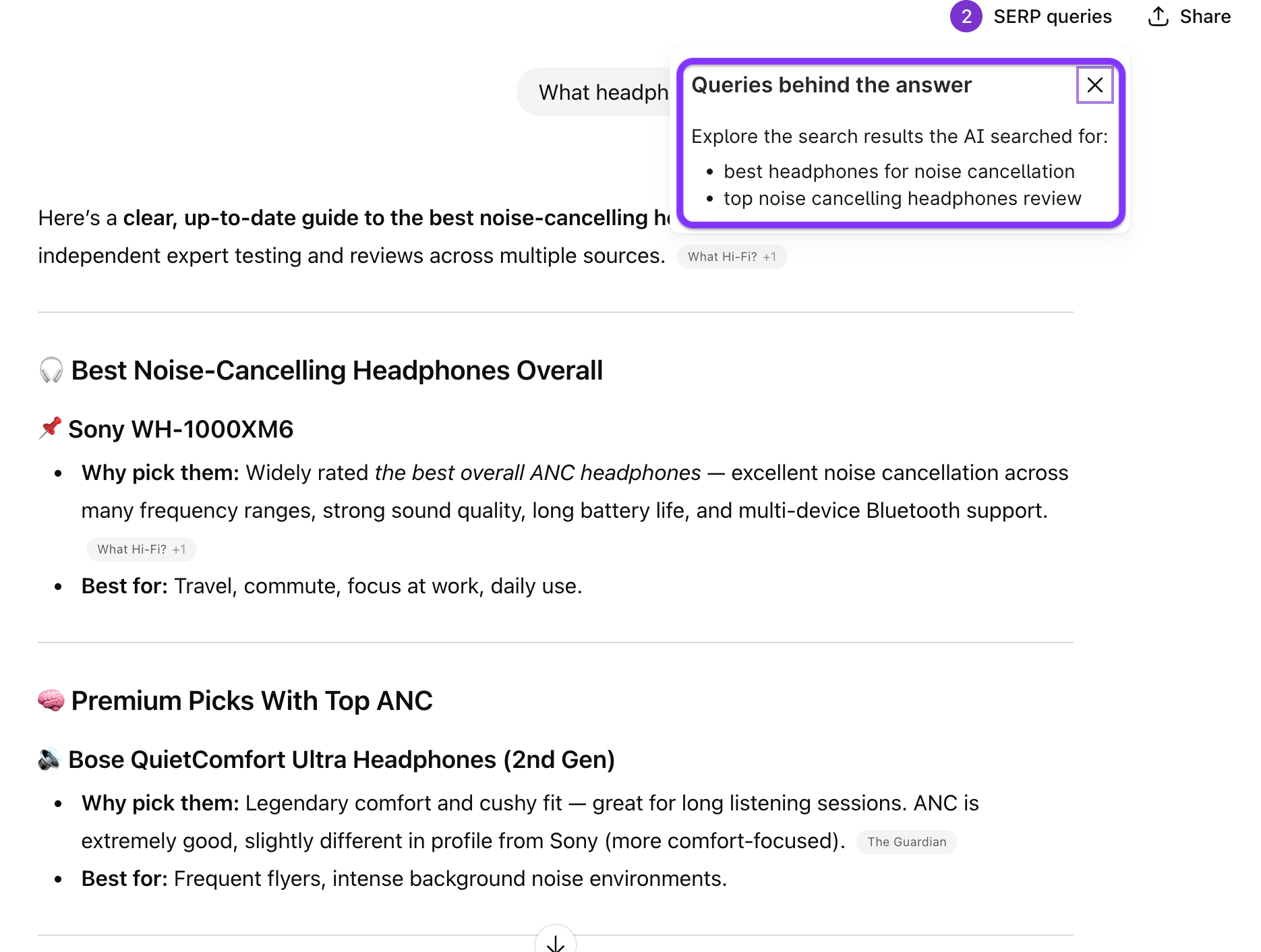
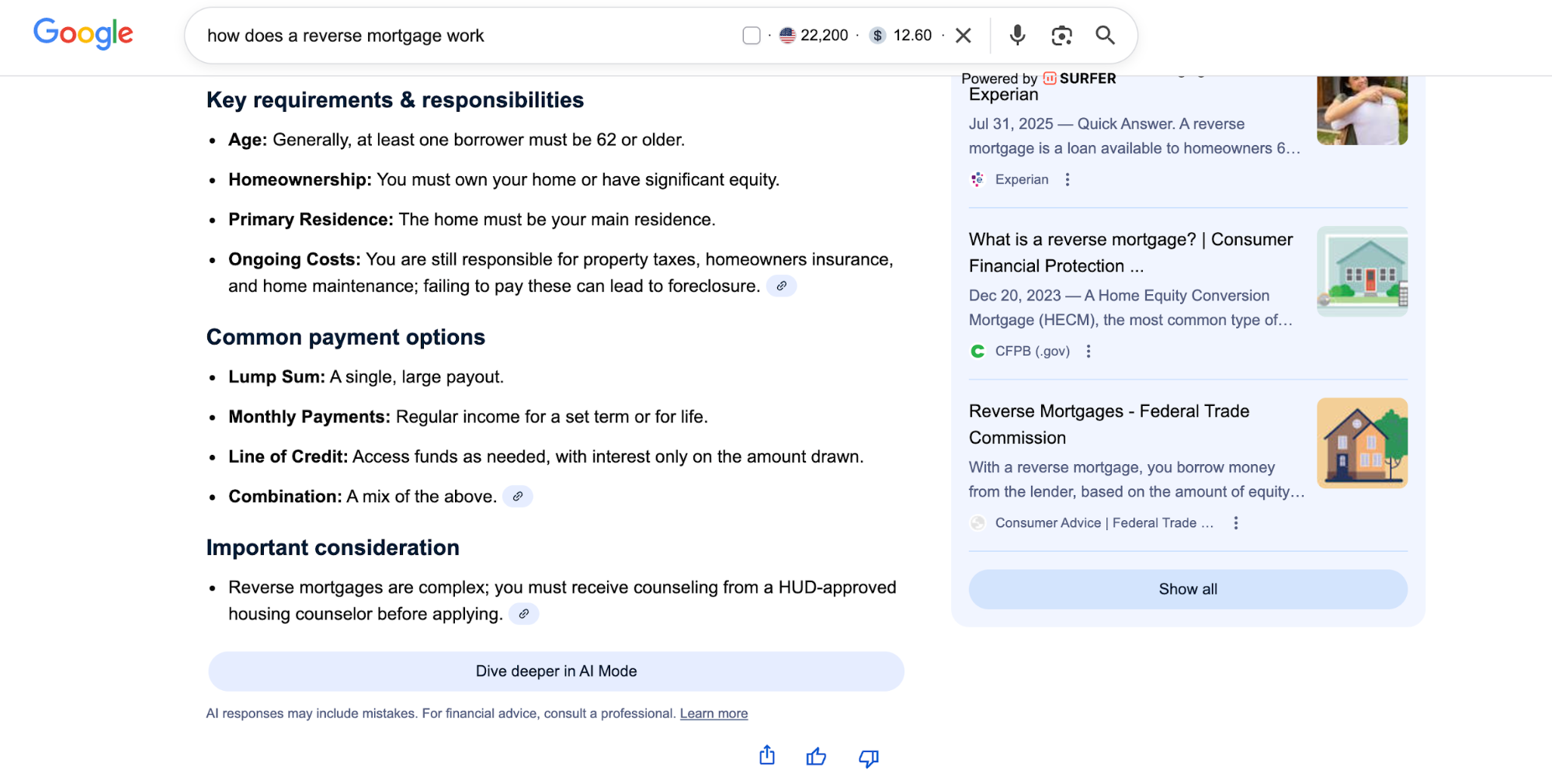
While you're on the SERPs, you can also check out Google AI Overviews (AIOs) for further fan-outs. Even though I only asked how a reverse mortgage works, the AIO also highlighted key requirements and considerations, which tells me these are also things that users want to know.
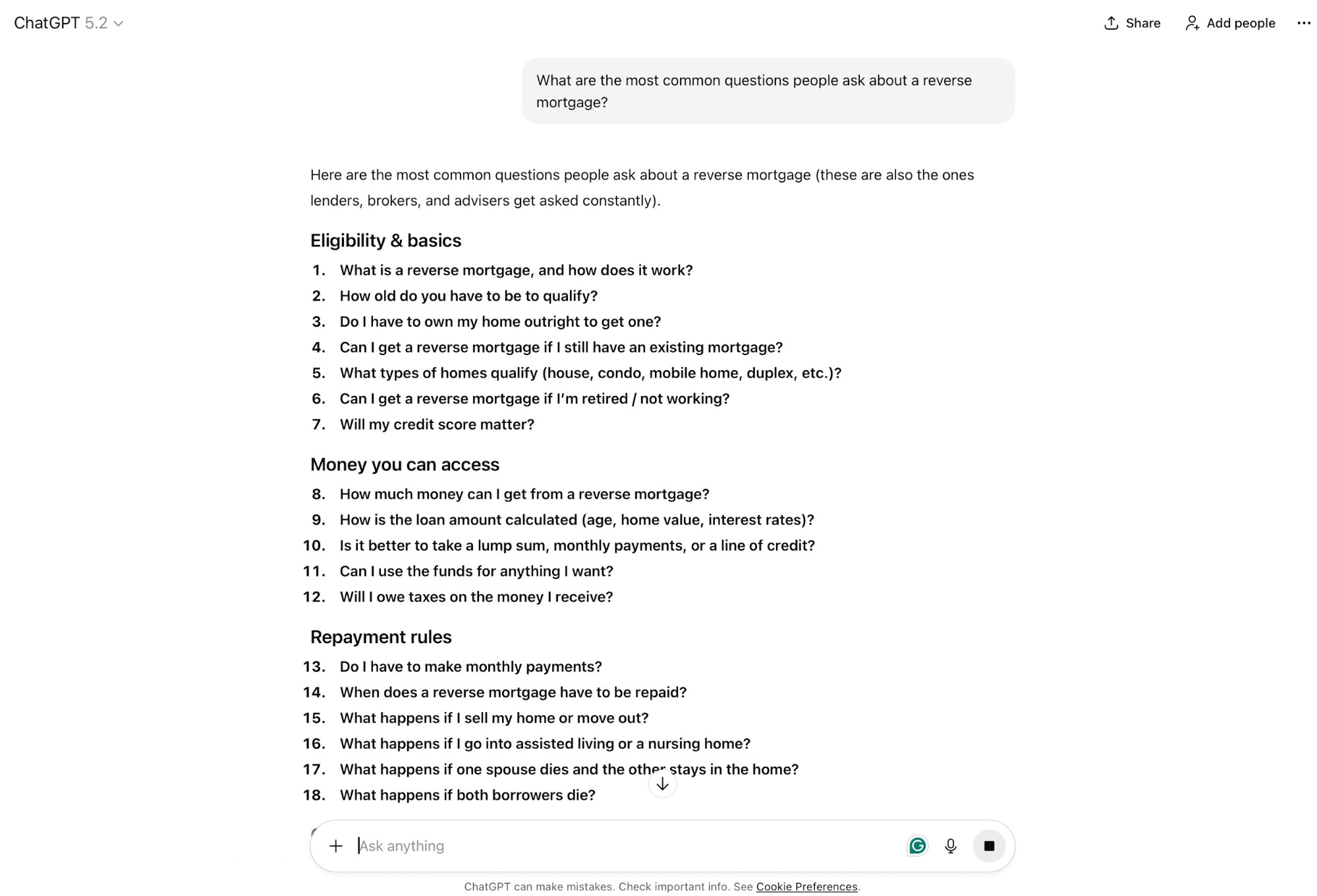
Whenever you're not sure what users ask an AI tool, you can also do the simplest and most obvious thing—ask it. You don't even need to be too strategic about it, but directly ask something like "What are the most common questions people ask about [your category]?"
In most cases, you'll get a bunch of questions that reflect real search patterns, like so:
When using AI tools directly, iteration is key. Use the AI-suggested prompts you get as seeds, and then ask follow-up questions to expand into related areas and get more granular with the potential prompts you can track.
Also, you might've noticed from my examples that each LLM surfaces different follow-up patterns. For best results, test query fan-out across ChatGPT, Claude, and Perplexity to cover as much ground as possible.
How many prompts should you track?
You should track 20–30 prompts per core topic. Anything less than this may not be comprehensive enough, and anything more can create noise that waters down your monitoring efforts and makes them too inefficient.
This is just a reference point, and your total number of prompts will depend on their availability and the number of categories. For example:
You probably won't find all the prompts you need in one go, so you'll need a strategic approach. My suggestion is to work from the inside out instead of going down the funnel by starting with educational topics because the point is to focus on prompts with the highest business value.
Specifically, you can use the crawl-walk-run approach:
- Start: Identify 5–10 high-priority brand prompts, based on which you'll focus on comparison prompts by adding the key competitors to the mix. For example, if a brand prompt is "Is Booking useful for flights," a comparison prompt can be derived from it (e.g., "Is Booking better than Skyscanner for flights?")
- Expand: Add 10–20 capability and transactional prompts. For example, a capability prompt like "Does [Product] have a [feature]," can turn into a high-intent transactional one like "Is [Product's feature] worth it if you're on a budget?"
- Mature: Add 10–15 educational ToFu prompts based on capability or transactional prompts. For example, an educational prompt can address an issue that a specific capability can solve (e.g., "Does Salesforce offer pipeline building?" can inspire a ToFu prompt like "How to set up enterprise-level pipeline management."
By choosing prompts strategically and ensuring their alignment, you can build a firm foundation for your monitoring strategy. As a general rule, 30 well-chosen, strategically important prompts tracked daily will always outperform 200 random prompts tracked weekly.
Your 30-day prompt selection roadmap
Now that you've seen how to find and select AI prompts, let me show you what the process looks like in practice. Here's a week-by-week plan you should follow:
Week 1: Source and collect (50–100 raw prompts)
- Day 1–2: Export your support tickets and analyze them for recurring questions, repeated phrasing patterns, and common customer pain points.
- Day 3–4: Review sales call transcripts and extract the most common "Can you…," "How does…," and similar questions that reflect real purchase objections and needs.
- Day 5: Pull long-tail queries from Google Search Console (especially queries with five or more words) and cluster them into themes based on user intent and topic similarity.
- Day 6: Mine Reddit, Quora, and Google’s People Also Ask (PAA) boxes for your core topics to capture authentic phrasing and community-driven language.
- Day 7: Manually query ChatGPT and Perplexity to generate suggested questions in your category and add the strongest variations to your prompt pool.
Week 2: Classify and score (narrow to 30 priority prompts)
- Day 8–9: Classify each prompt into one of five categories (brand, feature, category, comparison, or high-intent) so your tracking coverage stays structured across multiple prompts.
- Day 10–11: Score each prompt for business impact (e.g., on a scale of 1–3) and competitive difficulty (1–3), ensuring that the scores reflect both revenue relevance and ranking challenge.
- Day 12–13: Calculate priority scores using your scoring model and then rank prompts from highest to lowest priority to guide selection.
- Day 14: Select the top 30 prompts while ensuring balance across all categories, but deliberately weight the selection toward bottom-funnel prompts that reflect stronger commercial intent.
Week 3: Baseline and test (understand current state)
- Day 15–17: Run a manual baseline audit by querying your top 15 prompts across ChatGPT, Perplexity, Claude, and Google AI Overviews, and review the entire AI-generated answers.
- Day 18–19: Document visibility, citations, competitor mentions, and sentiment in a spreadsheet, using consistent labeling so results are easy to compare across platforms.
- Day 20–21: Test 2–3 variations of your highest-priority prompts to find the best-performing phrasings and pinpoint which wording gets the most reliable responses.
Week 4: Set up tracking and refine (establish ongoing monitoring)
- Day 22–23: Choose a prompt tracking tool, starting with a free or low-cost option (e.g., Promptmonitor) to start collecting data quickly without heavy commitment.
- Day 24–26: Configure the tool with your 30 priority prompts and set a daily refresh for the top 15 prompts.
- Day 27–28: Review the first week of tracking data and flag any gaps, anomalies, competitor takeovers, or unexpected positioning outcomes that require a follow-up.
- Day 29–30: Refine the prompt list based on initial findings, and then outline your first optimization efforts based on the highest-impact weaknesses.
With this roadmap, you can get to your first 30 prompts that kick off your tracking and optimization efforts. As you figure out what drives results, expect to fine-tune the strategy and expand your prompt base. Besides ongoing monitoring, you'll want to implement quarterly reviews to see the bigger picture and adapt the strategy as needed.
Select the right prompts to win in AI search
Prompt selection still feels foreign because it makes us refocus from thinking like a search algorithm to thinking like our audience. As challenging as this may seem, it benefits both your content strategy and overall understanding of your audience's needs.
The sooner you master prompt management, the more time you'll have to dominate AI-powered search while others are still figuring out what GEO is even about. As a result, you'll start showing up among those 700 million weekly AI conversations before the competition gets serious about optimization.
But enough talking—here's what I'd like you to do now: take 10 prompts sourced from support tickets, and run them through ChatGPT and Perplexity. If you don't see your brand in enough responses (or any at all), it's time to roll up your sleeves and start adapting content to AI engines.