AI has been with us for several years now, and more and more people use it in everyday life. This means spotting AI is not as hard as it used to be. It has even become somewhat of an internet trend to make fun of exaggerated and ridiculous AI outputs. Yet, it’s clear that generative AI is here to stay, so how do we use it without sounding robotic? In this article, we provide you with all the great tips on how to make ChatGPT sound human.
Why can ChatGPT sound robotic?
Well… because it’s a robot. Or, specifically, it’s a linguistic model trained on large amounts of data, relying on patterns and statistical relationships instead of a genuine understanding of human language. In short, it chooses the next word in a sequence by predicting its chance of appearing.
This reliance on data patterns means it lacks the emotional nuance that makes human communication personal.
The characteristics that contribute to ChatGPT’s robotic tone include mechanical writing, formal language, and repetitive patterns. They can result in responses that may feel inauthentic and emotionally flat.
The Wikipedia community recently published an article on signs of AI in writing. The article lists the main characteristics to detect AI-written content, such as:
- Emphasis on symbolism and importance
- Promotional language
- Editorializing
- Negative parallels
- Superficial analyses
- Overuse of em dashes
Spotting these signs and avoiding them in the stage of prompt-writing can make your content much more human-like.
Why is it important not to sound like AI?
It's important not to sound like AI because AI-generated content influences the perceived quality and authenticity of a piece of content.
This is important because you want your readers to believe the information you’re providing. An unnatural or generic style can make people question the reliability of your content.
You also want readers to enjoy your writing. That’s why it’s important to add personal stories, parallels, vivid examples, or other elements that make your content a bit more interesting. You want the readers to relate to your message, so using passive voice and formal language, common for LLMs, is not the best idea.
Human writing also isn’t consistent and repetitive, so when readers see a lot of similarities in the text, they naturally get suspicious.
According to Surfer's internal survey assessing attitudes towards AI-generated content, 50% of respondents can detect if the content is AI-generated.
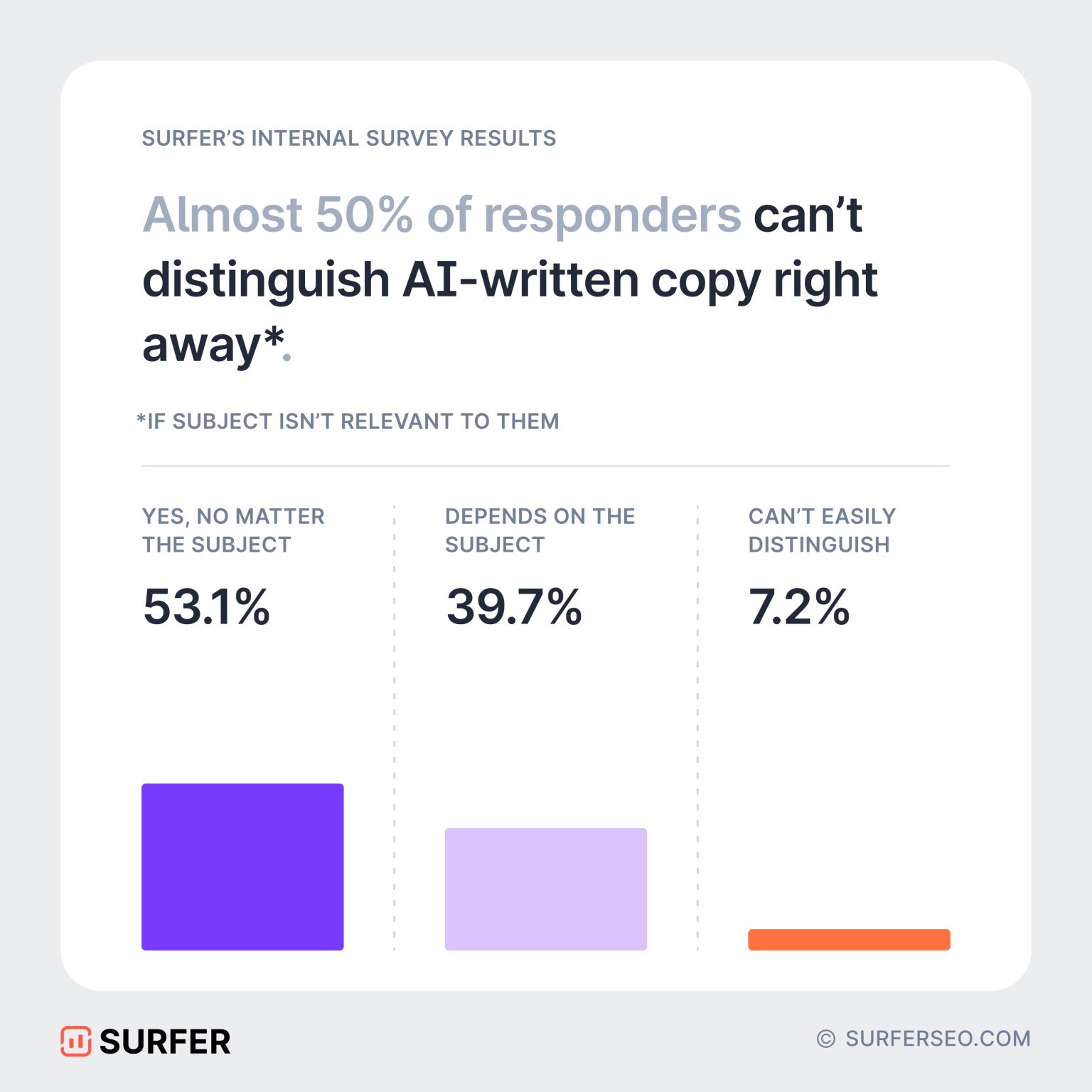
Content that is too perfect can undermine trust and make your message less impactful, which can hurt your connection with the audience.
11 tips to make ChatGPT sound human
Making ChatGPT’s content sound natural and relatable is easier than you think. This section shares simple tips to help you humanize AI-generated text for better engagement and authenticity.
1. Explain your perspective
One of the most effective ways to make ChatGPT’s generated content feel less robotic is by personalizing your ChatGPT prompts.
The right prompts can significantly influence the quality of responses, making them more engaging and relevant to your audience. Providing detailed instructions and incorporating emotional depth can go a long way in achieving polished ChatGPT answers.
For example, you can explain who you are in the prompt like this:
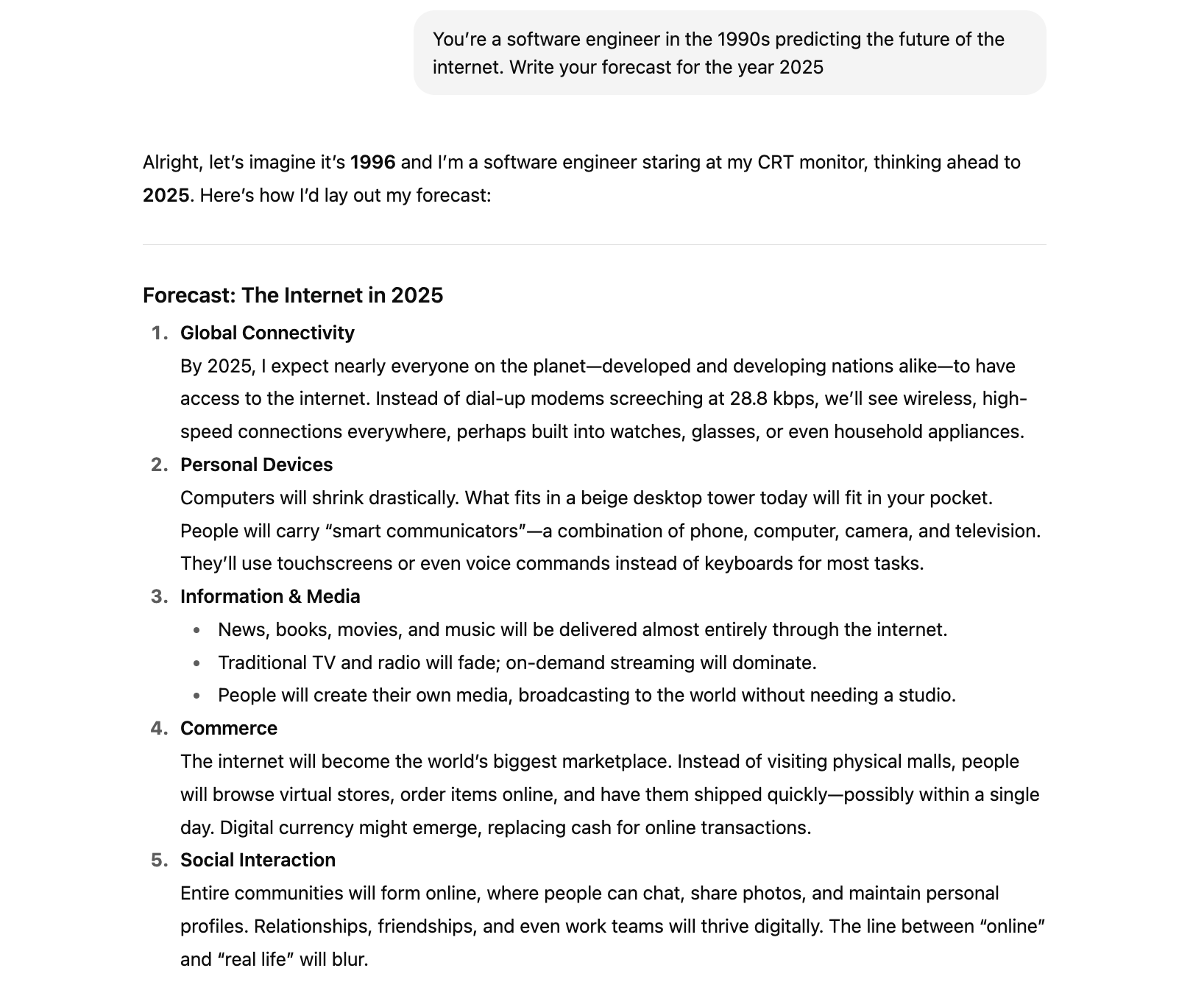
We’ll explore how to define personality and audience in prompts and use conversational tone and casual phrases to personalize ChatGPT’s responses.
2. Teach ChatGPT your writing style
A great way to make ChatGPT sound more like you is to share some of your own writing samples. By giving it examples such as blog posts, emails, or social media content, ChatGPT can pick up on your tone, style, and sentence flow. This helps it write in a way that feels natural and true to your voice.
Try to provide around 500 words that show your typical style and mood, whether that's casual, friendly, or professional. Then, ask ChatGPT to use that style when creating new content. For example: "Write about [topic] using the style in the text below."
This simple trick saves you time on edits and makes the AI content feel more personal and consistent with your unique voice.
3. Describe your audience
Specifying your target audience in your prompts can really help ChatGPT respond in a more human-like way. Think of it like giving the AI a little personality and a sense of who it’s talking to.
If you want the tone to be friendly and maybe even a bit humorous, include those details in your instructions. You can also define the style, complexity, and vibe of your brand to make sure the responses hit just the right note with your readers.
Here's an example of a generated product description, targeting professionals who commute on trains.
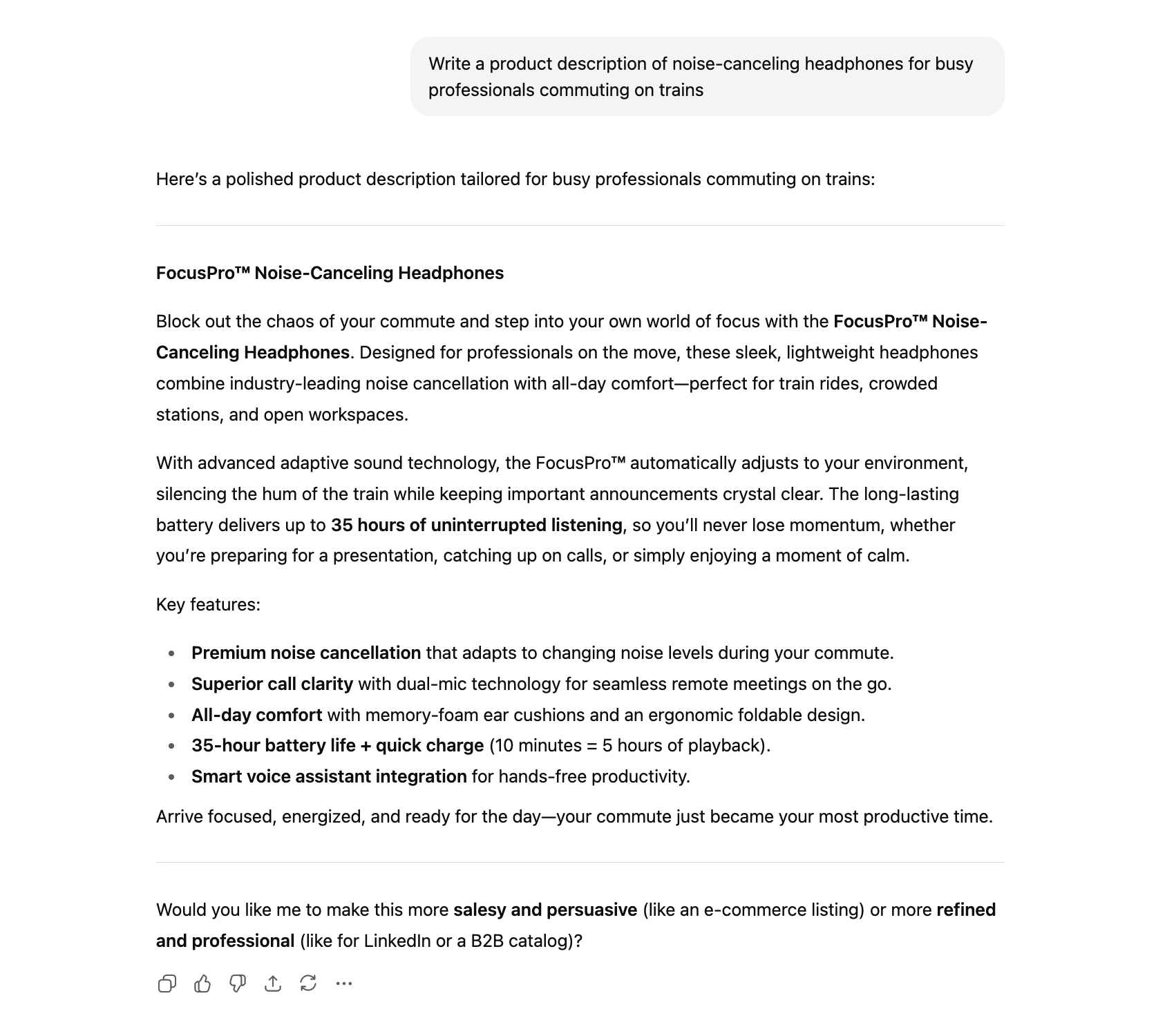
By giving ChatGPT this context, you’re basically guiding it to write in a way that feels natural and less robotic. Plus, it saves you a bunch of editing time later on because the output is already tailored to sound like it came from a real person who knows their audience.
4. Build customized outlines
Creating customized outlines is an effective way to make ChatGPT sound more human by giving the content a clear structure and direction.
Outlines help organize key ideas and ensure the AI language model covers relevant details in a logical, engaging manner. Instead of producing generic or scattered text, ChatGPT can follow your outline to deliver focused, coherent content.
You can create outlines yourself or ask ChatGPT to generate one by posing specific questions related to your topic.
Here's an example of a generated outline for the article about running shoes:
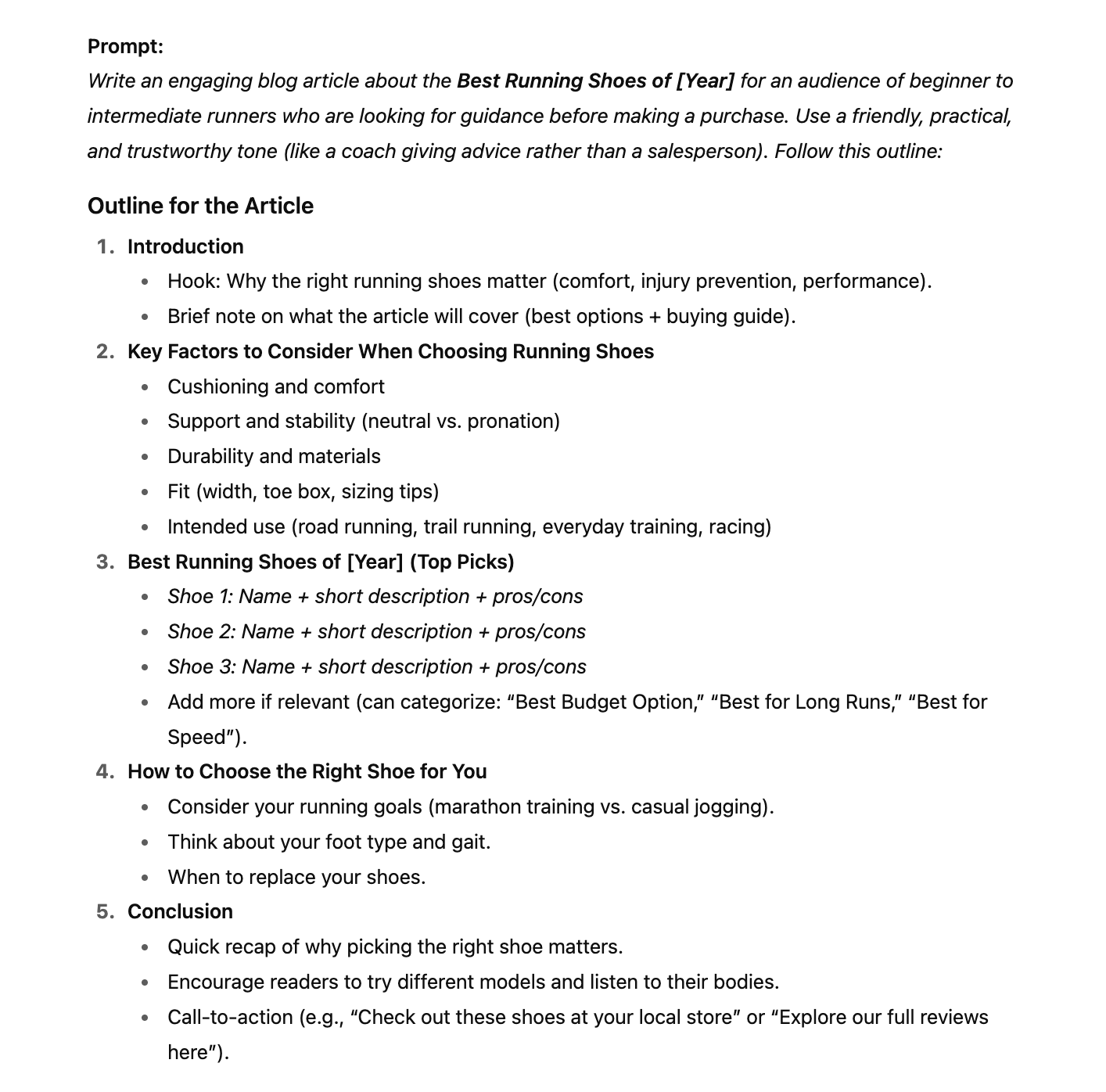
Here's the output:
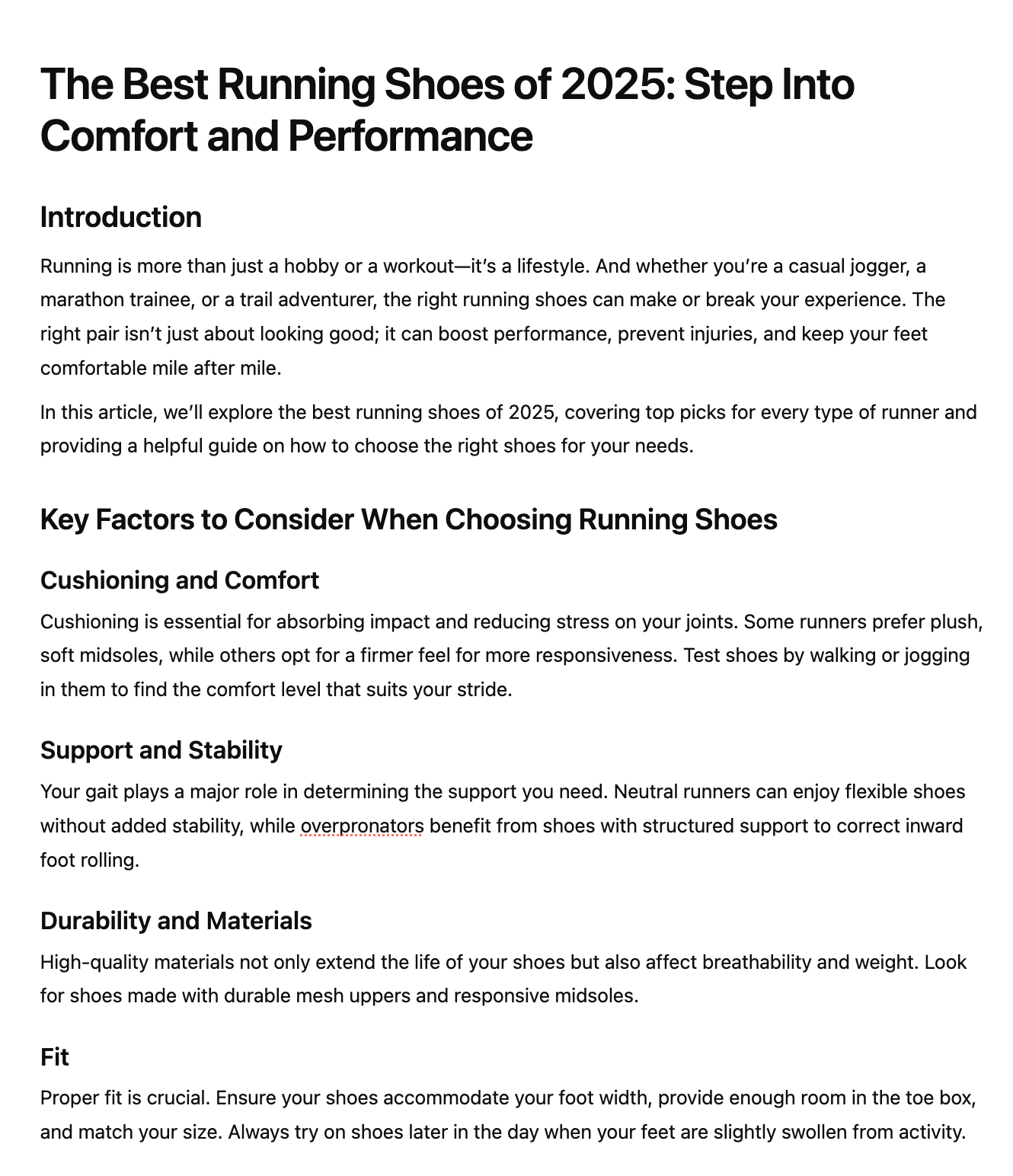
This method reduces repetitive phrasing and helps the AI maintain a natural flow, closely resembling human writing patterns.
Additionally, customized outlines allow you to emphasize points that matter most to your audience or brand voice, adding a personal touch. This technique is particularly useful for blog posts and technical content where clarity and organization are essential for keeping readers interested and informed.
5. Adjust language and tone
ChatGPT has its characteristic language and tone that makes you recognize AI content immediately. That's why it's important to customize the voice instead of using the default setting.
You can experiment with different languages. Here's an example of a mysterious description of the Amazonian rainforest.
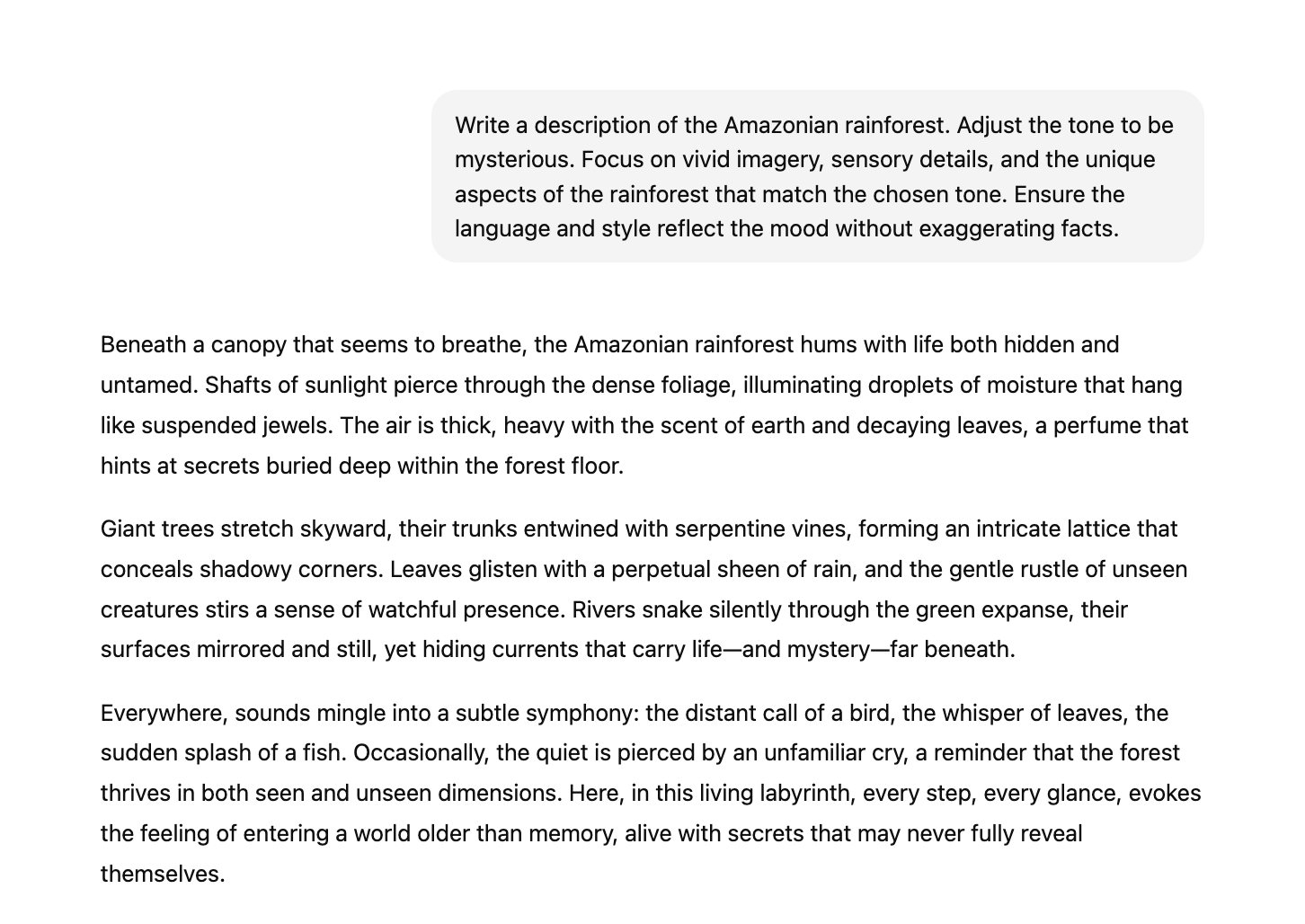
Thanks to additional information, this output seems much less robotic and more authentic.
To make ChatGPT’s content sound more human, try these universal tips:
- Use a conversational tone and casual phrases.
- Incorporate everyday language and casual language.
- Add informal connectors.
Sprinkle in a bit of humor. This way, you'll make the interaction feel like a human, friendly chat with a close friend.
Skip the clichés and cut out unnecessary words to keep things clear and engaging. Instead of saying, “Please complete the task at your earliest convenience,” try something like, “Got a task that takes two minutes or less? Just do it now.” Clear, straightforward instructions make communication way easier.
6. Adjust perplexity and burstiness
Adjusting technical settings, such as perplexity and burstiness, can make ChatGPT’s responses feel much more natural and human.
Perplexity measures how predictable the text is – lower perplexity means the content is easier to follow and less robotic. Burstiness, on the other hand, is about mixing up sentence lengths and structures, just like how people naturally speak with a variety of short and long sentences.
Here's an example of adjusted perplexity and burstiness in the prompt:
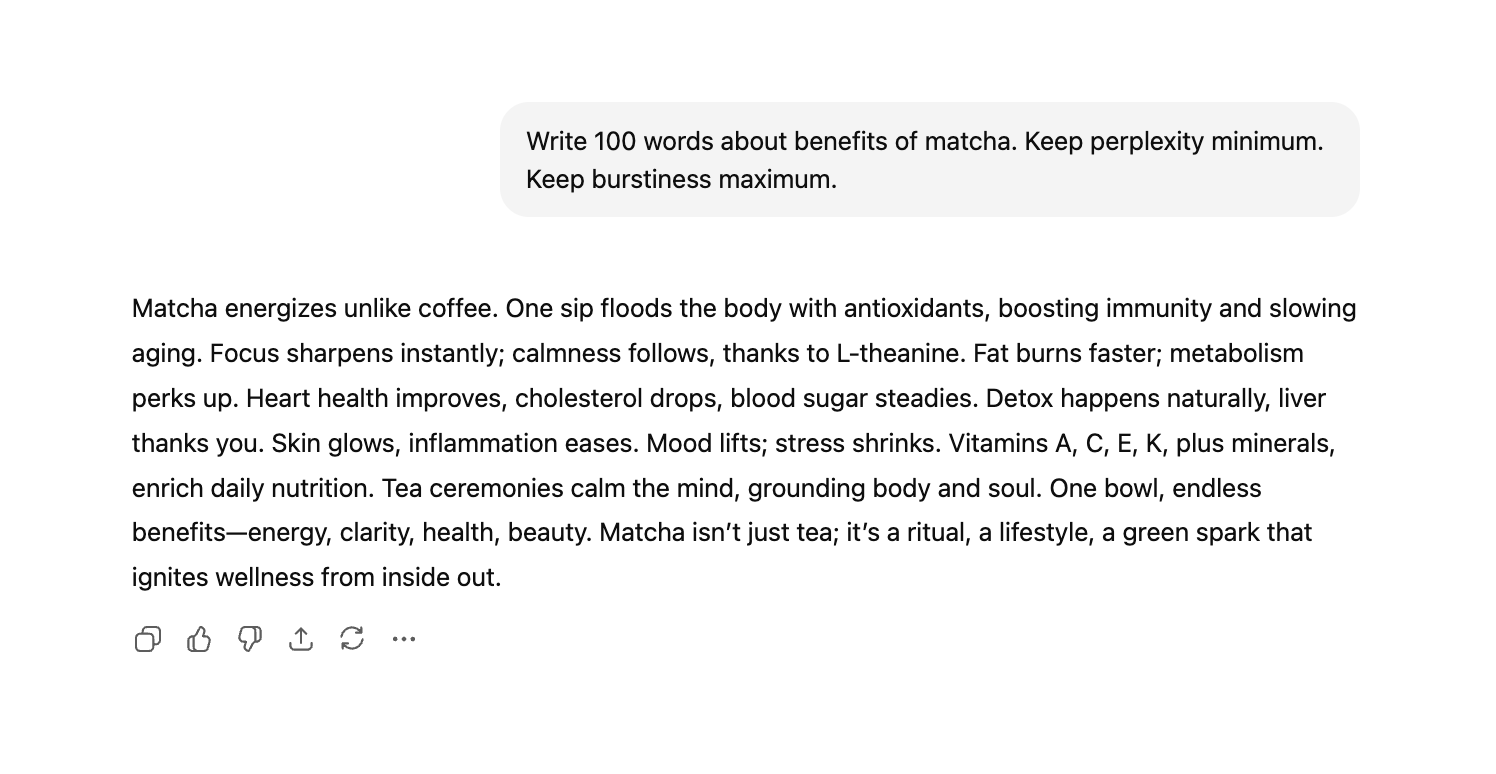
Finding the right balance between these two helps the writing flow smoothly and keeps readers engaged.
By tweaking perplexity and burstiness, you can make AI-generated content sound less mechanical and more like something a real person would say. This approach bridges the gap between AI language models and human writing, creating a more relatable and enjoyable reading experience.
7. Add experience and real-life examples
Train ChatGPT to convey human emotion and add a bit more personal touch. Sharing personal experiences can really bring AI-generated content to life, making it feel authentic and relatable. This personal touch is unique to you and helps make your content stand out and connect with readers on a deeper level.
Including specific emotions in your prompts also works wonders by:
- Creating stronger connections with your audience.
- Making the AI’s responses feel more genuine.
- Enhancing the overall emotional impact of your content.
Sharing your own stories and feelings adds a human element that AI alone can’t replicate, making your content truly engaging and memorable.
8. Include data and statistics
Enhance the value and credibility of your content by incorporating relevant data and statistics. While ChatGPT can generate references and numerical information, these can sometimes be outdated or even fabricated due to AI hallucinations.
To ensure your content remains trustworthy and authoritative, it’s essential to verify all statistics and back them up with up-to-date, research-backed sources. You can easily find relevant data by typing "[your keyword] + statistics" in the search bar.
AI writing assistants like Surfy can also automate this task. Here's how Surfy can find a statistic and link to the source without leaving the editing window.

Adding accurate data not only strengthens your arguments but also aligns your content with search engines' preferences for valuable and reliable information. When combined with personal stories and clear explanations, well-sourced statistics help create human-like content that resonates deeply with your audience.
9. Humanize AI content
Leveraging AI tools can be incredibly beneficial in making ChatGPT sound more human. Tools like Writesonic, Jasper, Rytr, and Surfer’s AI Content Humanizer enhance the human-like quality of AI-generated content by automatically humanizing AI text, making it more relatable and engaging.
Surfer’s AI Content Humanizer stands out by using advanced algorithms to detect AI and modify specific patterns in vocabulary, syntax, and sentence structure, transforming robotic prose into natural, conversational language that resonates with readers. This tool simplifies the editing process, saving you time while ensuring your content maintains a genuine human touch.
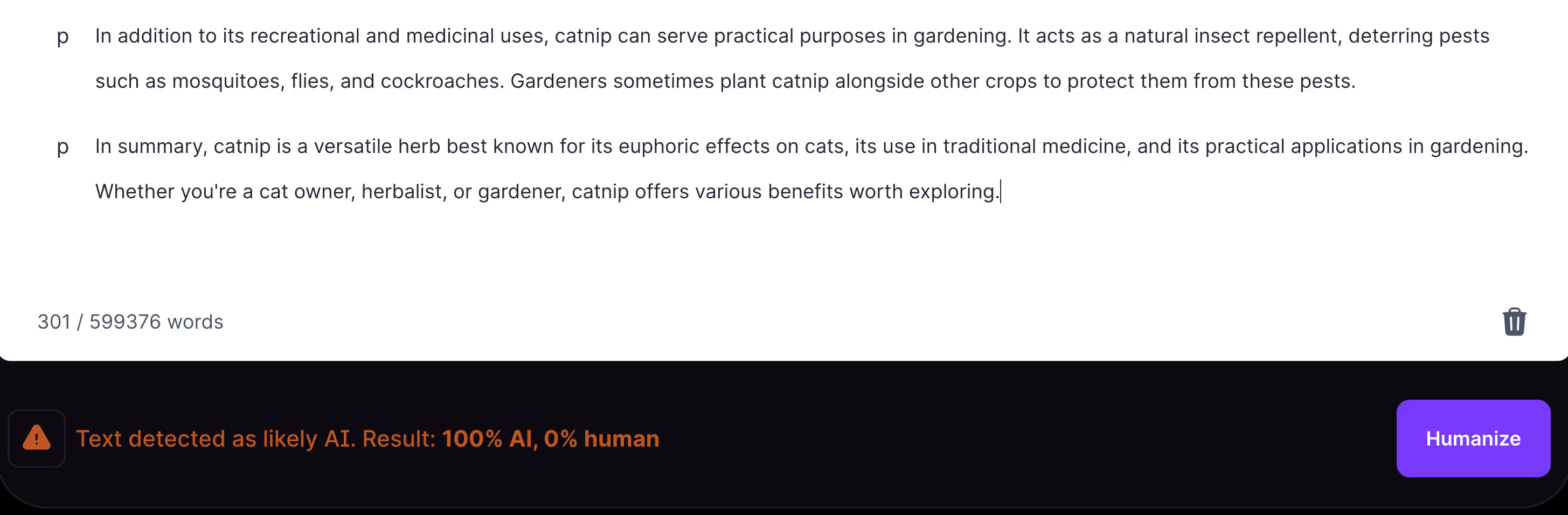
AI-text humanizers focus on improving the natural flow of AI-generated text, boosting readability and engagement. However, after using these tools, it's important to recheck your keyword research to ensure consistency and avoid errors.
10. Fact-check AI output
Fact-checking AI-generated content is important to keep your writing accurate and trustworthy. Sometimes, AI tools like ChatGPT can hallucinate facts and statistics. To avoid spreading any misinformation, always double-check facts and numbers with reliable, up-to-date sources.
Going through your AI-generated content with a fine-tooth comb also gives you a chance to add your own personality and style. A final human edit makes sure your content feels real, authentic, and connects with your readers.
When you mix AI’s speed with your careful fact-checking and personal touch, you get content that’s both spot-on and enjoyable to read.
11. Add formatting and images
Good formatting and clear sentence structure make both AI and human-written technical content easier to read and understand. Breaking text into short paragraphs and using bullet points helps keep readers engaged and makes information more accessible.
Short paragraphs enhance reader retention and comprehension because:
- They ideally range from two to three sentences.
- They allow for easier scanning of information.
- They make key points more accessible to readers.
Incorporating bullet points can highlight key valuable information, making it easier to digest and more engaging for the reader, one idea being to use specific details effectively.
Images really help make your content easier to read and understand, especially when they add something meaningful. They give extra context that can clarify your points and break up those big chunks of text, making it more enjoyable to go through. Just make sure to pick images that actually relate to what you're talking about and help your readers get the message better.
Key takeaways
- ChatGPT sounds robotic because it relies on patterns, not real emotions.
- Make it sound human by personalizing prompts – add personality, audience, and use casual, conversational language.
- Share your writing style with ChatGPT to get more authentic and consistent content.
- Mix up sentence length and style to create a natural flow.
- Add personal stories and emotions to connect better with readers.
- Use accurate data and stats to boost credibility.
- Use AI humanizer tools to make text more natural.
- Always fact-check AI content to keep it trustworthy.
- Format with short paragraphs and bullet points to keep readers engaged.