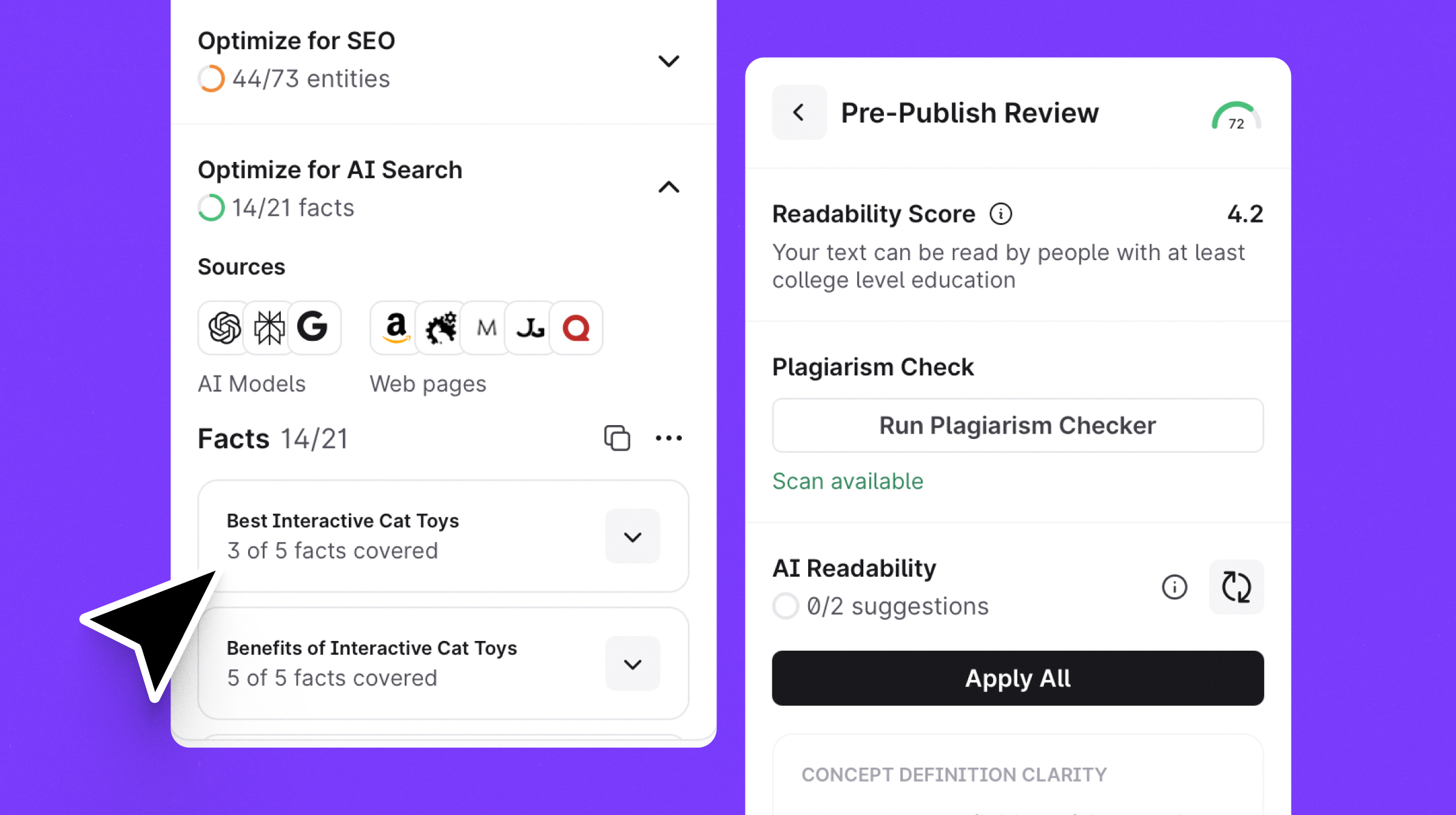
AI Search guidelines are now available to all users in Content Editor. Get real-time suggestions for citation-optimized writing, or use Auto-Optimize to automatically add missing entities and facts in one click.
Guessing what "AI-friendly" content looks like leads to missed visibility in the new search landscape — and lower sales.
That’s why we’re introducing AI Search Guidelines—a dedicated set of real-time suggestions within the Content Editor designed to help your content get picked up, cited, and reused by AI models.
How it works
By adding AI Search insights directly into the Content Editor, Surfer ensures that your content meets the specific criteria AI engines look for when generating answers. This means Surfer now maintains the correct context for:
- Real-time suggestions and checklists to ensure your content is structured for AI citation and discovery.
- Missing facts and entities to provide the high-density information that AI engines require to trust your source.
- Auto-Optimize functionality to instantly insert missing data in a natural, readable way.
- Manual control options, so you can review suggestions one by one and maintain your unique brand voice.
Instead of guessing what AI answers might need, Surfer provides a clear, actionable playbook right next to your draft that you can apply instantly with Auto-Optimize.
How to use it
Step 1: Increasing topical depth
In the Write and Optimize step, you’ll now see two clickable boxes: SEO and AI search.
The SEO box tells you which entities you need to add and how, to create content that ranks in SERPs.
While the AI Search box tells you which specific facts AIs need to see to trust your content and cite it.
You can check each group one by one for total control.
Or, you can hit Auto-Optimize — Surfer will then tuck those missing facts and entities right into your text.
It stays natural and readable, while optimizing your content in a single click.
Step 2: Structuring text for AI bots
If you want to maximize the chances of your content being cited by AI answers, don’t forget to go to the Pre-Publish Review step.
In there, under AI Readability, click “Analyze Content” and give it a minute to load.
You’ll get structural recommendations designed to make any text AI-friendly.
You can go through each suggestion one by one or hit “Apply All” and have Surfer apply them for you.
From there, simply review and accept suggested changes, and voila — your draft is now optimized for the full spectrum of AI SEO.
Why it matters
Without entities, topical depth and correct formatting, your content will neither rank, nor be cited.
Surfer’s AI search guidelines help you address all three parts in two clicks, so you can deliver future-proof content that ranks in classic SERPs and dominates AI-driven results.
Visibility now means more than just Page 1. Our new guidelines remove the guesswork for AI saerch optimization, giving you a clear checklist to win "Zero-click" searches. This transforms the Content Editor into a multi-purpose tool that satisfies human readers, search engine bots, and AI crawlers.
Gradual rollout
AI Search guidelines are rolling out slowly to all users. If you don’t see them yet but want early access (and want to help us fine-tune things), drop us a message at: [email protected]