Every content team hits the same wall: not a shortage of ideas, but a lack of process. Without a structured content production workflow, articles stall in review, deadlines slip, and quality drops. You end up with a team that works hard but publishes slowly.
A well-defined content production process fixes this. It turns content creation from a weekly scramble into a repeatable system. You set clear goals, define who owns each stage, document your workflows, and build a pipeline that moves every piece from concept to published page without bottlenecks.
What is content production?
Content production is the end-to-end process of planning, creating, and delivering content to your target audience. It covers every stage of a piece's lifecycle, from ideation and research through writing, editing, design, and distribution.
This goes well beyond writing blog posts. Content production spans articles, videos, podcasts, infographics, social media posts, and email newsletters. Each format plays a different role in your content strategy, whether the goal is to educate, drive conversions, or build brand awareness.
The important distinction is that content production is a system, not just the act of creating. It includes the planning, the people, the tools, and the workflows that keep content flowing consistently at a quality level that delivers results.
What is the content production process?
The content production process is a structured approach to creating, editing, and publishing content through a defined sequence of steps and workflows. It's what separates a team that ships consistently from one that scrambles every week.
Without a defined process, you're just creating content and hoping for the best. With one, you have a repeatable system that produces predictable output at a consistent quality level.
A streamlined process is essential to achieving content goals that align with business and marketing objectives while enabling scalability in your content efforts. It also facilitates efficient communication and collaboration within teams.
When everyone knows what stage each piece of content is in, and who's responsible for moving it forward, the entire workflow runs more smoothly. That organizational structure is what differentiates content production from simply creating content.
6 Steps to Build a Content Production Process
Effective content production requires an organized process with clearly defined steps, roles, and workflows. Here are the 6 steps you need to build one.
1. Set clear content goals
Setting goals is the foundation of a strong content production process. Clear goals set early in the process help you avoid miscommunication and delays while making it easier to monitor progress.
Align these goals with your overall business objectives. For example, if your business objective is to increase sales, your content goal could be to create informative bottom-of-funnel product guides that encourage purchases.
Follow the SMART methodology: set goals that are specific, measurable, achievable, relevant, and time-bound. They should clearly define what you want to achieve with your content, such as increasing website traffic, boosting brand awareness, or generating leads.
An example of a goal is "increase website visitors by 15% in Q2 vs Q1."
It's specific, measurable, and has a timeline. Importantly, it's also achievable.
The success of meeting your goals can be assessed by tracking key performance indicators (KPIs). A few essential KPIs to monitor include:
- Traffic
- Click-through rates
- Leads generated
- Conversion rates
- Revenue
By monitoring these KPIs, you can gauge the effectiveness of your content production process and make data-driven decisions to optimize your workflow.
2. Define roles and responsibilities
Accountability starts with assigning specific roles and tasks to team members based on their capabilities and expertise. This ensures that every part of the process is handled by someone with the right skills.
Common roles in a content production workflow include:
- Content strategist / SEO lead: Handles keyword research, topic planning, and content briefs
- Writer: Produces first drafts based on the brief
- Editor: Reviews for accuracy, clarity, tone, and adherence to brand guidelines
- Designer: Creates visuals, featured images, and graphics
- Publisher: Formats content and uploads to the CMS
Maintain a written list of responsibilities so everyone on the team is on the same page. When duties and roles are clearly documented, you avoid misunderstandings, finger-pointing, and potential delays.
Clear role definitions also improve team relationships. When everyone knows their role and understands the roles of others, it fosters mutual respect and cooperation, which ultimately enhances the effectiveness of your content workflow.
3. Choose your content management tools
You'll need two categories of tools to manage content production effectively: a content management system (CMS) for publishing, and a project management tool for tracking workflow.
A CMS like WordPress serves as your publishing platform. It lets you manage, edit, and organize all published content on your website. With themes, plugins, and user roles, it gives your team a centralized place to stage and publish content.
A project management tool like Asana or Trello gives you a bird's-eye view of where every content piece stands in your workflow. You can assign tasks, set deadlines, and track progress from drafting through publication.
Consider adding a content calendar to your stack as well. An editorial calendar maps out what content is being published, when, and by whom. This gives your team visibility into the publishing schedule and helps you maintain a consistent content cadence.
Whenever a task is completed, there should be a corresponding status update in your project management tool.
This practice ensures that your workflow always reflects the current state of your content assets and provides a clear trail for tracking progress and identifying bottlenecks.
4. Build your content repository and briefs
A content repository gives your team a centralized place to store ideas, references, and production-ready assets. Start by building two key resources: an idea bank and a swipe file.
Your idea bank is a running list of potential content topics. Generate ideas through keyword research, competitor analysis, trending industry topics, and audience questions. Store them in a shared tool like Notion, Google Docs, or a dedicated project board so the team can access and contribute anytime.
A swipe file is a collection of successful marketing materials you've found in the wild: compelling headlines, effective CTAs, viral social posts, or high-converting landing pages. When you spot content that drives action or catches your eye, save it. Reviewing these materials regularly can spark ideas and help you craft stronger content.
The third key artifact is the content brief. A brief is the document that guides each piece of content from planning to production. I recommend including the following in every content brief:
- Target keyword and search intent
- Recommended word count range
- Target audience
- Key points and subtopics to cover
- Internal linking opportunities
- Competitor URLs to review for gaps
- Tone and brand voice notes
A well-built brief means the writer receives a clear roadmap instead of a vague topic. The result is a first draft that comes back closer to publishable quality, which speeds up every downstream stage of your content production process.
5. Document your workflow and SOPs
To streamline your content production workflow, create a process document that defines every stage required to take a piece of content from idea to publication. Clearly define each step and put them in a specific order.
Breaking down each stage into specific steps provides a clear roadmap, making it easier for everyone to understand their tasks and deadlines.
For example, a standard operating procedure (SOP) for creating blog posts may look like this:
- Conduct keyword research. Identify relevant keywords that your target audience is searching for. The output should be a list of keywords relevant to your business and audience.
- Write a brief. This document includes the article outline, target audience, and specific requirements for the content. It serves as a roadmap for writers.
- Assign the brief to a writer. The writer begins creating the first draft based on the content brief and research.
- Provide feedback and edit. After the first draft is written, it is reviewed for clarity, accuracy, and adherence to the content brief. This step may include content editors and subject matter experts.
- Review the updated submission. Review the updated piece based on feedback. This may involve rewriting sections, adding information, or correcting errors.
- Optimize for SEO. This step involves implementing on-page SEO practices like content optimization and internal linking.
- Upload and publish to CMS. Once the content is finalized, it is uploaded to the CMS and published.
- Promote. Build backlinks and promote your content through email newsletters, social media, or other channels.
- Review performance and update as necessary. Review your content's performance and update it accordingly every 90 days or so.
By detailing each step in your content production process, you can ensure a smooth workflow and deliver high-quality content consistently.
Pay special attention to handoff triggers between stages. A handoff trigger is the specific action that signals one stage is done and the next can begin. This could be a status change in your project management tool, a message in a shared channel, or a file moved to a designated folder. Without clear triggers, finished work sits idle with nobody picking it up.
Besides workflow SOPs, consider creating editorial and brand guidelines. These ensure your content maintains a consistent tone of voice and is easily identifiable across all channels.
6. Schedule and track your content
Clearly defined timelines provide a framework for when tasks should be completed, keeping everyone on track and ensuring content is produced and published on time.
Task sequencing matters here. In content production, the order in which tasks are performed can significantly impact workflow efficiency. You wouldn't want to start designing an infographic before the research and copywriting for it are completed.
However, some tasks can run in parallel. While content for a blog post is being written, your social media team can simultaneously prepare promotional content for the post. This concurrent execution speeds up the production process and ensures better coordination among different teams.
Use a content calendar to map out your publishing schedule across all channels. A shared calendar gives your team visibility into what's coming, what's in progress, and what's live. Project management tools like Asana or Trello work well for this, especially when combined with calendar views.
Finally, build a measurement loop into your process. After publishing, set 30-day and 90-day review dates to evaluate performance. Track metrics like organic traffic, keyword rankings, and engagement, then decide whether each piece needs updating, expanding, or redirecting. This review cycle closes the loop on your content production process and turns it from a linear pipeline into a continuous improvement system.
5 Best Tools for Content Production
Content production is easier with the right tools. Here are 5 platforms that can streamline your content production workflow from planning through publishing and performance tracking.
Surfer
Surfer is an AI-driven platform that streamlines your SEO content workflow from research through optimization. It automates the time-consuming tasks of keyword research and content planning, and it can generate high-quality, SEO-ready articles.
Surfer Content Editor analyzes the top-ranking pages for your target keyword and provides a detailed plan for your article. An easy-to-understand content score measures keyword usage, content structure, and topical coverage. Surfer's study of 10,000 queries found that Content Score correlates with Google rankings at ~0.28, higher than the typical correlation measured for backlinks.
Take the example of this article I'm writing.
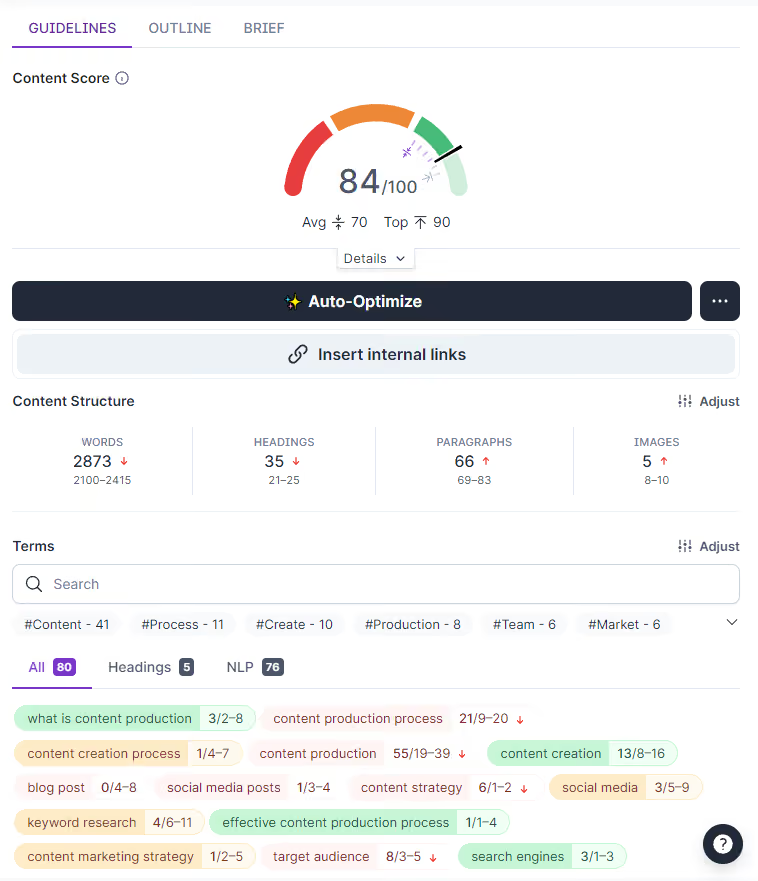
Surfer AI writes fully search-engine-optimized articles so all you need to do is review and publish. This results in a significantly faster content creation workflow for your blog.

WordPress [CMS]
WordPress is the most popular content management system, known for its versatility and ease of use. Its intuitive interface makes managing and publishing content straightforward.
WordPress supports multiple users with different roles and permissions, allowing editors, authors, and contributors to collaborate on a single platform. It also provides options for categorizing and tagging content, making it easy for both your team and audience to navigate.
Its wide selection of themes and plugins lets you customize your website's appearance and functionality without needing technical resources.
Notion [content briefs & collaboration]
Notion is a flexible workspace that works well as a content production hub. You can build content brief templates, editorial calendars, and idea banks all in one place.
Its database functionality lets you create a content tracker where each entry represents a content piece with custom fields for status, writer, deadline, keyword, and content type. This gives you a centralized view of your entire production pipeline.
Notion also supports real-time collaboration, so your team can draft briefs, leave comments, and share references without switching between tools. The ability to create reusable templates for briefs, SOPs, and checklists makes it especially valuable for teams looking to standardize their content production process.
Asana [tracking software]
Asana is one of the most popular project management platforms, used by small teams and large organizations alike. It provides features that let you organize your content creation process from start to finish.
You can assign tasks to different team members, with each task representing a content piece. Custom fields let you specify details like content type, target audience, and format. Asana also works well for building a content calendar with timelines and due dates to keep every piece on schedule.
Its centralized platform allows team members to collaborate, discuss ideas, and share updates, with @mentions to notify specific people about important tasks requiring their attention.
Google Search Console [reporting]
Google Search Console tracks your website's search performance on Google, including clicks, impressions, click-through rates, and average position.
You can look up specific pages and their target keywords to uncover how individual pieces perform in search. This data helps you decide what topics to prioritize in future production cycles and which existing content needs updating.
Pair it with Google Analytics for a complete picture of how your content drives traffic and conversions.
How AI Fits Into Content Production
AI has fundamentally changed how teams produce content. Recent industry data shows that 51% of content professionals now use AI to accelerate production tasks, and 88% of marketers rely on AI tools daily. If your content production process doesn't account for AI, you're likely leaving speed and efficiency on the table.
AI can accelerate nearly every stage of the production workflow:
- Research and ideation: AI tools can analyze search trends, identify keyword clusters, and generate topic ideas in minutes rather than hours.
- Brief creation: AI can draft content briefs based on SERP analysis, pulling in recommended word counts, subtopics, and competitor insights automatically.
- Writing: AI writers produce SEO-optimized first drafts that your team reviews and refines, cutting draft production time significantly.
- Optimization: AI-powered tools analyze top-ranking pages and provide real-time content scoring, so you can optimize as you write rather than after the fact.
- Performance analysis: AI can surface declining content, identify update opportunities, and recommend improvements based on ranking data.
The key is treating AI as a workflow accelerator, not a replacement for human judgment. AI handles the repetitive, data-heavy tasks so your team can focus on strategy, originality, and quality control.
Surfer's analysis of 1 million SERP results found that topical coverage is the strongest on-page signal tied to rankings. AI helps you achieve that comprehensive coverage faster, but the editorial eye that ensures accuracy and brand voice still needs to be human.
Build a Content Production Process That Scales
A content production process is not a one-time setup. It's a system you build, run, and continuously refine. Start by defining your goals and roles, then document your workflows with specific SOPs and handoff triggers. Layer in the right tools and let AI handle the repetitive work so your team can focus on strategy and quality.
The teams that scale content successfully are the ones that publish on schedule, review performance regularly, and make targeted improvements based on data. Treat your content production process like a machine: it needs regular maintenance, not constant rebuilding.
Start simple. Get your stages named and owned, run the system for 60 days, and then optimize based on what the data tells you.